How to Repurpose Content the Right Way
Learn how to repurpose content with a clear workflow that adapts one core asset into platform-ready posts, with tips on AI, approvals and measuring results.

You've just finished a strong webinar, report or guide. The source material is useful, the recording is sitting in a folder, and the social calendar still has empty spaces. The tempting response is to cut the webinar into clips, paste the same caption across every network and call the job done. That creates more files, not necessarily more value.
Repurposing works when one substantial idea is re-edited for different audience behaviours, formats and contexts. It can extend the useful life of a well-made asset, but only if every derivative earns its place. This guide shows how to repurpose content through a repeatable workflow, where AI helps, where human judgement matters, and which UK legal, accessibility and disclosure checks should happen before publication.
Table of Contents
- Why Repurposing Is Adaptation, Not Duplication
- Choosing Assets Worth Repurposing
- Mapping Each Asset to the Right Channels and Formats
- Building the Production Workflow With AI and Scheduling
- Guardrails Most Repurposing Guides Skip
- Measuring Lift Without Fooling Yourself
- Putting It All Together and Comparing Schedulers
Why Repurposing Is Adaptation, Not Duplication
A content lead looking at a finished webinar usually sees two jobs at once. The recording contains useful ideas, examples and objections, and the team still needs a blog article, LinkedIn material, a short video and newsletter copy. Copying the same promotional sentence into every channel may save time, but each platform gives people a different reason to stop, watch or click.
Cross-posting shares an asset largely unchanged. Reposting publishes it again on the same channel. Repurposing keeps the central insight and changes the structure, opening, length, visual treatment and call to action for a new setting. A forty-minute discussion might become a detailed article, a short explanation of one disagreement, a carousel showing the framework and a newsletter that answers the audience's most common question. Those outputs share a source, not identical copy.

The UK context makes this discipline more important. Ofcom's 2019 Online Nation report found that around 70% of UK adults had a social-media account, and that people spent approximately one in every five minutes online using social platforms. UK internet users spent an average of 39 minutes per day on services including Facebook, Snapchat, WhatsApp, Instagram, Tumblr, Twitter, LinkedIn and Reddit, while 44% of adults consumed news through social media in 2018. These figures are reported in coverage of Ofcom's online-use findings. A single publication format has never been the whole distribution strategy, so the goal is coverage where it counts, not presence on every network.
Practical rule: Keep the idea stable, but change the experience.
Mobile use adds a technical requirement. GOV.UK reported that mobile accounted for 61% of monthly visits in December 2025, compared with 38% desktop and 1% tablet in its published breakdown. That means the first screen, captioning, text size, image description and transcript quality need review for every derivative, not a quick check at the end. The GOV.UK analysis of visitor device use provides the relevant context.
A useful repurposing system should therefore give you four things: a way to select strong source assets with durable evergreen value, as covered in our evergreen content strategy guide, a content matrix that maps ideas to channels, an approval workflow that uses AI carefully, and measurement that shows which adaptations deserve another cycle. The operating principle is simple. Produce fewer interchangeable posts and more versions that make sense where people encounter them.
Choosing Assets Worth Repurposing
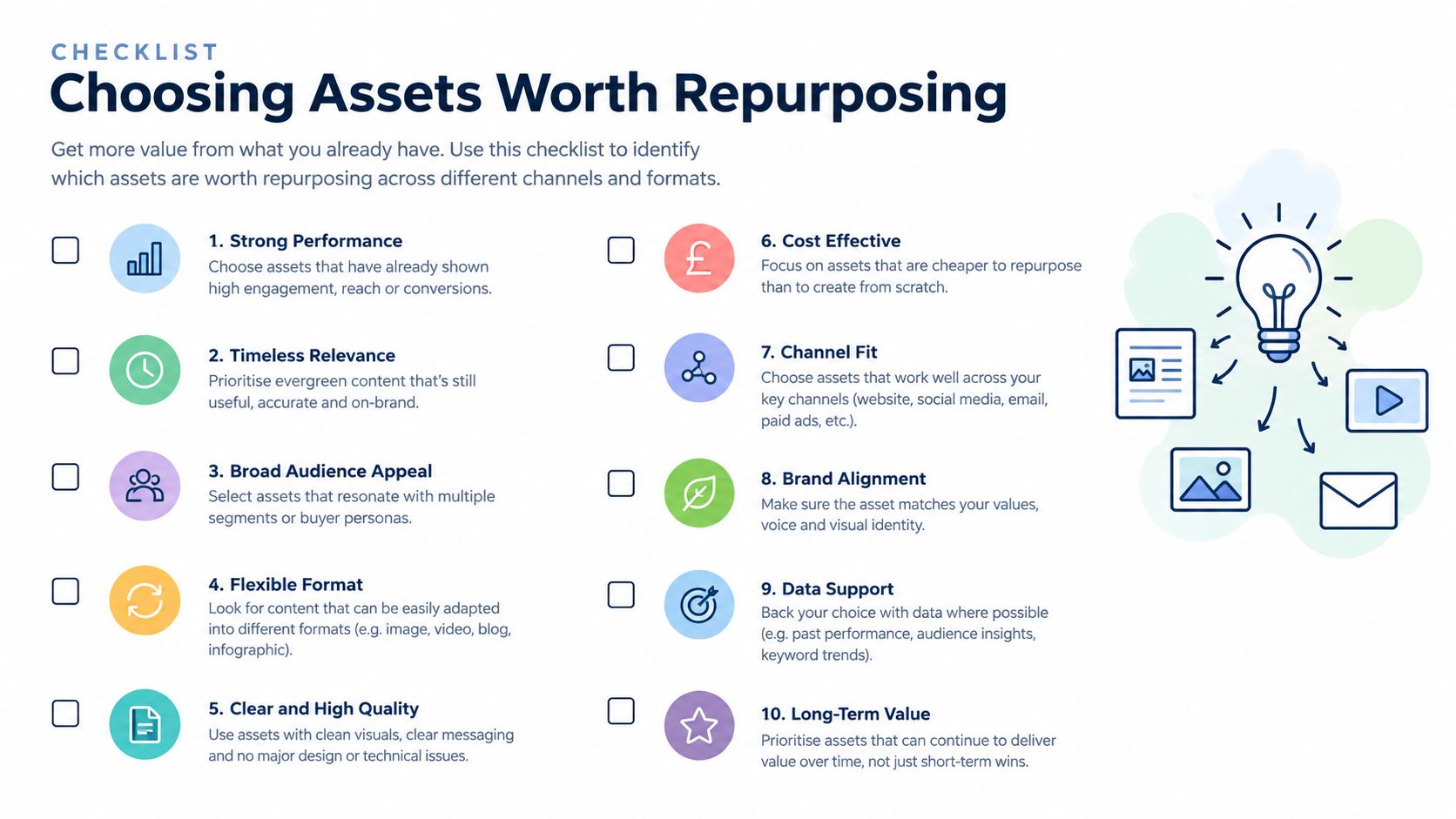
Start with the source, not the number of empty publishing slots. A weak announcement rarely becomes strong because it appears as a graphic, clip and thread. The best candidates contain a durable idea, evidence people can use and enough variation to support more than one treatment.
Score potential assets against five questions:
- Evergreen value: Will the underlying problem remain relevant after the original publication date?
- Original insight: Does the asset contain a point of view, method, comparison or explanation that isn't interchangeable with generic advice?
- Audience demand: Have readers, viewers, customers or sales conversations already exposed a recurring question?
- Reusable proof: Can you extract a case example, process, observation or verified data point without removing necessary context?
- Media potential: Does the source include a speaker, demonstration, diagram, quote, visual sequence or clear narrative?
A recorded webinar can produce a transcript-led article, speaker clips, an objection-handling post and a follow-up email. A research report can support a methodology article, a visual summary, a buyer checklist and a briefing for sales teams. A long-form article may become a series of focused posts, an FAQ or a short video script. A podcast episode can yield a written argument and several clips, provided the clips make sense without the full conversation.
A client case study needs extra care. Its strongest material may be specific to the client's permission, industry or results, so extract lessons without stripping away the conditions that make them credible. Time-sensitive news commentary and one-off announcements are different. They can be adapted quickly while the subject is current, but they shouldn't be treated as evergreen source material once the context has expired.
UK content-marketing research identifies case studies, email and LinkedIn as particularly effective formats, while email, social platforms, blogs and in-person events are among widely used channels. The UK content-marketing research report is useful for calibrating the formats your team already has the capacity to maintain.
A fifteen-minute source audit
Open your last major piece of work and answer these questions:
- What is the single idea a reader should remember?
- Which sections contain distinct claims or examples?
- Which claims need updating or additional verification?
- What could stand alone without misleading someone?
- Which audience question does the asset answer best?
- Which format would make that answer easier to consume?
- What permissions cover the people, music, images and recordings?
- Is the call to action still relevant?
- Can the asset support a useful follow-up conversation?
- Would adaptation improve access, or merely create more volume?
Store the answers with the source rather than leaving them in someone's notes. An asset management system for organised content operations can help teams record source ownership, freshness, permissions, derivative status and review dates. If the source fails several of these checks, leave it alone or refresh it before extracting anything.
Mapping Each Asset to the Right Channels and Formats
The practical centre of repurposing is a content matrix. Put each distinct insight, example, objection or verified data point in a row. Put destination channels in columns. Then decide what each cell needs, rather than assuming every row should become a post everywhere.
For a webinar about choosing a social media scheduler, one row might contain the difference between publishing volume and approval quality. On LinkedIn, that idea could become a document post with a short introduction. In a newsletter, it might become a considered explanation with a recommendation framework. In a short video, it needs a spoken hook, one example and a clear next step. In a community forum, it may work better as a question that invites practitioners to compare their approval process.
| Source asset | Strong format fits | Skip or rework |
|---|---|---|
| Webinar or video podcast | Article, newsletter, short clips, transcript-led FAQ | Clips that depend on missing visual or conversational context |
| Research report | Methodology article, carousel, briefing email, LinkedIn document | Isolated statistics without definitions or source notes |
| Long-form article | Platform-specific posts, video script, checklist, community prompt | Copying paragraphs into captions |
| Client case study | Narrative article, sales enablement summary, lesson-led post | Public derivatives without confirmed client permission |
| Podcast episode | Show notes, quote-led post, short clip, email argument | Audio excerpts where the speaker's meaning changes when shortened |
LinkedIn document posts and pure text posts are not interchangeable. A document post needs a clear progression from page to page, while text needs a strong first line and enough substance to reward reading. A vertical short video needs an immediate visual or spoken reason to stay, captions that work without sound and a conclusion that doesn't depend on a lengthy introduction. A horizontal clip may be perfectly usable in a longer video environment but awkward in a mobile feed.
Newsletters can carry nuance that social posts can't. Social hooks should create a reason to continue, not cram the complete argument into a caption. Search-led blog content needs descriptive headings, internal context and answers that remain useful after the original social conversation disappears. Forum or community prompts should invite experience and disagreement rather than paste a branded summary into a space built for participation.
The same insight can travel widely, but it shouldn't arrive wearing the same clothes.
For video teams, the practical details include the opening frame, speech rhythm, caption density, crop and placement of on-screen text. These considerations are developed clearly in the short video tips from Veo3 AI. Treat them as editing decisions, not as automatic settings.
Adapt five elements in every destination cell
- Hook: Lead with the question or tension that matters on that channel.
- Length: Keep only the detail needed for the intended action.
- Terminology: Use the language the audience already uses in that environment.
- Visual ratio: Rebuild the composition for the destination, rather than cropping important content out.
- Call to action: Ask for one relevant next step, such as reading, replying, saving or comparing.
Accessibility belongs inside this mapping process. Captions, alt text, transcript accuracy and first-screen value should be specified alongside the format. A derivative that technically exists but can't be understood on a phone, with sound off or through assistive technology isn't finished.
Building the Production Workflow With AI and Scheduling
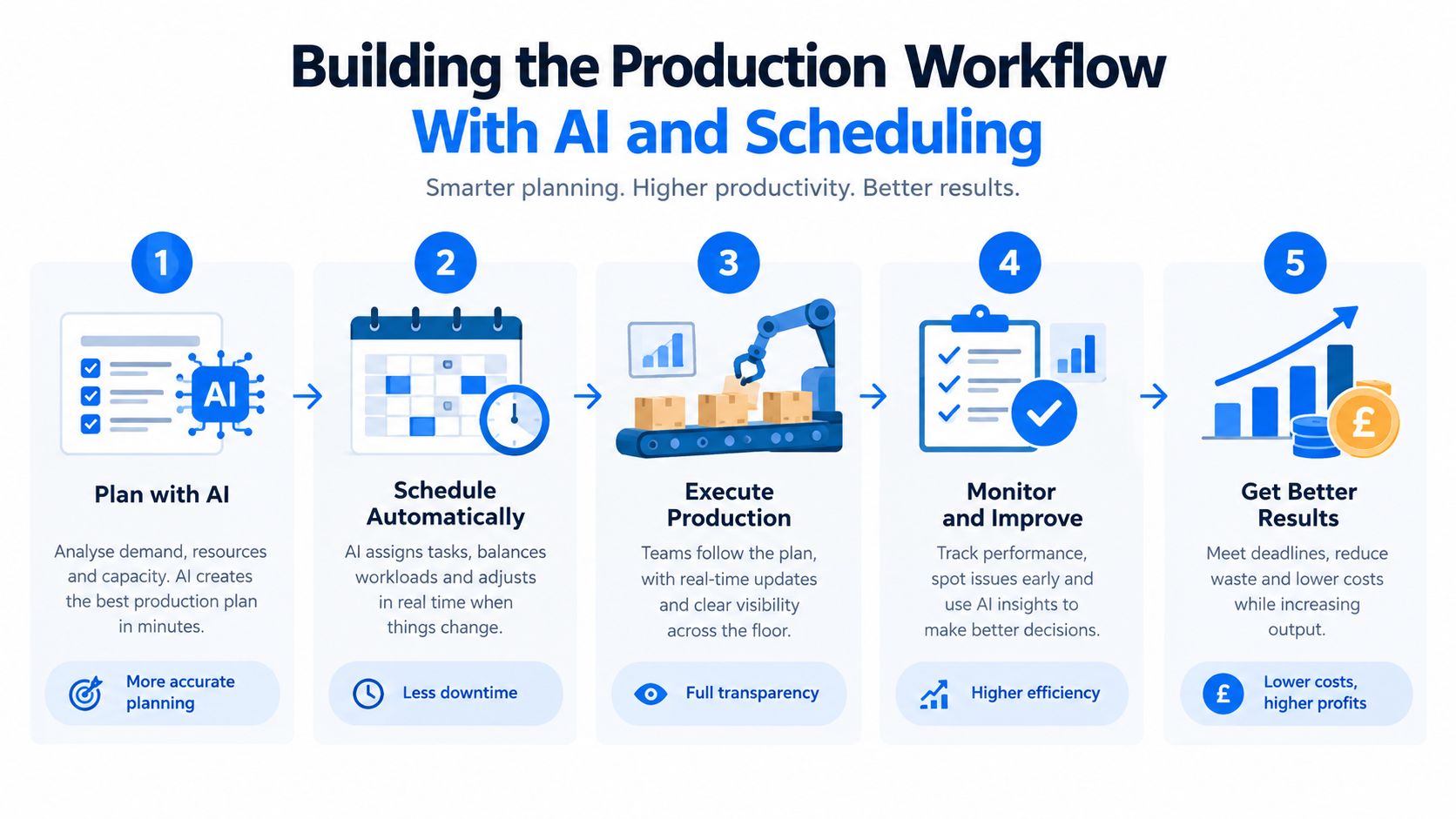
A reliable pipeline turns a source asset into governed derivatives. Start by choosing one measurable objective, such as qualified traffic or email sign-ups. Then transcribe the source, check names and claims against the original, identify reusable evidence, and create the long-form anchor piece before drafting shorter versions.
A practical sequence looks like this:
- Set the objective. Decide what the cycle is meant to influence.
- Prepare the source. Transcribe recordings, correct errors and fact-check every claim.
- Build the anchor. Create the article or newsletter that holds the complete context.
- Draft derivatives. Extract individual insights into posts, scripts, graphics and FAQs.
- Rewrite by destination. Change the hook, structure, terminology, visual treatment and action.
- Add tracking. Use UTM parameters consistently so traffic and conversions can be compared.
- Review and approve. Check accuracy, permissions, accessibility, disclosure and brand risk.
- Schedule through a suitable tool. Match the tool to the team's platforms, approval needs and reporting requirements.
AI is useful when the task is mechanical and the source is available for checking. It can transcribe a long recording, suggest a first summary, identify possible hooks, reformat a caption or create alternative introductions. It shouldn't decide whether a claim is true, invent a quote, select a flattering interpretation of a case study or shorten a speaker's statement until the meaning changes.
A dictated draft can benefit from controlled cleanup, especially when punctuation and structure are inconsistent. The AI text refinement guide for dictation offers useful context for separating transcription correction from editorial rewriting. Keep a human responsible for the approved source of truth and compare generated copy against it.
Where scheduling fits
Scheduling is an operational layer, not the repurposing strategy. Teams may compare Buffer, Hootsuite, Later, Sprout Social, SocialBee, Metricool, Publer, Vista Social, Planable, Postiz and Typefully, but the right choice depends on platform support, approval flow, analytics, collaboration and the way each team handles media.
Scheduler.social is an independent directory that compares social media scheduling tools. It does not schedule or publish posts, and it isn't an app, dashboard or publishing service. Its AI social media content generator guide can sit alongside your editorial review process, while its use-case comparisons cover needs such as approval workflows and AI writing. Check each tool's current site for capabilities and pricing, since those details can change.
Keep approvals close to the source. The approver should be able to see the original claim, the derivative, the intended channel and any rights or disclosure notes before publication. That small amount of context prevents an attractive but inaccurate clip from passing through because it looks polished.
Guardrails Most Repurposing Guides Skip
Volume-first workflows often fail at the point where trust matters. Before you cut, rewrite or generate anything, classify the source as owned, licensed, public-domain or third-party material. Publication online doesn't place an asset in the public domain, and a guest appearing in a webinar doesn't automatically grant unlimited rights to every future edit.
UK copyright protection is generally automatic when a work is created or recorded. Content posted on a website or social network can still be protected, so downloading and editing another person's article, image, video, music or post requires permission or a relevant exception. UK guidance explains that most uses require permission and that fair-dealing quotation should be reasonable, fair and accompanied by sufficient acknowledgement, generally including the title and author. The UK copyright guidance for practical scenarios is a useful reference point.
Music and stock footage need their own audit. A licence that covers the original webinar may not cover derivative shorts, paid promotion or every platform. Guest agreements and client contracts should address recording, editing, future reuse, clips, transcripts and the period during which the material can be published.
Public material still needs a rights check
Government content provides a useful example of why assumptions cause problems. Much Crown copyright material is intended to be reusable under the Open Government Licence, but third-party material published through a government channel may have separate rights. The GOV.UK social media playbook explains that republishers should check the specific asset, follow licence conditions and provide appropriate attribution where OGL reuse applies.
Advertising disclosure is another place where derivatives lose important context. UK government guidance says promotional content should be recognisable as advertising from the first interaction. If a sponsored review, gifted product, affiliate recommendation or branded article becomes a short caption, image, video or story, the commercial label must remain obvious in that version. Moving the disclosure into the original long-form page doesn't solve the problem. The UK guidance for content creators on social media endorsements sets out that expectation.
Accessibility is part of editorial quality, not a decorative extra:
- Captions: Check names, technical terms and punctuation against the recording.
- Alt text: Describe the information conveyed by an image, not just its subject.
- Transcripts: Preserve context and identify speakers where that matters.
- Mobile readability: Test the first screen, text size, crop and contrast.
- Meaning: Don't compress a nuanced explanation into a misleading slogan.
A fast workflow is only efficient if it doesn't create a slower legal, editorial or trust problem later.
AI adds another boundary. It can help reorganise owned material, but confidential recordings, client information and personal data need appropriate handling controls. A careful discussion of ethical AI writing assistance can help teams define where editing support ends and unreviewed authorship begins. Retain evidence of consent, licences, approvals and the source version, particularly when an agency is producing derivatives for multiple clients.
Measuring Lift Without Fooling Yourself
Measurement starts before publication. Give every derivative a consistent UTM structure and record its source asset, channel, format, audience segment, hook and call to action. Track reach, saves, completion rate, click-through rate and conversion rate by format, then read the comments and replies as a qualitative check. A post can attract attention while revealing that the audience misunderstood the point.
Run a controlled test for four to six weeks using equivalent topics and audience segments. Compare repurposed versions with a baseline, but don't change the topic, hook, format, posting time and call to action simultaneously. If all variables move together, you won't know which decision produced the result.
The lift calculation is:
[ \text{Lift}=\frac{\text{repurposed metric}-\text{baseline metric}}{\text{baseline metric}}\times100 ]
One useful reference point comes from independent reporting that summarised large-scale LinkedIn analysis. It found median engagement of 21.77% for document or carousel posts, compared with 7.35% for video, 6.52% for images, 3.81% for link posts and 3.18% for text posts. These are not guaranteed UK outcomes. Treat them as hypotheses for testing, not promises, and consult the reporting on the LinkedIn format analysis with appropriate caution because the figures come from broader analysis rather than a controlled UK experiment.
Feed the result back into the matrix
If a document version earns saves but the video generates completion, record both findings without declaring one universally superior. The useful conclusion might be that the document is better for considered reference, while the video works as an entry point.
Review the source, derivative and audience response together before the next cycle. Keep successful principles, retire weak formats and investigate unexpected comments. Measurement should reduce guesswork, not turn every publishing decision into a chase for one headline metric.
Putting It All Together and Comparing Schedulers
A repeatable system looks like this: choose a source with durable value, extract distinct insights, map each one to a suitable channel, create the anchor asset, adapt every derivative, check rights and accessibility, add disclosure where needed, tag the links, approve the work and measure the result. Review what worked and what failed before the next asset enters the matrix.
Tomorrow morning, you can start with one source and ask: what is the central idea, which three insights stand alone, where does each belong, what must change for that audience, and who approves the final version? For scheduling operations, compare tools such as Buffer, Hootsuite, Later, Sprout Social, SocialBee, Metricool, Publer, Vista Social, Planable, Postiz and Typefully by platform, collaboration and use case. Scheduler.social also organises comparisons for Instagram, TikTok, LinkedIn, X, Facebook, YouTube, Pinterest, Threads and Bluesky, plus agencies, solo creators, free plans, approval workflows, AI writing, open source, analytics and enterprise.
The habit that makes repurposing stick is a short review before every new source enters production. The goal isn't maximum volume. It's fewer, better-adapted pieces that respect the audience and the original idea.
Compare social media schedulers on Scheduler.social to find a tool that fits your platforms, approval process and reporting needs. Use the directory to compare options side by side, then choose the scheduler that supports your repurposing workflow without confusing distribution software with the editorial work itself.