Asset Management System Guide: Features, Costs, Setup
What is an asset management system? Compare digital and physical asset tools, key features, a buyer checklist, implementation pitfalls and KPIs
A team's “asset management system” often starts as a shared drive, three spreadsheets and a folder on someone's laptop. The marketing manager has the latest campaign image, legal has a different version, and nobody can confirm whether the photographer's usage rights still apply. Meanwhile, an operations colleague is assigning maintenance work from a condition report that hasn't been updated since the previous inspection cycle.
This arrangement creates more than clutter. People duplicate work, decisions rely on stale records, and important permissions disappear into email threads. By the end of this guide, you'll be able to define an asset management system properly, separate digital asset management from physical asset management, compare vendors against practical criteria, plan a controlled implementation and measure whether the system is improving decisions rather than just storing more files. If competitor data is part of your commercial workflow, Agenty's competitor price scraping guide is a useful example of how structured information can support repeatable monitoring rather than one-off research.
Table of Contents
- Why Your Spreadsheet Is Not an Asset Management System
- Understanding Asset Management Systems and Their Types
- Key Features That Separate Real Systems From Storage
- Why UK Scale Makes Asset Systems Non-Negotiable
- How to Choose the Right Asset Management System
- Implementation Roadmap and Common Pitfalls
- Connecting Social Media Asset Workflows to DAM
- KPIs and Your First 90 Days
Why Your Spreadsheet Is Not an Asset Management System
The problem rarely begins with bad intentions. A project team creates a spreadsheet because it needs a quick inventory. Another department adds a second one for approvals. A contractor uploads files to a shared drive, while the person who understands the naming convention keeps a private tracker. For a while, everyone compensates with memory and messages.
That approach fails as soon as an asset changes hands, changes condition or acquires a new version. Staff spend time checking which file is current, recreating material that already exists and asking colleagues to confirm information that should be visible in the record. Rights can expire unnoticed, defects can remain disconnected from work orders, and managers can approve spending without a dependable view of risk.
Practical rule: If two people can edit separate records for the same asset without the system detecting a conflict, you have a filing arrangement, not a governed system.
A proper asset management system gives each asset an identity, an owner, a status and a history. It records what the asset is, where it sits, who can use it, what has happened to it and which decision should happen next. For a physical asset, that may mean location, condition, inspection and maintenance history. For a digital asset, it may mean metadata, usage rights, approval status and channel-ready versions.
The software matters, but it comes after the operating model. Before selecting a supplier, decide which records must be trusted, who maintains them, how duplicates are resolved and what evidence an auditor or manager must be able to retrieve.
Understanding Asset Management Systems and Their Types
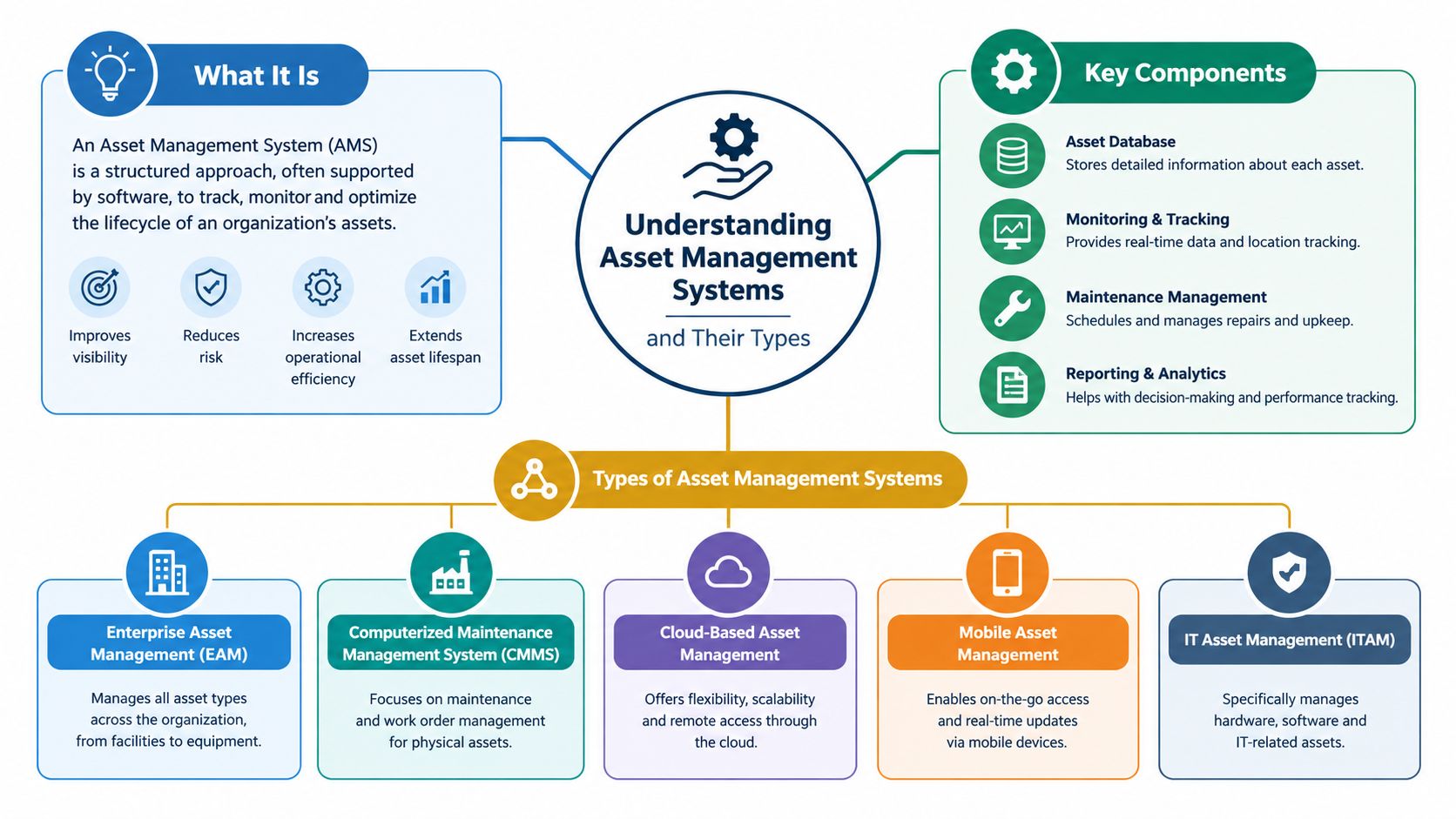
Think of an asset management system as a library with a strict librarian. Every item has an identifier, a known location, a condition record, a borrowing or usage history and rules governing access. The librarian doesn't merely place more books on shelves. They prevent duplicate catalogues, retire obsolete material and make sure the catalogue reflects reality.
That distinction separates a governed system from a repository. The system should follow an asset through its lifecycle, from creation or acquisition to use, maintenance, transfer, archiving and retirement. It should also preserve the decisions made along the way, so teams can understand not only what changed, but who approved the change and why.
Physical asset management
Physical asset systems track tangible items and infrastructure. Examples include vehicles, manufacturing equipment, IT hardware, buildings, rail assets, roads, bridges and street lighting. Their records usually connect:
- Identity and location: A unique identifier, geospatial reference, asset type and responsible owner.
- Condition and performance: Inspection results, defects, failure modes, operational status and condition history.
- Work and cost: Maintenance requests, work orders, labour, parts, contractors and whole-life-cost information.
- Lifecycle decisions: Planned maintenance, renewal, replacement, disposal and risk-based prioritisation.
A highway authority, for example, needs to know which specific asset has a defect, how serious that defect is, what intervention is due and whether the action has been completed. A spreadsheet may record some of this information, but it usually struggles to preserve the relationships between records.
Digital asset management
Digital asset management, or DAM, applies the same discipline to files and media. The assets may include photographs, videos, logos, templates, campaign copy, presentations, documents and design files. A useful DAM record includes version history, creator, approval state, usage rights, expiry information, related campaign and channel-specific variants.
The two families often overlap. A product photograph is a digital asset, but it describes a physical product. A maintenance manual is a digital record associated with a physical machine. The right architecture therefore depends on the relationship between assets, not on whether a vendor uses the label “DAM”, “enterprise asset management” or “asset register”.
Key Features That Separate Real Systems From Storage
A credible asset management system is a governed management framework, not an inventory database with a search box. The Office of Rail and Road describes the ISO 55001 model as a framework for establishing policies, objectives, processes and governance that support strategic goals in its review of Southern Region readiness for ISO 55001 alignment.
The foundation is a maintained asset register. Durham County Council's Highway Asset Management Plan identifies the register as the single source of condition data for each asset type and requires information to be reviewed for quality, currency, appropriateness and completeness. That principle applies equally to digital assets. A content team needs one dependable record for the approved file, not five nearly identical exports.
The control hierarchy
Start with identity. Each record needs a unique asset identifier and a physical or logical reference, such as a location, project, campaign, client or product relationship. Without that foundation, duplicate resolution becomes guesswork.
Next, preserve history. Condition data, approvals, metadata and ownership should be versioned rather than overwritten. A current value tells a user what the system believes now. A history tells an investigator how the system reached that position.
Finally, connect the record to action. Inspections should lead to defects, defects should lead to work orders, and work orders should connect to lifecycle decisions. For digital assets, creation should connect to review, approval, publication, rights monitoring and retirement.
| Feature | What It Delivers | Why It Matters |
|---|---|---|
| Maintained asset register | One authoritative record for each asset | Prevents competing inventories and supports dependable reporting |
| Unique identifiers | A stable identity across systems and teams | Allows inspections, files, costs and interventions to refer to the same asset |
| Location or logical referencing | Physical coordinates or relationships to campaigns, products and projects | Makes assets findable and exposes misplaced records |
| Condition and metadata history | A traceable record of change | Supports audit, trend analysis and defensible decisions |
| Validation rules | Checks for missing, conflicting or invalid values | Detects poor data before it reaches a report or workflow |
| Linked work and lifecycle records | Connections between observations, tasks and decisions | Moves teams from reactive allocation towards risk-based prioritisation |
| Role-based access and audit trails | Controlled editing and evidence of activity | Protects integrity and clarifies accountability |
| Retention and publication controls | Rules for archiving, deletion and sharing | Supports security, legal obligations and stakeholder access |
A vendor that offers storage without these controls may still solve a narrow filing problem. It won't solve asset governance.
Why UK Scale Makes Asset Systems Non-Negotiable
The UK market is too large and institutionally complex for informal records to remain a sensible foundation. In its market study, the Financial Conduct Authority estimated approximately £6.6 trillion of assets were managed in the UK, making the country the largest asset-management centre in Europe and second globally behind the United States. The same analysis recorded around 1,787 asset-management firms, with approximately £2.1 trillion in pension-fund investments, £1.2 trillion in retail investment products and £0.4 trillion in public-sector and charitable investments.
Those categories create different reporting, access and control requirements. An institutional client may expect historical valuations and allocation views. A retail product team may need product-level records and controlled disclosures. A public-sector organisation may need auditable decisions, retention controls and evidence that interventions followed approved policy.
The pension market adds another layer of structural change. The Investment Association reported that its members managed £9.1 trillion in total assets in 2023, while UK pension funds represented 56% of UK institutional assets in that year, according to its Investment Management in the UK 2023-2024 report. A system designed only to record current holdings won't adequately support historical valuation, provider tracking, allocation changes or forecasts.
Translate scale into requirements
Budget holders often hear “asset management system” and think of another operational application. The stronger argument is that the system protects decision quality at scale. It should support:
- Multiple client categories: Institutional, retail, public-sector and charitable records should remain distinguishable.
- Historical analysis: Users need to understand how values, ownership, condition or allocation changed over time.
- Provider and product relationships: The system should connect assets to managers, schemes, products, contractors or channels.
- Controlled reporting: Reports should be reproducible, permission-aware and supported by an audit trail.
- Forecasting and lifecycle planning: Decisions should account for future maintenance, renewal, retirement or reuse.
For a practical way to assess connected publishing workflows, see this guide to a mobile marketing platform. The underlying principle is the same: central visibility only helps when the records, permissions and actions behind it remain reliable.
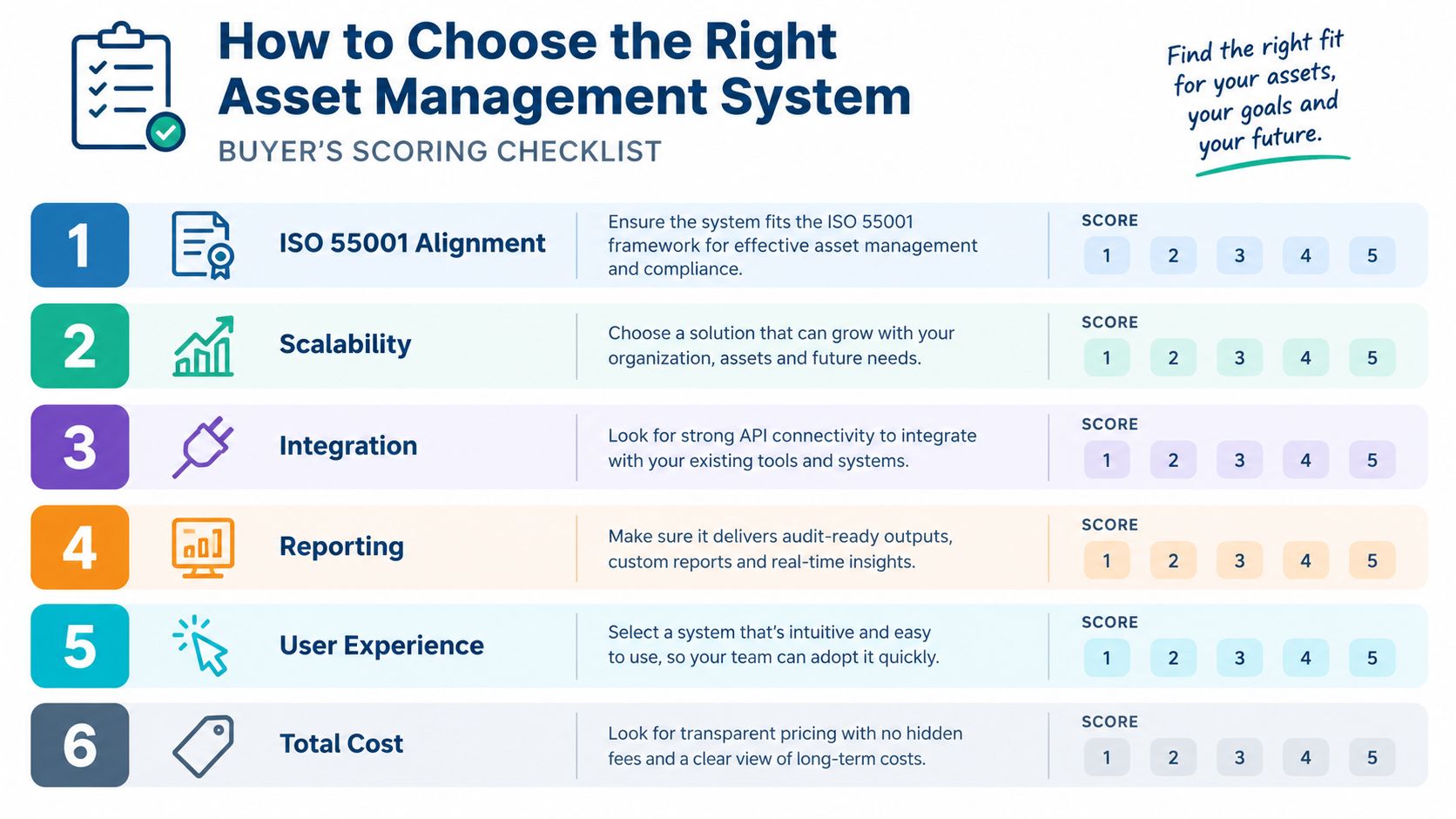
The accompanying video offers another way to think about system selection and operational fit.
How to Choose the Right Asset Management System
Run vendor selection as a scored operating-model test, not a parade of polished demonstrations. Give each supplier the same sample records, including duplicates, missing metadata, an outdated condition value and a change requiring approval. Then ask the vendor to show how the system handles those imperfections.
Test framework alignment
The ISO 55001 model matters because it links policies, objectives, processes and governance to strategic outcomes. A vendor doesn't need to turn your organisation into a certification project, but it should help you document controlled information requirements, risk decisions, assurance activity and responsibilities.
Ask whether users can create auditable decision records, connect asset-integrity dashboards to source data and demonstrate the relationship between condition, criticality, performance and intervention. If the demonstration focuses only on maps, filters and attractive dashboards, ask where the underlying evidence lives.
Test integration and migration
A system that can't exchange data with finance, work management, GIS, document management, CRM or publishing tools will create another manual hand-off. Look for practical API capability, clear metadata standards, import validation and an error queue that a named person can resolve.
Migration support needs equal scrutiny. Ask the vendor to explain how it will:
- Identify duplicate records before loading them.
- Preserve history and source references.
- Flag missing owners and incomplete metadata.
- Prevent invalid values from entering the target system.
- Reconcile migrated records against the source.
A central repository can worsen governance if it aggregates inconsistent records without resolving them. The buyer should score the operating model, not just the database.
Ask the questions competitors skip
Who owns each asset record after launch? Who approves a change? What happens when two systems disagree? How does the system measure quality exceptions? Can an administrator export a complete audit log? Can permissions distinguish viewing, editing, approving, publishing and retiring an asset?
A strong shortlist makes these answers visible. A weak one treats them as implementation details.
Implementation Roadmap and Common Pitfalls
Most failed implementations don't fail because the supplier can't switch on the software. They fail because the organisation loads unresolved ownership, duplicate records and contradictory metadata into a new interface, then expects users to trust the result.
A phased approach exposes those problems early.
Start with inventory and ownership
List the asset classes, source systems, critical fields and known consumers. Don't aim for a perfect enterprise catalogue on the first pass. Identify which records support safety, financial control, regulatory reporting, customer commitments or daily operations.
Assign an owner to each asset class and a steward to each important field. The owner decides what the record should mean. The steward keeps the value current and manages exceptions.
The case for this discipline is clear in the public sector. A survey of UK government leaders found that 70% described their data environment as fragmented, underused and lacking a single source of truth, as reported in KPMG's UK wealth and asset-management research. Treat that figure as a warning about operating conditions, not as an argument that one repository will fix them.
Define metadata and quality rules
Agree the meaning of each field before migration. Decide which values are mandatory, which formats are allowed, how dates are represented, how assets are classified and what makes a record complete. Define the acceptable response when information is unknown. “Unknown” is usually more honest and manageable than a blank field that looks complete.
The UK government's data-asset policy requires organisations to identify and centrally report data assets, assign ownership, improve discoverability and interoperability, and maintain a data-quality action plan. Those are useful implementation controls for commercial teams too.
Migrate selectively, then validate
Don't migrate every historical row just because the old system contains it. Classify records as trusted, repairable, duplicate, obsolete or requiring investigation. Load a controlled sample, compare outputs with source records and have operational users test the result before wider migration.
Finish with a live quality routine. Measure unresolved duplicates, missing owners, stale records and failed validations. Give someone authority to fix the cause, not just clear the queue.
A migration is successful when people trust the new record enough to stop maintaining their private spreadsheet.
Common pitfalls include treating implementation as an IT project, skipping update ownership, accepting vague metadata and delaying permissions until after launch. The system changes how people work, so training, escalation routes and management attention belong in the implementation plan from the start.
Connecting Social Media Asset Workflows to DAM
Content teams often call a shared media folder a library. It becomes a DAM-adjacent workflow only when each asset carries enough information to support a decision. A campaign video needs an owner, approval status, usage rights, version history, source material and channel-ready metadata. Storage alone doesn't tell a social manager whether the file is approved for a particular audience or whether a newer cut exists.
A practical workflow connects the asset to the post, review state and publishing destination. A visual content calendar can show where an image or video is scheduled. AI-assisted adaptation can create channel-specific versions from one idea. Multi-seat review can keep comments, roles and approvals attached to the work instead of scattering them across messages.
That model is useful for teams publishing across Twitter/X, Instagram, LinkedIn, Facebook, YouTube, Pinterest and Bluesky. The platform can hold media alongside planned posts, support status tracking and reduce repeated manual uploads, but governance still decides whether an asset is safe to publish.
AI needs a chain of custody
AI adaptation is not automatically a control improvement. It can change wording, composition, claims, tone or accessibility characteristics, so the system should label the transformation and preserve the source version. An approver should be able to see what changed, which source material was used and whether the output passed brand, legal and accessibility checks.
Recent UK wealth and asset-management research found that only 11% of firms believed they were fully aligned with emerging AI regulation, while 33% were unprepared or had taken no action, according to Funds Europe's report on asset managers and automation. The research concerns financial services, but the governance lesson applies to content operations: automation moves faster than accountability unless teams build controls into the workflow.
Use labelled AI transformations, approval gates, role-based permissions, immutable version history and exportable audit logs. Teams assessing automation should also review practical guidance on how to avoid automation pitfalls on X. A dedicated social media approval tool can support the review step, but it won't replace an owner who understands rights, claims and brand risk.
KPIs and Your First 90 Days
A system creates value when it changes decisions and behaviour. Counting uploads or logins can show activity, but those figures don't prove that records are accurate, that approvals are controlled or that maintenance is becoming more deliberate.
Start with record completeness. Define the fields that must exist for each asset class, then report the proportion of records meeting that standard. The result tells owners where missing information is blocking work. For digital assets, completeness may include usage rights, approval status, owner, campaign, format and expiry. For physical assets, it may include location, condition, criticality, inspection date and maintenance responsibility.
Track record currency separately. A complete record can still be stale. Set a review expectation appropriate to the asset class and flag records that have passed it. This gives managers a prioritised queue rather than a vague instruction to “keep data updated”.
Measure duplication and workflow friction
The duplicate-record count is one of the clearest indicators of whether the system is becoming trusted. Measure identified duplicates, unresolved duplicates and the time taken to resolve them. A falling total matters because users can stop checking competing sources.
For content workflows, measure time to approve and time to publish. Break the result down by asset type, team and approval stage. A long approval time may indicate excessive permissions, unclear ownership or incomplete briefs. A short time with frequent rework may indicate that controls are being bypassed.
For operational assets, compare reactive and planned maintenance activity. The ratio should inform a decision about preventive work, inspection quality and risk prioritisation. Don't treat a change in the ratio as automatically good. A lower reactive share may reflect better planning, or it may reflect under-reporting, so pair the measure with defects, failures and overdue work.
Use the first 90 days to establish habits
Days one to thirty should establish visibility. Inventory the asset classes, identify source systems, nominate owners and record the most damaging duplicates. Agree which fields matter for operational and regulatory decisions. Don't begin with a broad migration target. Begin with a trusted scope.
Days thirty-one to sixty should establish meaning. Publish metadata definitions, validation rules, permissions and approval responsibilities. Test sample records with the people who create, inspect, approve and use them. Resolve disagreements about definitions before they become configuration disputes.
Days sixty-one to ninety should establish control. Migrate the approved scope, reconcile it against source records and run quality audits. Publish a dashboard covering completeness, currency, duplicate records, approval times, maintenance planning and audit findings. Give each exception a named owner and due action.
A content team may also benefit from a structured brand library of creator content, provided that ownership, rights and approvals remain visible rather than hidden in folders. The same principle applies to physical infrastructure. A central library is useful only when the records inside it support accountable action.
Review the first results through a regular social media audit, or an equivalent operational review for non-content assets. Ask which decisions became easier, which records still require manual checking and which permissions are preventing adoption. Then change the process, not just the dashboard.
The central lesson is straightforward. An asset management system is a governed operating model supported by software. Stewardship, data-quality controls and enforceable access rules determine whether the system becomes a trusted source or another silo with a cleaner interface.
Scheduler.social helps teams organise content assets, plan campaigns on a visual calendar, adapt posts for different channels, manage approvals and publish from one workspace. If your current workflow depends on scattered folders and manual sign-offs, visit Scheduler.social and assess whether its shared planning and approval workflow fits the controls you need.