Mobile Marketing Platform Guide for UK Teams in 2026
Learn how a mobile marketing platform streamlines scheduling, AI content adaptation and cross-channel publishing for UK brands, agencies and creators in 2026.
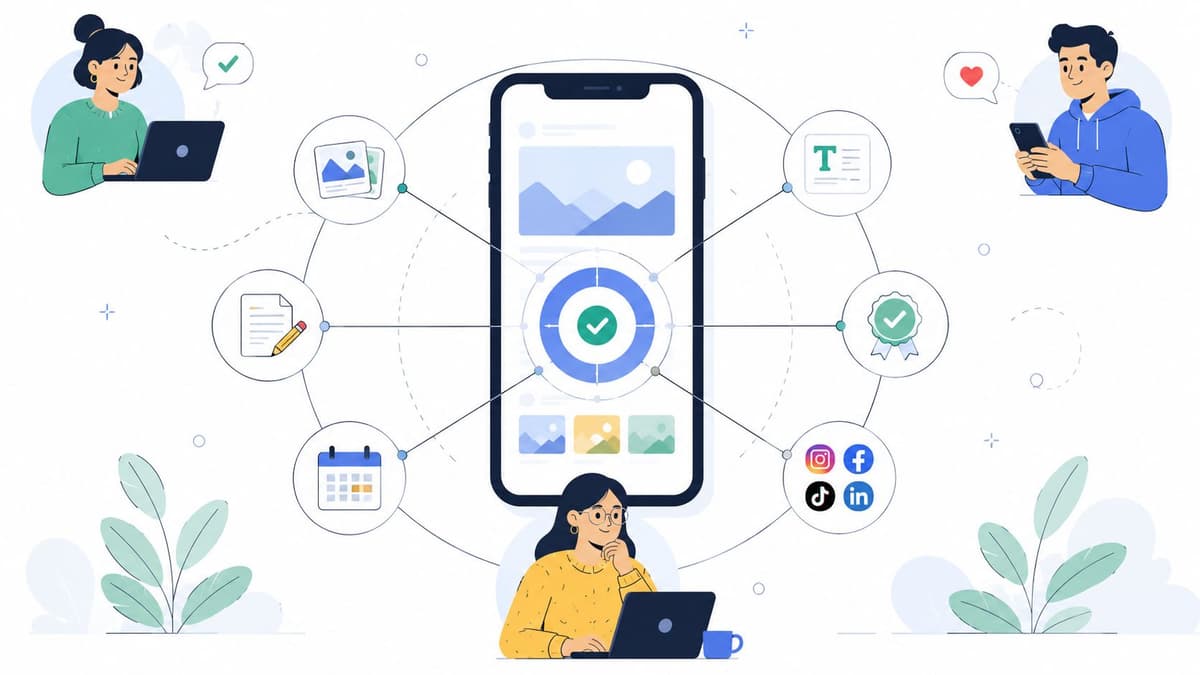
A mobile marketing platform acts as the central hub for mobile-first campaigns, bringing planning, approvals, publishing, and adaptation under one roof. Rather than hopping between native apps, teams operate from a single dashboard and keep every message on-brand.
Table of Contents
- How Mobile Marketing Platforms Fit Modern Campaigns
- Mobile Marketing Platform Types Compared
- What Good Scheduling Looks Like
- Comparing Platform Capabilities
- How Scheduler.social Fits Mobile Campaigns
- Choosing Features That Matter
- Track The Signals That Show Real Behaviour
- Match Metrics To The Channel
- Connect Scheduling To Outcomes
- Match The Tool To Your Workflow
- Set Up In The Right Order
- Avoid The Common Mistakes
- Check Whether The Platform Fits Mobile Work
- How Creators Save Time
- DTC Brands Need Coordination
- Agency Teams Need Structure
- Startup Founders Need Momentum
- What Good Looks Like
How Mobile Marketing Platforms Fit Modern Campaigns
Picture a busy kitchen pass. One station plates the right dish for each table, but the chefs still need to coordinate timing, ingredients, and presentation so nothing falls apart.
That is exactly why the category has grown well beyond simple SMS tools or push notification vendors. It now covers social scheduling systems with AI that can reshape a single idea into versions for Instagram Reels, TikTok, and YouTube Shorts, which matters when audiences flit between channels without a second thought.
The best platforms do not just publish content, they help teams decide what to publish, where it belongs, and how it should change for each mobile surface.
To get a fuller picture of what a mobile marketing platform actually does, it helps to understand how a performance creative platform fits in. A solid starting point is to browse creative automation platforms, which explains how creative variation can strengthen mobile execution.
Key benefits tend to include:
- Faster publishing, because content moves from draft to live without endless copy and paste.
- Stronger consistency, because captions, visuals, and approvals stay within one workflow.
- Better mobile fit, because messages can be adapted for short-form, vertical, or chat-led formats.
- Clearer teamwork, because role-based access keeps review steps tidy. For more on this, see role-based access for social teams.
Core Functions That Matter Most
A proper platform should do more than schedule posts. It should help a team plan, adapt, approve, and measure work across every mobile touchpoint.
The table below summarises the essential capabilities that distinguish a true mobile marketing platform from basic schedulers or single-channel tools.
| Function | Purpose | Mobile-Specific Benefit |
|---|---|---|
| Planning calendar | Maps campaigns in advance | Keeps posting rhythms steady |
| AI adaptation | Rewrites one idea for each channel | Saves time on mobile-native formats |
| Approval workflow | Adds review before publishing | Reduces brand errors |
| Cross-channel publishing | Sends content to multiple networks | Supports reach across devices |
| Analytics | Tracks what happened after posting | Shows which mobile messages worked |
These functions work best when they sit inside a single system rather than being stitched together from separate tools.
What UK Teams Should Look For
For UK brands, agencies, and creators, the useful question is not "Can it schedule?" It is "Can it keep pace with mobile behaviour?" That means checking for bulk publishing, collaboration controls, post-level analytics, and support for the channels where people actually spend their time.
Mobile users now jump between social feeds, apps, and messages all day, so the platform should feel like a conductor, not a filing cabinet. If it helps your team move from idea to live post with less friction, it is doing its job well.
A mobile marketing platform isn't a single piece of software. It is a collection of channels and workflows designed for audiences who rarely look up from their phones. Picture a busy transport hub: each platform type carries your message to the right stop, at the right moment, using the right vehicle.
SMS and Messaging Hubs
SMS and messaging hubs are the quickest way to reach someone, much like a text from a close friend that gets read straight away. They shine for transactional moments: booking confirmations, delivery tracking, appointment reminders, and time-sensitive offers where speed beats polish.
Where they fall short is visual storytelling and long-term brand building. For a closer look at how messaging can work at scale, a useful category to explore is the WhatsApp chat platform for agencies, which demonstrates how conversational workflows can support a mobile-first service model.
If your message has to land instantly, SMS is hard to beat. If your campaign depends on visual rhythm and pacing, you will need something else layered on top.
Push, In-App, and Mobile Ads
Push notification services work like a tap on the shoulder while someone is already inside your app. They are excellent for re-engagement, nudging people towards an abandoned basket, or building daily habits. The catch? You need an installed app and an audience that opted in.
In-app engagement tools go a step further. They shape the experience while the user is actively inside your product, making them a natural fit for product teams trying to improve retention with onboarding prompts, feature tours, or contextual tips.
Mobile advertising networks are the paid billboard of the set. They drive reach and help with attribution, and concepts like the Mobile Advertising ID explain how activity can be linked across devices for measurement. What they do not do is manage your organic posting or approval chains.
Social First Scheduling Platforms
Social-first scheduling platforms sit between content creation and team coordination. Tools like Scheduler.social, for instance, let teams plan, adapt, approve, and publish from a single shared calendar. That kind of setup suits brands that need a steady daily presence across Instagram, TikTok, LinkedIn, and YouTube Shorts.
This is where mobile-centric campaigns stop being theoretical. A solo creator can take one video idea and turn it into channel-specific captions in minutes. An agency can batch approvals, share creative assets, and keep clients in the loop without hunting through chat threads for the latest version.
Choosing the Right Mix
The most effective setups tend to be hybrid rather than single-channel. A direct-to-consumer brand might lean on push for reactivation, SMS for delivery updates, and Scheduler.social for social publishing. An agency might combine scheduling with AI-assisted content adaptation and a browser guide to creative automation platforms to keep campaigns moving without bottlenecks.
Before committing to any tool, mobile-first teams should ask three questions:
- Does this platform reach people where they already spend their time?
- Can it handle the format I need, not just the message?
- Will it slot into my approval process and measurement workflow without friction?
Once those answers are clear, choosing the right combination becomes simpler, and your budget is far less likely to disappear into tools that never quite fit.
Mobile Marketing Platform Types Compared
The table below contrasts five common platform categories so you can match them to your actual needs, rather than relying on feature lists alone.
| Platform Type | Primary Channel | Ideal User | Key Limitation | Integration Needs |
|---|---|---|---|---|
| SMS and messaging hubs | Text and chat | Retail and service teams | Limited visual depth | CRM and consent tools |
| Push services | App notifications | Product and retention teams | Needs an installed app | App analytics and events |
| In-app tools | Inside the app | Product-led teams | No external reach | Product data and tagging |
| Mobile ad networks | Paid media | Performance marketers | Low organic cadence | Attribution and audience sync |
| Social-first schedulers | Social feeds | Brands, creators, agencies | Smaller transactional scope | Asset libraries and AI writing |
Use this as a starting point. Most teams will end up combining two or three of these categories to cover both reach and retention.
A mobile marketing platform ought to function less like a feature list and more like a proper control tower. When campaigns shift quickly, the tools that count are the ones that let your team plan, write, approve, and publish without constantly switching tabs.
The first sign of something genuinely useful is a visual content calendar with drag-and-drop scheduling. Think of it like a kitchen whiteboard, every dish, station, and service time stays in view, so nothing arrives late or gets plated twice.
What Good Scheduling Looks Like
AI-assisted writing matters as well, but only when it genuinely saves time. A creator might take a single Reel idea and turn it into platform-native captions for Instagram, TikTok, and YouTube Shorts in one sitting. A brand team can use that same workflow to keep tone consistent across every post.
The strongest tools do not just schedule content, they strip out the friction between a good idea and a live campaign.
That is exactly why approval workflows deserve more attention than they usually get. Role-based access allows an agency client to review content without seeing drafts meant for another account, and it helps larger teams keep sign-off straightforward instead of buried in long email threads.
- Bulk publishing comes in handy when you need to queue an entire week of posts at once.
- Post-level analytics reveals which individual post landed, not just how the campaign performed overall.
- Channel adaptation helps one message fit different formats without sounding copy-pasted.
- Team permissions protect brand quality when several people touch the same calendar.
Comparing Platform Capabilities
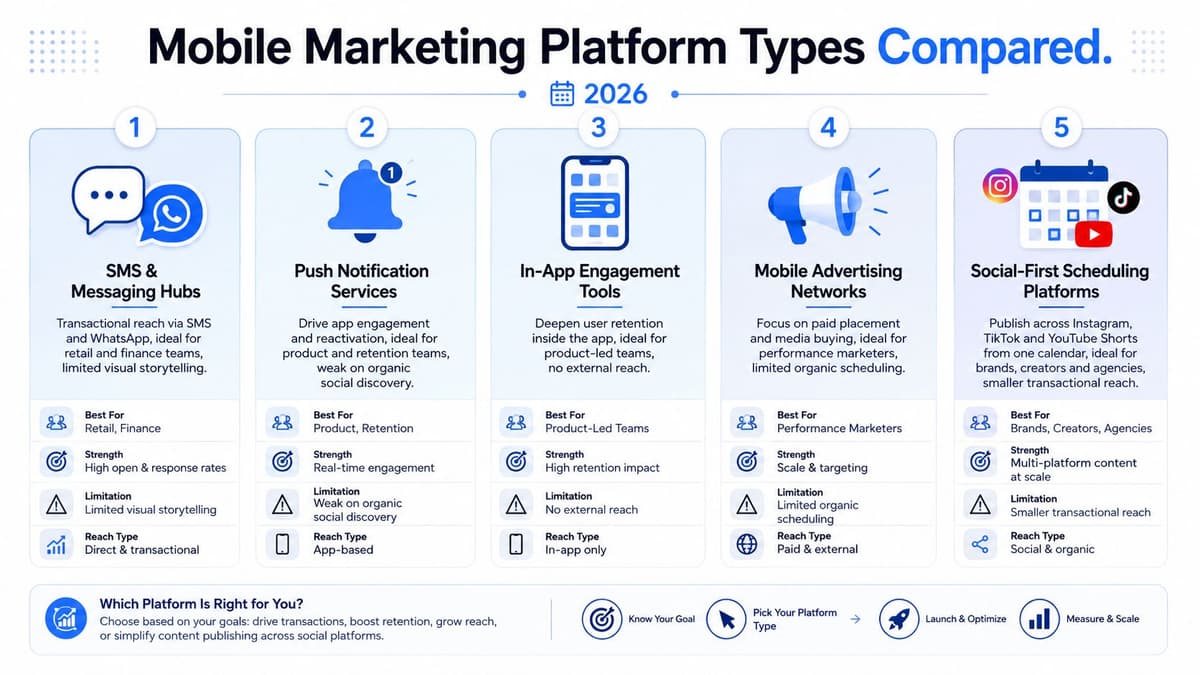
This infographic lays out five types of mobile marketing platforms, spanning SMS and push tools through to social-first scheduling platforms.
The takeaway is straightforward, each type solves a different problem. SMS wins on immediacy. Push notifications drive people back into an app. In-app tools deepen retention once they are there. Mobile ad networks buy you reach. And social-first schedulers like Scheduler.social keep mobile content flowing across visual channels.
| Feature | Why It Matters | What To Check |
|---|---|---|
| Calendar view | Keeps campaigns visible at a glance | Drag-and-drop editing |
| AI writing | Speeds up variant creation | Channel-specific output |
| Approvals | Prevents costly mistakes | Multi-seat review |
| Bulk publishing | Cuts down repetitive admin | Multi-network support |
| Analytics | Ties action back to outcome | Post-level reporting |
For UK teams, the real test comes down to whether the platform fits your day-to-day rhythm. If it helps you move from idea through approval to publication without chaos, it is doing its job. If it only looks impressive in a demo, you will notice the gap by week two.
How Scheduler.social Fits Mobile Campaigns
Scheduler.social is a solid example because it brings planning, AI adaptation, and publishing together in one place. That means a social team can draft once, review once, and publish across major channels without rebuilding the same message from scratch each time.
It also suits mobile-centric campaigns because content can be queued around actual audience behaviour rather than office hours. In practice, that might look like loading a full week of Reels captions on a Monday, then checking which posts earned the strongest response before the next batch goes live.
Choosing Features That Matter
Before signing up, ask yourself three questions.
- Can this tool help us publish faster without sacrificing quality?
- Does it show which posts actually performed well on mobile?
- Will it slot into our existing approval and collaboration process?
If the answer to all three is yes, you are looking at something that genuinely supports modern mobile marketing, rather than just another scheduler with a polished landing page.
If your mobile marketing platform is still being measured by desktop page views, you're working with the wrong yardstick. Mobile campaigns don't flow like motorway traffic — they're closer to city driving, full of stops, detours, and sudden turns. The metrics that actually matter capture that movement, those pauses, and where people drop off.
Start with engagement by format. A Reels caption, a push notification, and an in-app prompt each compete for attention in completely different ways. Lumping them into a single average flattens out the story and hides what's really going on.
Track The Signals That Show Real Behaviour
For teams running mobile-first campaigns, the KPIs worth watching are the ones tied to genuine phone-based action, not just impressions. Think click-through rate on mobile-optimised links, conversion attribution from social through to app or site, remarketing audience growth, and content velocity — which measures how quickly your team can get new posts live.
A good KPI does not just report activity, it tells you what to do next.
Mobile-native signals deserve extra weight. Swipe-through rates, story completion percentages, and in-app event triggers reveal whether someone stuck around long enough to actually care about the message. If you need a refresher on how engagement is properly calculated, read our guide on calculating engagement rate.
Match Metrics To The Channel
Not every channel plays by the same rules. SMS campaigns might hinge on response speed, while a social-first scheduling tool like Scheduler.social calls for post-level engagement and format-specific click data.
| Channel | Best KPI | What It Tells You |
|---|---|---|
| SMS | Click-through rate | Whether the offer felt urgent |
| Push | Re-open rate | Whether users returned to the app |
| In-app | Event completion | Whether the prompt changed behaviour |
| Social | Story completion | Whether the creative held attention |
| Mobile ads | Conversion attribution | Whether spend drove action |
The takeaway here is straightforward: let measurement follow the user journey, not the tool category. If a post generates saves but zero clicks, it might still be doing valuable top-of-funnel work. Don't dismiss it prematurely.
Connect Scheduling To Outcomes
Scheduling data only becomes useful when you line up posting time, format, and message adaptation against the results that follow. You might, for instance, find that short vertical clips posted on weekday evenings pull noticeably better completion rates than the same clip dropped at lunchtime.
A practical review loop looks something like this:
- Publish the same idea in two mobile-friendly formats.
- Compare engagement within the first 24 to 48 hours.
- Check which version delivered more clicks or in-app events.
- Feed that learning back into next week's content calendar.
That fourth step is where most teams stumble. It's tempting to let analysis gather dust in a report somewhere. But the real gains come from closing the loop — taking what you've learned and plugging it straight back into planning so each cycle gets sharper and more relevant.
For UK brands, agencies, and creators, the winning approach is the one that ties together publishing, measurement, and iteration inside a single workflow. When your mobile marketing platform shows what happened, why it happened, and what to test next, you stop guessing and start improving with purpose.
Choosing a mobile marketing platform works best when you start with daily work, not a feature bingo card. Think of it like choosing a vehicle for city driving, you need the right size, turning circle, and fuel economy, not the flashiest paint.
A good first filter is team shape. A solo creator needs speed, an SMB needs repeatable publishing, an agency needs approvals, and an enterprise team needs control, visibility, and audit trails.
Match The Tool To Your Workflow
Start by mapping how content moves today. Who drafts, who reviews, who publishes, and where does the process slow down?
When exploring the initial setup phase, a robust get started with LunaBloom AI resource can help you think through early structure before you commit.
The right platform should fit your habits first, then help you build better ones.
Use this quick test:
- Channel mix, if you publish across Instagram, TikTok, LinkedIn, or YouTube Shorts, you need cross-channel support.
- Approval complexity, if several people sign off, look for role-based access and clear status tracking.
- AI needs, if you rewrite the same idea often, check whether AI can adapt copy by format.
- Budget model, if you want predictability, compare subscription tiers, storage limits, and AI credit usage.
- Reporting depth, if you need evidence, make sure analytics go beyond vanity counts.
This is also where free trials earn their keep. Don't just click around, run one real workflow from draft to published post.
Set Up In The Right Order
Implementation goes smoother when you treat it like moving into a new office. First you unpack, then you label the drawers, then you decide who gets which keys.
- Set up the account structure and permissions.
- Import content libraries, brand assets, and captions.
- Configure publishing queues and approval steps.
- Train the team on the exact workflow.
- Review the first month and adjust timings, roles, and formats.
If you are using a subscription tool such as Scheduler.social, remember that sustainable pricing usually means trial periods, paid tiers, AI credits, and storage limits, not a forever-free plan that disappears later.
Avoid The Common Mistakes
The biggest mistake is buying for novelty instead of fit. A platform can have brilliant AI, but if collaboration is clumsy, your team will still end up in spreadsheets and chat threads.
Other traps include:
- Over-valuing flashy features while ignoring publishing reliability.
- Underestimating onboarding time, especially for agencies and larger teams.
- Skipping a first-month review, which means bad habits harden quickly.
- Expecting instant consistency, when posting rhythms usually take weeks to settle.
For practical setup guidance, read also our guide on social media management software, which explains how scheduling, approvals, and reporting fit together.
Check Whether The Platform Fits Mobile Work
A strong mobile-centric stack should feel like a relay team, not a pile of separate runners. If the tool helps you plan, adapt, approve, and publish without friction, it is doing its job.
That is why Scheduler.social fits many mobile-first teams well, especially when social scheduling and AI adaptation need to live in the same place. It supports the kind of steady, on-brand publishing that grows confidence over time.
If you want a final rule of thumb, choose the platform that matches your current workflow, then expands with you. Test it on a real campaign this week, and if it saves time without adding confusion, you have found the right fit.
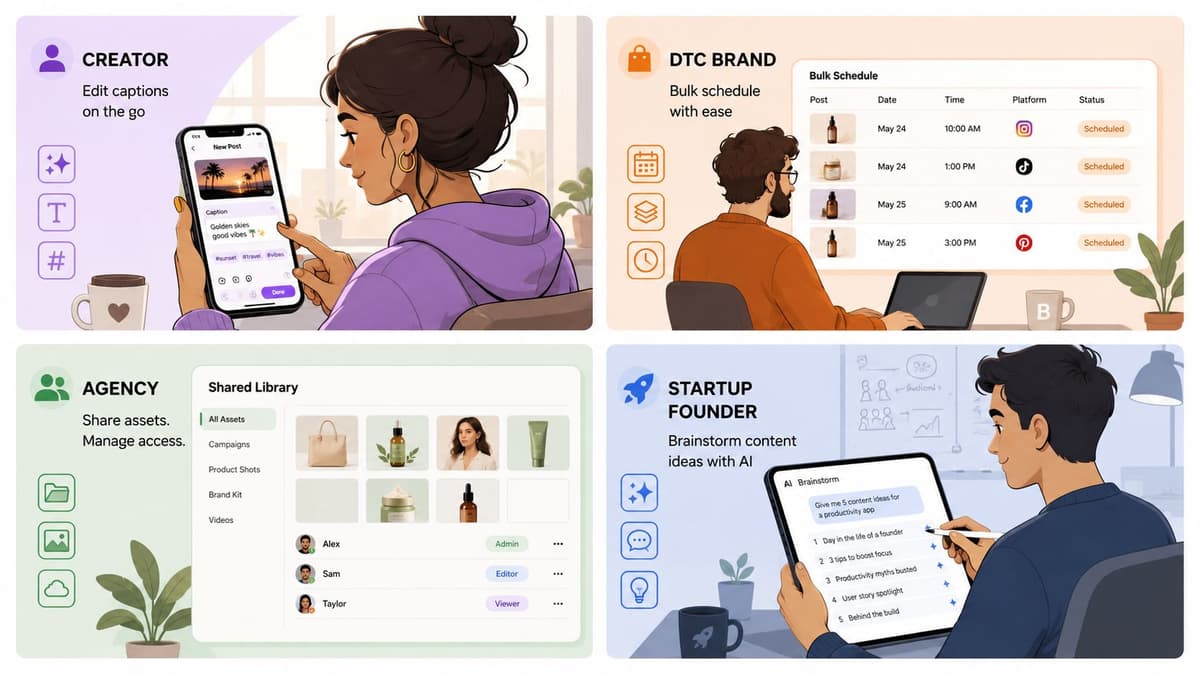
A mobile marketing platform starts to make sense when you see it in motion, not as a feature list. Think of it like a shared workshop bench, where each team member can shape the same raw idea into something ready for mobile audiences.
For a content creator, the workflow often begins with one video script. AI adaptation can turn that script into captions for Instagram, TikTok, and YouTube Shorts, while keeping the creator's voice intact, so the message feels consistent without sounding copied.
That matters because mobile audiences jump between formats quickly, and each channel has its own rhythm. A short caption on TikTok may need a sharper hook, while a Shorts post might need clearer context, and the platform helps handle those differences without extra manual rewriting.
How Creators Save Time
The biggest win is not just speed, it is mental space. Instead of rebuilding every post from scratch, the creator can draft once, review once, then queue the variations for the right channels.
Useful creator-side features usually include:
- AI writing support, which reshapes one idea into multiple captions.
- A visual calendar, which keeps publish dates easy to scan.
- Bulk scheduling, which removes repetitive posting work.
- Asset storage, which keeps clips, thumbnails, and copy together.
The best results come when the platform feels like an editing desk, not a pile of disconnected tabs.
DTC Brands Need Coordination
A DTC brand uses the same kind of platform differently. Product launches often need bulk-scheduled posts, approval gates, and performance tracking tied to remarketing audiences, so timing and message control become just as important as the creative itself.
That is where a tool such as Scheduler.social fits well. A team can prepare launch assets, assign review steps, and publish across channels from one dashboard, which reduces the chance of a missed post or an off-brand caption.
A simple launch flow might look like this:
- Draft the launch theme and key offer.
- Build channel-specific versions.
- Send them through approval.
- Schedule the full sequence.
- Review results and reuse winners in remarketing.
Agency Teams Need Structure
For agencies, the challenge is not volume alone, it is multi-client coordination. Shared asset libraries, role-based access, and cross-client reporting help distributed teams stay organised without mixing up approvals or creative files.
This is especially useful when different clients need different tones, formats, and deadlines. With clear permissions, an account lead can review work, a designer can upload assets, and a strategist can track performance without stepping on each other's toes.
Startup Founders Need Momentum
Startup founders often need ideas fast, before the first full campaign brief even exists. Agentic AI teammates can brainstorm concepts, divide tasks, and draft assets across channels, so the team has something concrete to review instead of a blank page.
That does not replace human judgement. It simply moves the team from "What should we post?" to "Which version should we approve?" much faster, which is often the difference between shipping and stalling.
What Good Looks Like
Across every team type, the pattern is the same, less manual switching, fewer approval bottlenecks, and clearer reporting. When a mobile marketing platform supports planning, adaptation, and publishing in one place, the gains compound week after week.
Scheduler.social is built for exactly that kind of mobile-centric workflow, with planning, AI support, approvals, and publishing in one place. Try it on a real campaign and see how much faster your team can move.