What Does the Star on Snapchat Mean? a Clear Guide
What Does the Star on Snapchat Mean. Learn what the star on Snapchat means, where it appears, how it differs from Snap Star and Snapchat+ badges, and how
A gold star on a friend's Snap generally means they replayed one of your Snaps within the previous 24 hours, but check its placement because other star-like badges have different meanings.
You might be looking at your chat list, wondering whether someone paid extra attention to your message, became a recognised creator, or bought a subscription. Those are different questions, and the star's location is your best starting point. You don't need to memorise every Snapchat symbol, just learn to separate interaction indicators from account labels.
Table of Contents
- Why Snapchat Stars Look Similar but Mean Different Things
- What a Gold Star on a Snap Means
- How Snapchat Friend Emojis Change
- What the Snap Star Badge Represents
- How to Read a Star in Real Chats and Profiles
- How a Snap Star Differs from a Snapchat+ Badge
- Key Takeaways for Snapchat Users and Managers
Why Snapchat Stars Look Similar but Mean Different Things
You open Snapchat, notice a star beside a familiar name and pause. Yesterday, you saw something similar on a creator's profile. It's tempting to assume both symbols mean the same thing, perhaps popularity or special account status.
That assumption skips the most useful clue: where the symbol appears. A mark connected to a private conversation needs a different interpretation from a badge presented as part of a public account's identity.
Start with the surrounding screen
Before deciding what a star means, look beyond its shape. Are you viewing a friend's name in a chat list, a public creator profile, or information about an account's subscription? Keep those settings separate rather than treating every star as part of a single ranking system.
| Where you're looking | The question to ask |
|---|---|
| A private chat or friend list | Is this connected to recent interaction? |
| A public creator profile | Is this a creator-recognition label? |
| Account or subscriber information | Is this identifying a subscription? |
The diagram below captures the different questions a similar-looking symbol can prompt.
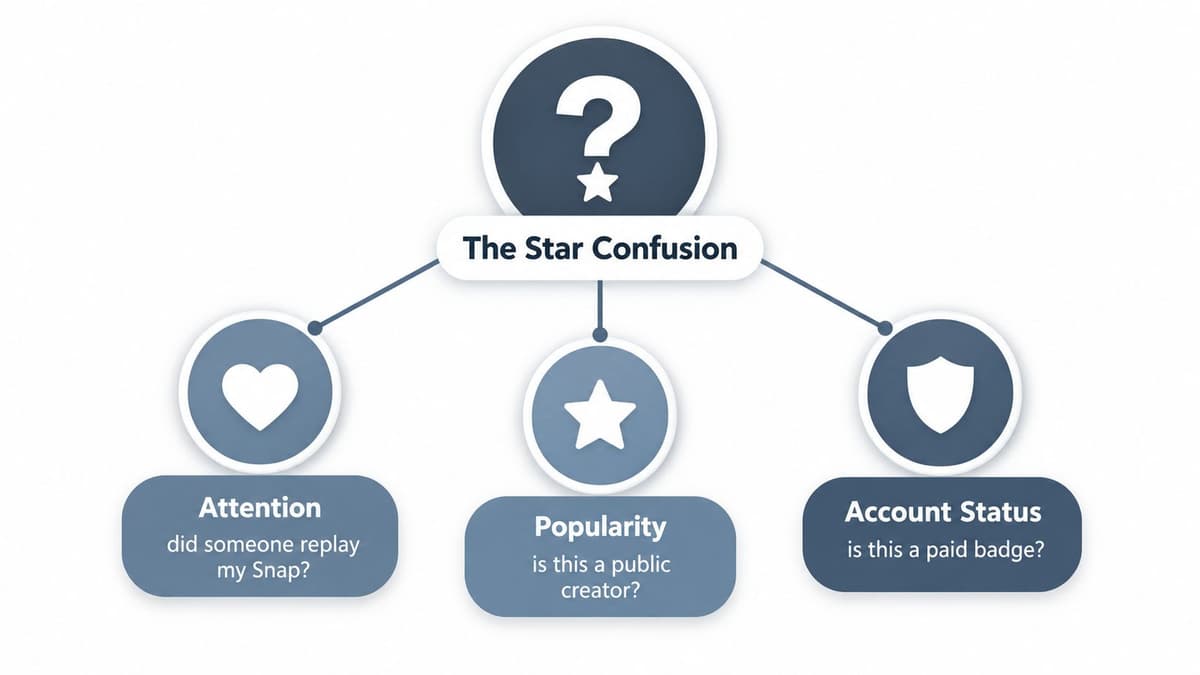
Suppose you're comparing a friend's chat entry with a public creator's profile. Even if both contain a star-like mark, don't carry your interpretation from one screen to the other. Read each in its own setting.
That's a useful habit when following social media trends, too: separate what an interface communicates from what people assume it communicates. Attention, popularity and account status aren't interchangeable.
Practical rule: Identify the screen first, inspect the label second, and interpret the symbol last.
If someone sends you a cropped screenshot, ask to see enough of the surrounding interface to understand its location. A star on its own leaves out precisely the context you need.
What a Gold Star on a Snap Means
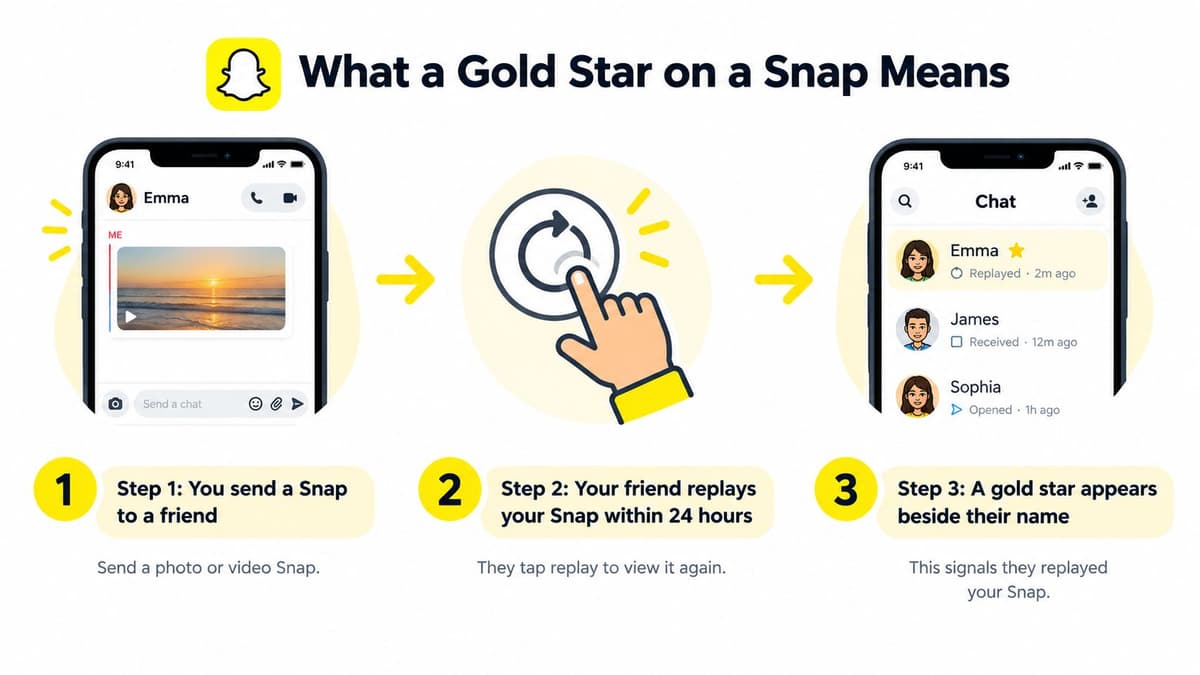
The best-known gold star indicator means that a friend has replayed one of your Snaps within the past 24 hours, as described in Snapchat's Friend Emoji guidance. Read it as a specific, recent activity signal rather than a verdict on the friendship.
The replay sequence is easier to understand when you follow the action behind the icon.
Follow the action, not the assumption
For example, suppose you send a friend a Snap of your dog doing something funny. Your friend opens it, then replays it, and you later notice the relevant gold star beside their name. The cautious interpretation is that the replay happened, not that you've discovered how much they like you.
You can't tell from the star why they watched again. They might have enjoyed the moment, missed a detail or wanted another look at something in the image. Those are possible explanations, not information contained in the symbol.
Keep these limits in mind:
- It isn't an add notification. Don't use the star to decide whether someone has just added you.
- It isn't a subscription confirmation. Replay activity and subscription status are separate matters.
- It isn't a Story-viewing record. It doesn't establish that someone watched every Story.
- It isn't a relationship score. A replay can't tell you how close someone feels to you.
When the star isn't there
The absence of the indicator deserves just as much care. It doesn't reliably establish that a friend is uninterested, ignoring you or less engaged with your friendship. The relevant replay activity may not have occurred during the applicable period.
Avoid turning a temporary interface signal into a personal judgement. If you need to know whether a friend understood a message, asking them is more useful than interpreting an absent emoji.
For another visual walkthrough, the video below offers a companion to the replay example.
The safest wording stays close to the observable action: a recent replay, without adding assumptions about motives, loyalty or wider viewing habits.
How Snapchat Friend Emojis Change
Think of Friend Emojis as a relationship thermostat rather than a certificate. They reflect communication patterns within Snapchat, not a permanent award that someone earns and keeps.
Snapchat says these emojis are assigned from how people use the service and can change regularly. Its definitions distinguish a yellow heart for mutual number-one Best Friends, a red heart for maintaining that position for two consecutive weeks, and two pink hearts for two consecutive months, according to Snapchat's UK Friend Emoji help.
Hearts and replay indicators answer different questions
| Indicator | What to focus on | What not to infer |
|---|---|---|
| Gold replay star | A particular recent action | An enduring friendship ranking |
| Yellow heart | Mutual top Snap-sending status | Identity verification |
| Red heart | Continuity of that mutual status | A guarantee about someone's feelings |
| Pink hearts | A longer maintained pattern | Permanent status regardless of future activity |
The distinction is between an event and a pattern. The replay star relates to the event already described. Relationship hearts concern how your exchanges compare over time.
Suppose you and a friend usually exchange Snaps frequently, but your habits change during a busy period. An altered emoji shouldn't automatically become a story about an argument or a fading friendship. You're seeing a service-generated indicator, not a direct statement from the other person.
Why the thermostat comparison helps
A thermostat responds to conditions; it doesn't explain everything happening in a room. Likewise, an interaction-based emoji can reflect activity without explaining the circumstances behind it.
Someone might be busy, taking a break from their phone or communicating with you elsewhere. Those are hypothetical possibilities, but they illustrate why it's unwise to infer a person's intentions from an automated symbol alone.
An emoji can describe a pattern of app use without describing the quality of a friendship.
For parents, this provides a calmer way to discuss changing symbols with younger users. Ask what communication happened rather than treating a lost heart as evidence of rejection.
For creators, it also prevents a category mistake. Private relationship indicators aren't substitutes for public audience measures, and none of the hearts in this comparison establishes that an account is a recognised public creator. Interaction status and account recognition belong to different systems.
What the Snap Star Badge Represents
A star associated with a public creator profile calls for a different interpretation from a symbol beside a private conversation. Snap Star is Snapchat's recognition for eligible public figures and creators, not a reflection of your personal messaging relationship with them.
Snapchat lists engagement, public Stories, authenticity, notability or cultural relevance, and content quality among its eligibility considerations. Its official explanation of Snap Star status also states that it doesn't charge for verification.
Separate recognition from personal attention
The comparison below places the private interaction indicator and public creator label side by side.
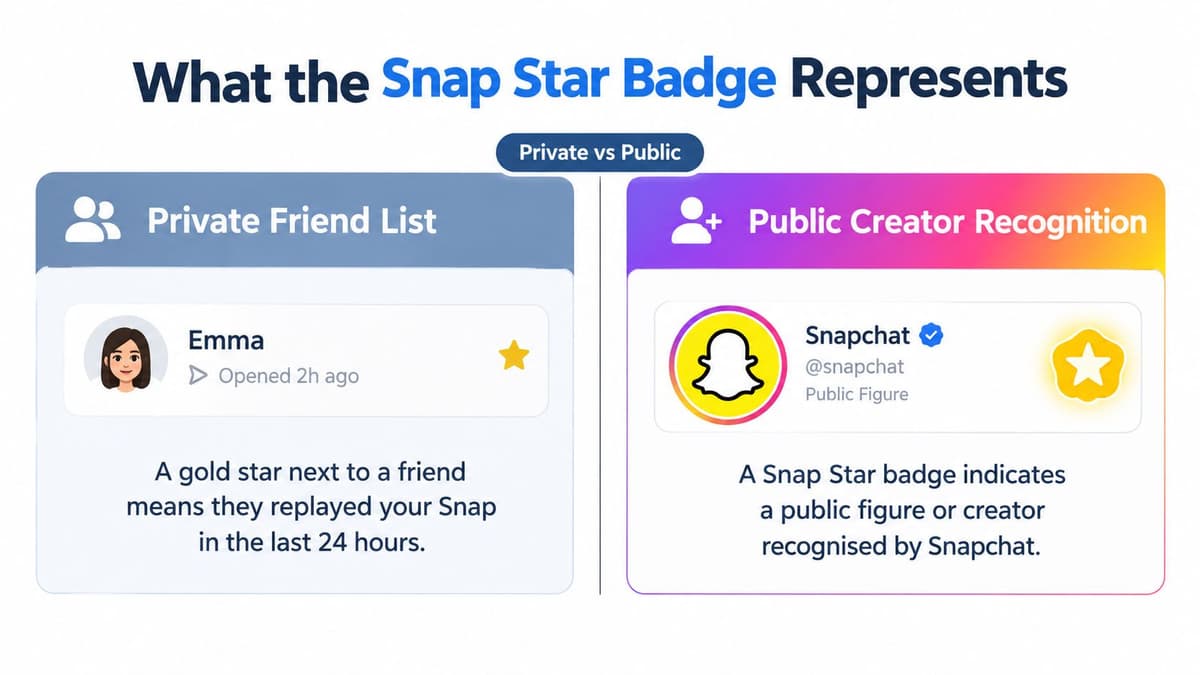
Suppose you visit a musician's public profile and notice the creator badge. That isn't evidence that the musician replayed your message or placed you among their closest contacts. You're looking at recognition attached to the public account.
The eligibility factors also shouldn't be simplified into a popularity contest. Snapchat's stated considerations include the nature and quality of the account's activity, not merely whether an individual viewer recognises the name.
Recognition isn't blanket reassurance
For a small business researching a potential creator partnership, the badge can provide context. It shouldn't replace checking whether the creator's content, audience and conduct suit the proposed relationship.
That distinction belongs in any careful approach to social media marketing for small business. Treat account labels as part of your assessment, not as permission to skip it.
- Check the particular claim. Recognition doesn't establish that every product recommendation or factual statement is correct.
- Assess the interaction separately. An unexpected request for money or sensitive information still deserves scrutiny.
- Reject paid-verification promises. Someone asking for payment to obtain Snap Star status is making an offer inconsistent with Snapchat's stated policy.
Safety reminder: A recognised creator label isn't a guarantee that every post, offer or conversation is safe.
Parents can explain this without dismissing the badge altogether. It has a defined purpose, but that purpose is narrower than endorsing everything an account might say or do.
How to Read a Star in Real Chats and Profiles
When you're unsure what does the star on Snapchat mean in a particular screenshot, slow down before interpreting it. Your task is to identify the kind of indicator you're seeing, not to guess the account holder's intentions.
Consider these contrasting situations. Each requires a different observation, even though the initial question sounds similar.
Match the interpretation to the setting
A friend's chat entry. You notice a star while checking a conversation. Start with the replay explanation above, but make sure you're looking at the relevant interaction indicator rather than another mark elsewhere on the screen.
A changing relationship emoji. A symbol beside a contact differs from what you remember. Check the current emoji and its definition rather than assuming that every change means the same thing.
A public creator profile. The star appears as part of the creator's public identity. Use the Snap Star distinction, not the private-chat interpretation.
An account label. The surrounding information refers to subscriber status. Read that label before deciding the symbol represents creator recognition.
Write reports that don't overclaim
For a creator or social media manager, the same method helps keep reporting accurate. Describe the specific action or label you can establish, and keep broader conclusions separate.
For example, a report that describes an observed replay stays close to the evidence. A report that turns it into proof of audience loyalty adds a judgement the icon can't support.
If a colleague shares a cropped image, request the original context before assigning a meaning. If you can't distinguish the label confidently, record the interpretation as unresolved rather than choosing whichever explanation sounds most impressive.
Use this short checklist before acting:
- Locate it. Is the symbol in a chat, friend list, public profile or account-information area?
- Read around it. Look for nearby wording that identifies recognition or subscription status.
- Name only what's supported. Keep activity, relationship patterns and account labels separate.
- Check uncertainty. Consult the relevant current Snapchat help material when the context remains unclear.
- Limit the conclusion. Don't translate an icon into proof of popularity, personal commitment or safety.
How a Snap Star Differs from a Snapchat+ Badge
A Snapchat+ badge is a subscription marker, not another route to Snap Star recognition. Snapchat's account-label guidance says it identifies an optional paid subscription when displayed, but doesn't establish identity verification, authenticity or endorsement by Snap.
The badge is off by default. A subscriber can choose to display it, and subscriber-only features may also surface the status, as explained in the same account-label guidance.
Compare the purpose, not just the appearance
| Question | Snap Star | Snapchat+ badge |
|---|---|---|
| What distinction matters? | Creator recognition | Subscription status |
| Should you apply the private replay explanation? | No | No |
| What should you check next? | The public account and the specific content | The account label and the specific interaction |
| Can the mark replace your judgement? | No | No |
This visual comparison helps separate the categories, but the surrounding account label should guide your interpretation rather than colour alone.
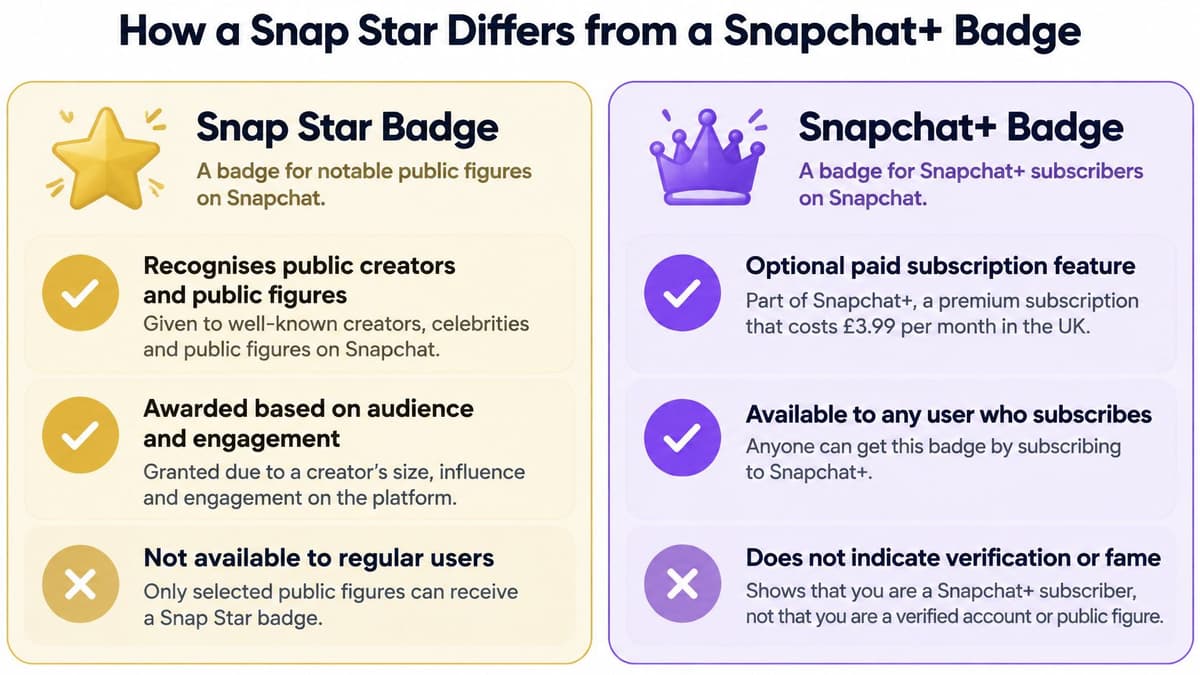
Payment doesn't establish identity
Suppose an unfamiliar account contacts you and displays a subscriber badge. Don't treat the subscription as evidence that the person is who they claim to be. Evaluate the message and any request independently of the account's paid status.
For parents, the useful distinction is simple: paying for an optional service and receiving public creator recognition aren't the same process. Neither should become shorthand for allowing a conversation that otherwise feels uncomfortable.
For brands, keep those categories separate in creator research notes. A subscriber marker shouldn't be recorded as creator verification, and a polished profile shouldn't remove the need to assess a proposed partnership carefully.
- For identity questions, look beyond the subscription marker.
- For purchasing decisions, examine the offer and seller rather than relying on a badge.
- For suspicious messages, prioritise the nature of the request over the account's appearance.
The practical benefit isn't memorising badge artwork. It's knowing which conclusion a label can support, and refusing to stretch it further.
Key Takeaways for Snapchat Users and Managers
Location is the reliable starting point, because the same star-like mark changes meaning with its surroundings. A star beside a replayed Snap describes recent activity, a star in the Friend Emoji slot describes a shifting relationship pattern, and a star on a public profile or beside a subscriber's name describes an account label. Ask where the mark sits before deciding what it supports.
That habit is worth building early. Ofcom's reporting on children's online lives recorded Snapchat profiles for 62% of UK teenagers aged 13–17 in 2025, so a large share of the people reading these symbols are still forming their expectations.
Keep a clear distinction
A quick scenario shows why position matters. Suppose a star appears beside a contact in your chat list: check whether it sits in the emoji position, where it acts like other Friend Emojis and can change as your snapping pattern changes. If a similar shape appears on a creator's public profile instead, it belongs to account recognition with separate criteria. Same outline, different location, different conclusion.
If you're weighing Snapchat as a marketing channel, the Affiliate Landscape event on finding next growth channel is a related resource to investigate. Treat channel strategy as a separate decision from decoding an individual badge.
For publishing-workflow research, our Snapchat scheduling page outlines what to check, and you should verify the capabilities of any tool you shortlist. Buffer, Hootsuite and Later are options to compare for broader social media needs rather than guaranteed Snapchat support.
Before icon definitions go into client-facing guidance, re-check Snapchat's current help pages and attach a dated screenshot to each claim so your team can verify it later.
Scheduler.social is an independent directory that reviews and compares social media scheduling tools, not a service that schedules or publishes posts. If this Snapchat review has prompted you to reassess your wider workflow, visit Scheduler.social, browse the full scheduler directory and use the head-to-head comparisons to find the right tool for your platforms and needs.