Social Media Marketing for Small Business: 2026 Playbook
Social media marketing for small business owners: build a practical 2026 plan, pick the right platforms, and turn followers into paying customers.
You've got a customer question sitting unanswered in your inbox, a half-finished Instagram draft, an old Facebook page that still brings occasional enquiries, and a growing suspicion that social media is consuming more time than it returns. The problem usually isn't a shortage of ideas. It's that social has become another operational task without an owner, a process or a clear definition of success.
Social media marketing for small business works better when you treat it like a manageable operating system. Choose the commercial outcome first, select only the channels your customers use, create repeatable content, schedule it with sensible controls and measure actions that connect to enquiries, bookings or sales. The result should be a workflow your team can maintain during a busy week, not a performance that depends on constant inspiration.
Table of Contents
- Why Social Media Marketing Feels Hard for Small Businesses
- Setting a Measurable Goal and a Real Audience
- Choosing the Platforms That Actually Fit
- Building a Content Calendar You Can Actually Keep
- Scheduling and Automating Without Losing Control
- Measuring What Connects to Revenue
- Your 90-Day Plan, Review Rhythm and Next Steps
Why Social Media Marketing Feels Hard for Small Businesses
A founder might begin the week intending to publish a useful video, answer comments and promote a service. By Friday, client work, stock, invoices and staff questions have taken priority. The post remains in drafts, the replies are late and the only available report shows likes and follower growth without explaining whether anyone became a customer.
That gap between activity and commercial progress creates most of the frustration. Small businesses often try to solve it by adding platforms or posting more frequently, but volume doesn't repair an unclear process. A 2026 UK survey of 223 businesses found that 61% posted on social media, while 32% didn't create content regularly and 25.5% identified lack of time as their biggest marketing barrier (Nettl Pulse 2026 survey).
Replace improvisation with decisions
A workable system starts with a short chain of decisions:
- Choose one commercial objective. It might be qualified enquiries, bookings, sales or email sign-ups.
- Define the audience that can create that outcome. Avoid addressing every possible customer at once.
- Select a small platform mix. Each channel needs a job and a reason to exist.
- Create a few repeatable content themes. Your team should know what to make without starting from a blank page.
- Add a publishing workflow. Scheduling protects production time, but it doesn't remove the need for review.
- Measure the path to action. Website events, CRM records and sales matter more than a busy-looking feed.
A useful external reference is this SuperX guide to social strategy, particularly for teams that need help turning broad social ambitions into a more defined plan. Use it for ideas, then adapt the system to your staffing, customer journey and risk tolerance.
Practical rule: If you can't state what a post is supposed to help the business achieve, it probably shouldn't take priority over customer work.
The first decision controls all the others. A business seeking local bookings needs a different content and measurement system from a B2B consultancy seeking sales conversations. Once success is explicit, platform choice, formats and software become practical decisions rather than distractions.
Setting a Measurable Goal and a Real Audience
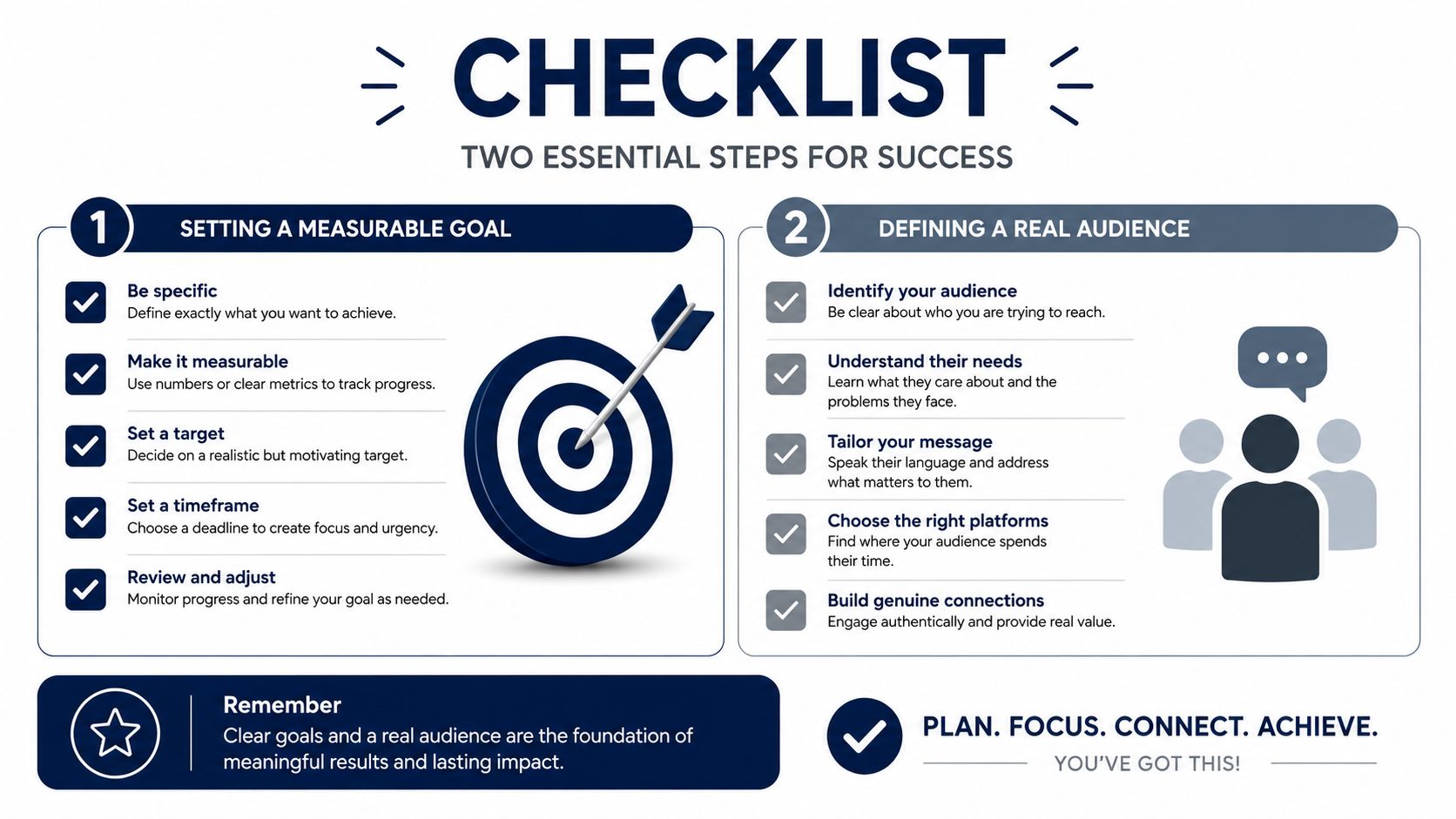
Before choosing a network, write one sentence that connects social activity to a business result. “Grow our presence” is too vague to guide a decision. “Generate qualified enquiries for our service” gives you a direction, a conversion event and a reason to review performance.
A measurable objective doesn't need to be complicated. Choose one outcome for the next operating period, then define what counts as evidence. For a booking-led business, that might be completed booking requests. For a consultant, it could be qualified enquiries recorded in the CRM. For an ecommerce business, it could be tracked purchases from social traffic. Follower growth and likes can provide context, but they shouldn't be the finish line when revenue or demand is the core requirement.
Write the audience as a useful customer profile
Describe one priority audience in a short paragraph. Include:
- Commercial situation: What are they trying to buy, fix or improve?
- Decision trigger: What makes the need urgent now?
- Main hesitation: What stops them from contacting or purchasing?
- Useful proof: What would help them trust your business?
- Likely action: Would they enquire, book, download, visit or buy?
Keep the profile close to observable customer behaviour. Review enquiries, sales conversations, support messages and customer wording. If people repeatedly ask about turnaround, suitability or price, those questions should influence both your content and your conversion path.
Then check whether the audience uses the channels you're considering. Don't assume that a platform's overall popularity proves commercial relevance for your business. The audience decision should be based on customer behaviour, the format you can produce and the action you need people to take.
Build measurement before publishing
UK SME research cited by ComparetheCloud reported that only 31% of small businesses track social-media ROI effectively, indicating a substantial measurement gap (ComparetheCloud's UK SME social-media research). Set up the basics before increasing output:
- Use one commercial definition of success. Keep it visible in the content plan and reporting.
- Tag every important social link. UTM parameters should identify the platform, campaign and content theme.
- Record lead sources consistently. A form or CRM field should distinguish social enquiries from other channels.
- Define micro-conversions. Enquiries, downloads, email sign-ups and booking starts can show movement before a sale.
- Review the baseline. A social media audit can help identify existing channel activity, profile gaps and tracking weaknesses before you change the publishing routine.
This order prevents a common mistake: producing a large volume of content, then trying to work out later whether it influenced demand. Establish the outcome and the audience first. Content can then serve a defined customer journey rather than merely filling a calendar.
Choosing the Platforms That Actually Fit
Nearly every UK SME now has some relationship with social media, but that doesn't mean every business should maintain every channel. Research published in April 2025 found that 97% of UK SMEs used social media, with Facebook used by 69%, Instagram by 67%, YouTube by 63% and TikTok by 49% (April 2025 UK SME platform research). Those figures show where SME activity is concentrated, not which platform will generate sales for a particular business.
Ofcom's research adds a useful reach perspective. In 2025, 51% of UK adults used social media to get news. Facebook reached 30% of all UK adults for news, while TikTok reached 11%, up from 1% in 2020 (Ofcom's 2025 news habits research). This describes news use, not commercial conversion, so use it to inform reach and discovery decisions rather than treating it as proof of sales potential.
Give each channel one clear job
A small business usually needs two or three channels at most to begin. Facebook can support broad adult reach, local updates, reviews and direct messages. Instagram suits visual proof, product detail and community interaction. YouTube and TikTok can support video-led discovery, but they demand a production process that can sustain useful footage. LinkedIn may fit B2B services where professional credibility and founder expertise influence the sale.
Ofcom also reported that the average UK adult spent four hours and 30 minutes online per day in 2025, while 49% of UK respondents actively posted on platforms such as Instagram, Facebook and X, down from 61% the previous year (BBC coverage of Ofcom's online-use research). Passive viewing and public posting aren't the same behaviour. A quiet comment section doesn't necessarily mean people aren't watching, which is another reason to track reach, profile visits, clicks and enquiries.
| Platform | UK SME usage | UK adult news reach | Best fit for |
|---|---|---|---|
| 69% | 30% of all UK adults | Local discovery, community updates, reviews and messages | |
| 67% | Not specified in the cited data | Visual products, transformations, portfolios and direct messages | |
| YouTube | 63% | Not specified in the cited data | Demonstrations, tutorials and searchable video |
| TikTok | 49% | 11% | Short-form discovery, practical demonstrations and younger audiences |
Use a simple drop test
Keep a channel only when three conditions hold. Your priority audience must be present, your offer must translate naturally into the channel's format and your team must be able to maintain the workflow without damaging core business work. If one condition fails repeatedly, reduce the channel to a basic presence or stop investing in it.
Don't copy the same post everywhere and call that a multi-channel strategy. Adapt the opening, length, visual treatment and call to action to the network. A professional service may turn one insight into a LinkedIn explanation, an Instagram carousel and a short video, but each version should feel native rather than duplicated.
Write down the reason for every selected platform. “Our customers use it to see recent work and message us” is defensible. “Everyone says we should be on it” isn't.
Building a Content Calendar You Can Actually Keep
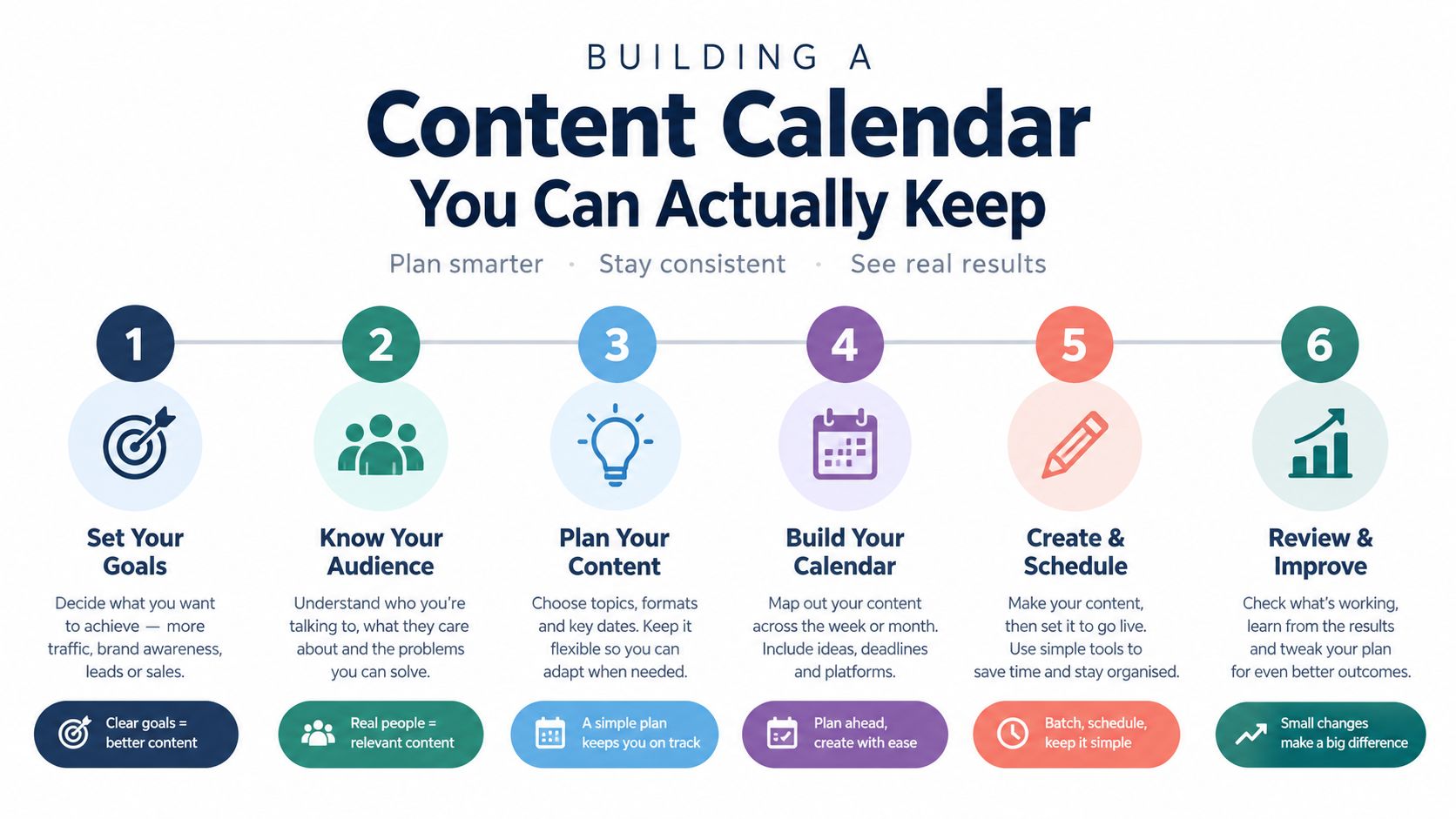
A calendar should reduce decisions, not become another document that nobody updates. Start with two or three content pillars linked to the audience's questions and the commercial objective. A local service might use practical advice, proof of completed work and behind-the-scenes trust-building. A product business could use demonstrations, customer use cases and buying guidance.
Build around reusable source material
The efficient unit isn't the individual post. It's the source asset that can become several platform-adapted pieces. Record a product demonstration, then extract a short clip, a still image, a question-and-answer caption and a website FAQ. Turn a customer question into an educational post, a story response and a sales team's talking point.
A practical monthly skeleton might look like this:
- Week one: Publish a useful answer to a common customer problem and collect questions from replies.
- Week two: Show proof of work, such as a finished project, customer feedback or a product in use.
- Week three: Explain how to choose, compare or prepare, with a clear next step.
- Week four: Share a timely offer, booking prompt or behind-the-scenes post that makes the business more recognisable.
This isn't a mandatory posting quota. It's a repeatable set of prompts that prevents every week from becoming a creative emergency. A social media plan template resource can help structure ownership, status and publishing dates, but a simple spreadsheet works if the team consistently maintains it.
Protect the production budget
Batch work when the business can make several related assets without repeatedly resetting equipment, locations or approvals. Prepare a small library of photographs, clips, customer questions and proof points. Create templates for recurring formats, but leave enough flexibility for posts to sound current and specific.
Content pillars should also reflect intent. Educational content earns attention, proof reduces risk and commercial content gives ready buyers a path forward. If every post sells, the feed becomes tiring. If every post teaches without a clear route to action, the business may earn attention without demand.
Operator's view: A modest calendar that survives a busy month will outperform an ambitious plan that requires the owner to become a full-time creator.
Reserve space for real-time interaction. A customer reply, an unexpected project milestone or a useful question from a prospect may be more valuable than a polished post planned weeks earlier. The calendar should provide structure without preventing the business from responding to what customers are saying now.
Scheduling and Automating Without Losing Control
Once content exists, publishing becomes a workflow problem. Manual posting can work for a single channel and a small volume, but it becomes fragile when the owner is also handling sales, fulfilment and customer service. Scheduling creates a buffer between production and publication, which helps the team keep a consistent presence without opening every app at the busiest point in the day.
A scheduler may queue posts, preview how they appear, adapt content for different networks and provide some analytics. Those capabilities vary, so compare the actual workflow rather than choosing based on a familiar brand name. Buffer, Hootsuite, Later, Sprout Social, SocialBee, Metricool, Publer, Vista Social, Planable, Postiz and Typefully are examples of tools a small business might assess.

Separate planning from publishing
The calendar answers what should be created and why. The scheduler answers when and where approved content should be published. Keeping those functions distinct prevents a scheduling queue from becoming a substitute for strategy.
Before selecting a tool, check:
- Network support: Confirm that it handles the platforms your business uses.
- Review controls: Look for approval steps if a founder, client or compliance lead must review posts.
- Adaptation: Check whether each network can receive a suitable caption, crop and call to action.
- Analytics: Confirm that the reporting supports the metrics you defined, not just surface engagement.
- Integrations: Consider links with the rest of your marketing workflow.
- Cost and limits: Prices, user limits and plan conditions can change, so verify them on each tool's own website.
The independent Scheduler.social directory compares scheduling tools rather than acting as a scheduler itself. It doesn't publish posts, provide a dashboard or offer software access. That distinction matters when you're evaluating a directory against the products it reviews.
A 2026 survey of 501 UK small-business owners found that 76% spend time creating or editing social content each week, while only 39% reported insurance covering social-media-related legal claims (UK small-business content survey). Automation can protect time, but it shouldn't remove judgement. A useful prioritised automation guide for founders can help identify repetitive work worth systemising without handing every customer-facing decision to software.
Keep a human checkpoint
Schedule evergreen educational content, recurring reminders and approved proof assets. Review time-sensitive offers, customer images, claims, references to people and anything that could create a legal or reputational issue before it goes live. Also check that links work, dates are correct and the post still makes sense in the context of current stock or availability.
Use social media scheduling guidance to compare publishing approaches, then shortlist tools based on your channels, approval needs and reporting requirements. Don't buy complexity that a one-person operation won't use, and don't choose a basic queue if several people need to review content.
Measuring What Connects to Revenue
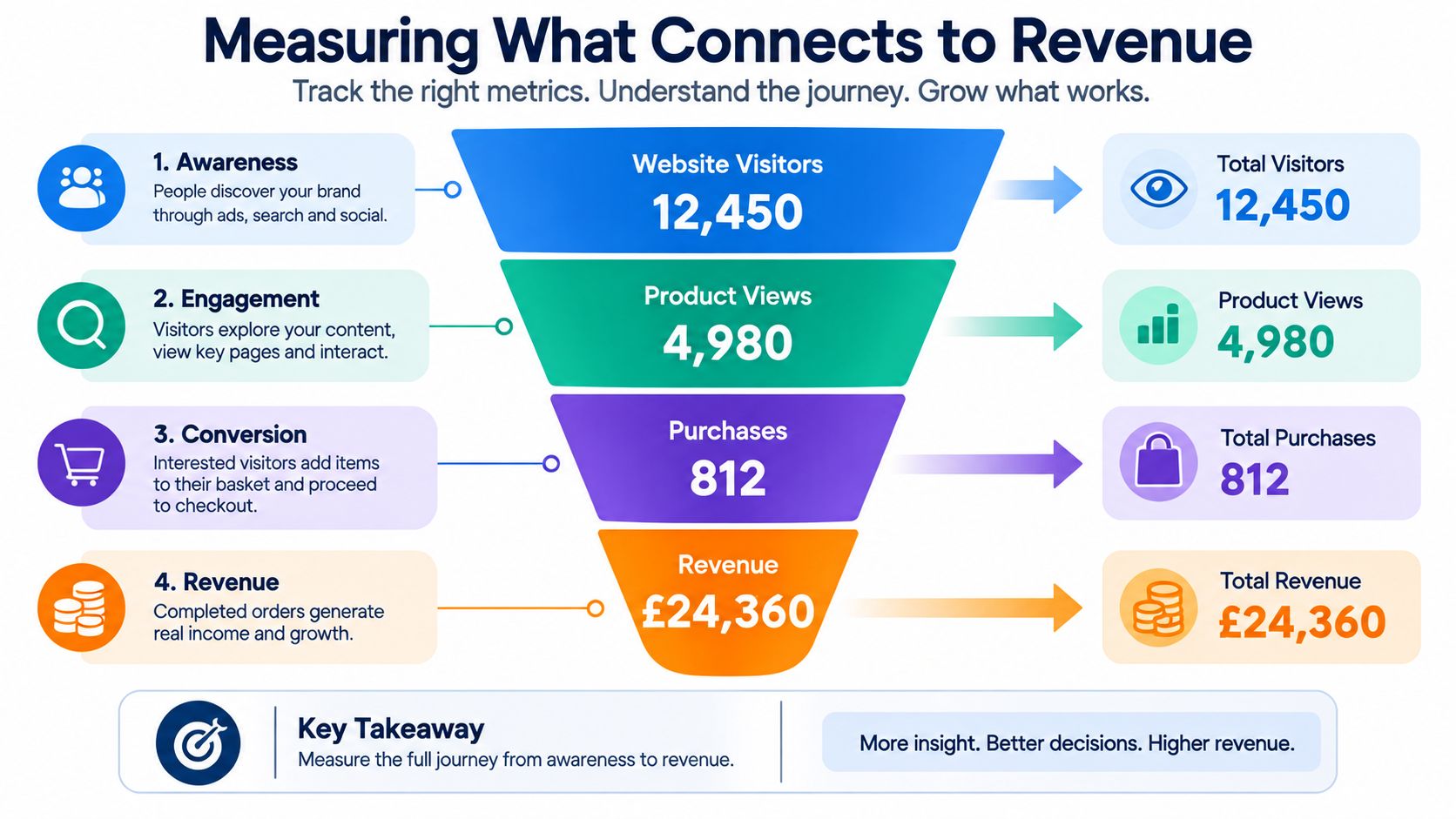
A report full of reach and likes can still leave the commercial question unanswered: did social create qualified demand? The measurement loop should connect a post to a website action, then connect that action to a lead record, booking or sale where the business can track it.
Start with the link. Add UTM parameters to every social URL so GA4 can identify the source, medium, campaign and content theme. Configure events for useful micro-conversions such as enquiries, downloads, email sign-ups and booking starts. Then reconcile those events with CRM lead-source records, because analytics may show a conversion without telling the sales team whether the lead was relevant or closed.
Use metrics at the right level
Weekly reporting should help you decide what deserves attention. Review:
- Reach and views: Are relevant people seeing the content?
- Engagement rate: Are viewers taking meaningful actions?
- Qualified clicks: Do visitors show intent after leaving the platform?
- Profile visits and messages: Is the content creating a conversation?
- Landing-page actions: Are people completing the next step?
Monthly reporting should answer the business question. Compare conversion rate, cost per acquisition and revenue influence where tracking supports it. Treat likes, comments and follower growth as diagnostic signals. They can show whether a message is attracting attention, but they don't automatically demonstrate commercial value.
Run a controlled 30-day test
Keep the audience, offer and measurement baseline stable. Change one meaningful variable, such as content theme or format, and compare it with the existing baseline. You might test practical education against proof of work, or short video against a static explanation. The point isn't to create a scientific experiment from limited data. It's to avoid changing the platform, offer, audience and creative all at once.
Report each stage separately rather than combining everything into one score:
- Distribution: Reach and views.
- Response: Engagement rate, saves, shares or messages.
- Intent: Qualified clicks and landing-page actions.
- Conversion: Enquiries, bookings, sign-ups or purchases.
- Efficiency: Cost per acquisition and the time required to produce the result.
For a broader explanation of calculating marketing ROI, focus on including the true investment, not only advertising spend. Owner time, freelance production, editing, design and software all consume resources. A result that looks positive before those costs are considered may not be worth repeating.
Measurement principle: Keep the metric that changes a decision. Drop the metric that only decorates the report.
Your 90-Day Plan, Review Rhythm and Next Steps
A 90-day rollout gives the business enough time to install a process without committing to an untested system indefinitely. The sequence should begin with decisions, move into production, then use evidence to adjust the workload.
Weeks one to four establish the foundations
During the first two weeks, write the single commercial objective, define the priority audience and record the conversion events that matter. Check the website journey, enquiry forms and CRM source fields before asking social to generate more traffic.
Use the next two weeks to select the platform shortlist and define the content pillars. Write down the reason each channel fits the audience, the format and the team's capacity. Remove any channel that depends on content the business can't reliably produce.
Weeks five to eight create a repeatable routine
Batch-produce a small set of assets, adapt them for each selected platform and load approved content into the publishing workflow. Assign an owner for copy, visuals, approval, replies and reporting. Scheduling should reduce daily administration, not allow the team to publish unchecked material.
Use a simple approval checklist:
- Accuracy: Are claims, prices, dates and availability correct?
- Permission: Does the business have permission to use every client image, quote or video?
- Copyright: Does the team own or have permission for the music, photography, footage and design elements?
- Brand safety: Could the wording mislead, offend or expose private information?
- Destination: Does the link work and match the call to action?
Keep a consent log for customer images and videos. The 2026 UK small-business survey found that 19% did not always obtain client permission before sharing images or videos, and 28% wouldn't know what to do after a client raised a legal concern (UK small-business content risk survey). A basic process is safer than relying on memory.
Weeks nine to twelve review and revise
Compare content themes and formats against the baseline. Retain formats that improve qualified actions, revise those that create reach without intent and stop activities that consume time without measurable progress. Review customer messages and sales feedback alongside platform reports, because useful influence may appear in conversations before it appears in attribution.
Create a short crisis path. Pause scheduled posts when a serious issue emerges, capture the facts, assign one spokesperson, move private customer details out of public replies and escalate legal or safety concerns to a qualified professional. Don't improvise a public response while several team members are posting different explanations.
For scheduling software, choose two or three candidate tools and compare them by network support, approval controls, analytics and workload. Use the full scheduler directory, head-to-head comparisons, platform-specific comparisons and use-case comparisons before making a decision. Pricing and features may change, so confirm current details on each tool's own site.
The right social workflow isn't the one with the most content. It's the one your team can operate, measure and improve without compromising client work or exposing the business to avoidable risk.
Scheduler.social is an independent directory for comparing social media scheduling tools, with listings, editorial comparisons and use-case pages for different teams and platforms. Visit Scheduler.social to compare suitable schedulers side by side, check current options and choose a publishing tool based on your actual workflow rather than signing up on instinct.