Customer Journey Automation: What to Hand Off
Customer journey automation removes routine effort without trapping people in bots. See which stages to automate, how social fits, and what to measure.
British customers do not need more automated messages. They need fewer dead ends. A good automated journey notices what a person just did, moves them to the next useful step, and recognises quickly when a person should take over.
That distinction matters because many teams still buy a chatbot, an email sequence, or a social calendar and call the result a journey. Those are single touchpoints. Customer journey automation is the logic that connects them, including the exit when automated help is no longer the right help.
Table of Contents
- What Customer Journey Automation Means
- Stages Worth Automating and Stages to Escalate
- The Record That Keeps Context Intact
- Measures That Beat a Containment Rate
- How to Launch One Journey Without the Rollback
- Social Workflows and Choosing a Scheduler
What Customer Journey Automation Means
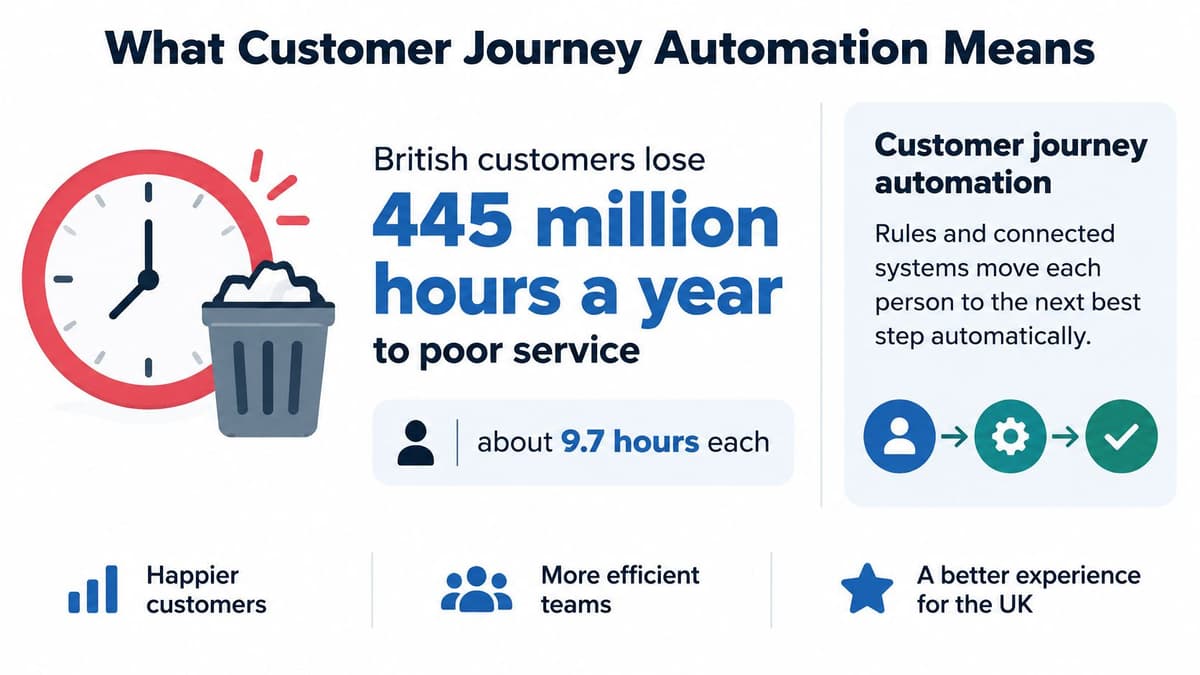
British customers collectively lose 445 million hours each year dealing with poor customer service, an average of 9.7 hours per consumer annually, according to CX Today's report on ServiceNow's 2026 CX Shift study. That 2026 study covered 2,465 UK consumers within a global survey of more than 34,000 executives, agents and consumers. It found that 76% of UK customers try self-service before contacting an agent, yet 82% still prefer phone support.
Nearly half said current chatbots fail to understand their questions or concerns, while more than half reported that AI had improved after-hours and round-the-clock support. Read together, those figures do not say customers reject automation. They say customers will start alone, value help outside office hours, and still want a human route when the automated answer misses the point.
A Plain Definition
Customer journey automation means rules and connected systems that advance a person to the next useful step when a defined event happens, without a human pushing every message. A trigger starts it, eligibility rules decide who should enter, and exit conditions stop it. A chatbot, an FAQ page, or a content calendar can sit inside that system, but none of them is the whole journey.
Say someone comments on a product video asking for a link. Automation can send the link, record the intent, and stop if they buy. If they reply that checkout failed, the journey should change course and hand the case to a person with the comment and purchase context attached.
The Clinic Queue Test
Think of a clinic queue. Good automation calls the right desk, remembers why the person came, and passes the notes on. Bad automation plays a looping recorded message while the queue grows longer.
If your system cannot explain why a person received a message, it probably should not have sent it.
Historically, teams automated one channel at a time through FAQs, IVR menus, and standalone chatbots. The shift now is toward journey-level orchestration, where intent and previous interactions follow the customer across self-service, digital channels, and human escalation. That is why the useful measures include time saved and transfer quality, not containment alone.
Before you choose any tool, use a stage map as your filter. Decide which predictable work automation can do well, which moments need a person, and which signal proves the customer progressed.
Stages Worth Automating and Stages to Escalate
Start with the map, not with a vendor demo. Each row separates routine work from work that needs judgement.
| Stage | Automate when | Hand to a person when | Signal to trust |
|---|---|---|---|
| Discovery | Planned posts and simple comment intent such as a link request | Complaints, vulnerability or a blocked purchase in public replies | Save, profile visit or explicit question, not impressions alone |
| Consideration | Comparison or FAQ content after a click, save or search | Follow-up on an existing case or a pricing dispute | Return visit or comparison-page view |
| Selection | Basket, booking or back-in-stock reminders for a known intent | High-value deals, refunds or contract negotiation | Completed checkout or booked call |
| Onboarding | Welcome sequence, setup checklist and straightforward status notes | Failed payment, identity checks or access needs | First successful use of the product |
| Usage | Status checks, how-to prompts and renewal reminders | Repeat contact on the same issue or emotional language | Resolved without a repeat contact |
| Advocacy | Review or referral ask after a clear positive signal | Negative reviews, press or legal risk | Referral or a public recommendation the customer chose to make |
How to Read a Row
Take discovery. Scheduling a post and answering a simple request for a link are predictable tasks, so automation can handle them. A public complaint, a sign of vulnerability, or a blocked purchase needs a person because the risk is no longer just delay. It is embarrassment, lost revenue, or harm.
The signal to trust column stops teams from celebrating empty activity. A save, profile visit, or explicit question shows stronger intent than an impression because the person did something deliberate. In later stages, trust completed checkout, first successful use, or resolution without another contact.
Why the Bias Should Favour People
UK evidence reported by Home of Direct Commerce on AI cynicism and loyalty found that 58% of consumers worry they will not be able to reach a human when companies use AI, while only 5% prefer an automated assistant for customer service. It also found that 54% say issues are resolved only when speaking with a human, and 57% have abandoned a purchase because customer assistance was poor or unavailable. A journey that hides the human route is therefore not efficient. It is a conversion risk.
Three triggers should cut across every row.
- Low confidence: The system cannot classify the intent reliably, so it should ask one clarifying question or escalate.
- Complaint or vulnerability language: Anger, distress, bereavement, disability, or financial difficulty needs a person, not a scripted sequence.
- Commercial risk: A refund threat, failed payment, high-value basket, or cancellation signal should pause promotional automation.
Do not automate the whole lifecycle at once. Pick one row where the trigger is clear, the outcome is measurable, and a named person owns escalation. Prove that row works before you connect the next stage.
The Record That Keeps Context Intact
Most journeys break at a handoff, not at the first message. Each channel starts from zero, so the customer repeats the order number, the problem, and the steps they have already tried.
The diagram below contrasts that fragmented experience with a joined-up record.
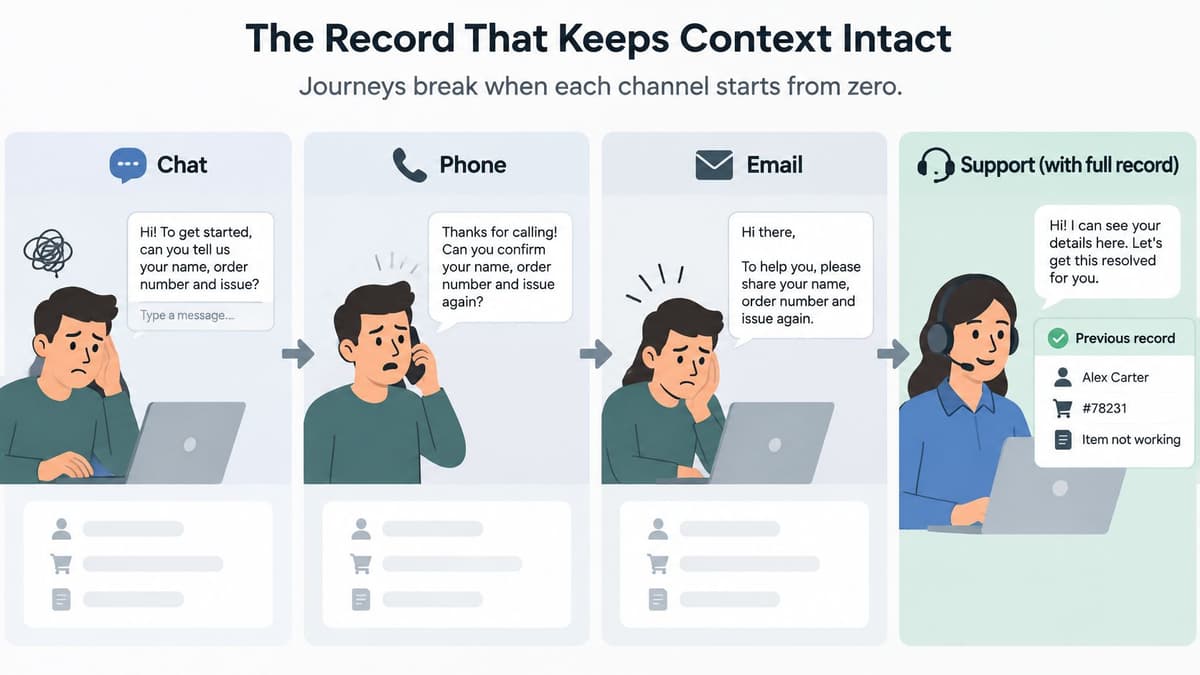
UK findings reported by Ecommerce News UK on contextual intelligence show that 84% of UK consumers want agents to continue conversations smoothly across channels without repeating information, 79% become frustrated when asked to repeat themselves, and 63% expect support to reflect prior interactions. The same report notes that 91% of UK consumers expect clear explanations for AI-made decisions. Continuity is not a nice extra. It is the technical condition that makes automation feel helpful.
The Parts You Actually Need
You do not need a perfect data warehouse before you start. You need a small set of fields that travel reliably.
- Persistent identifier: A customer or account ID that links web, CRM, messaging, and social activity where consent allows.
- Event stream: Views, clicks, comments, purchases, and case updates recorded as events, not buried in free-text notes.
- Consent and preferences: Flags synchronised across systems so an opt-out in one channel stops the journey elsewhere.
- Orchestration rules: Logic that chooses the next step, pauses a sequence, or exits when the goal is met.
- Confidence and audit trail: A score for automated classification plus a log showing what happened and why.
- Human queue: A destination that receives structured context, not only a transcript dump.
A strong first-party data strategy makes this easier because you rely less on borrowed identifiers that disappear between platforms. Even then, design for gaps. Guest checkout, shared inboxes, and people who refuse tracking will not produce a complete record.
The Relay Baton
Treat handoff like a relay. The baton is the identifier plus the last intent, along with consent, channel, and a link to the source interaction. Pasting an entire chat into a note is not the same thing because the next person still has to hunt for what matters.
The short video below is useful for seeing how context can be passed between steps rather than recreated at each one.
Be clear about a scheduler's place in this stack. A publishing tool can emit events such as a post going live or a comment arriving, but it isn't the customer record. Your CRM or service system should hold the state, while the scheduler supplies one stream of signals.
Before you connect tools, write the fields that must travel on every handoff. If identity or consent is missing, keep a human path open and use only the context the customer has allowed you to use.
Measures That Beat a Containment Rate
Containment looks tidy in a dashboard. It can also hide failure because a customer who gives up is counted as handled without an agent.
Independent ContactBabel research summarised by Netcall's report on AI in UK contact centres, involving more than 200 UK contact-centre and customer-experience professionals and 1,000 UK consumers, found that 70% of contact centres expected their AI budgets to increase. Yet only 43% of consumers preferred AI for simple enquiries, and just 8% would choose AI when following up an existing case.
80% of consumers worried about receiving inaccurate answers or being misunderstood. 31% of organisations had withdrawn, paused or rolled back an AI solution after implementation, while 93% expected a hybrid future combining automation and human agents. Rising budgets clearly do not prove that every automated journey deserves to stay.
| Measure | What a healthy move looks like | How it misleads | Review cadence |
|---|---|---|---|
| Containment | Fewer routine contacts reach a person while simple tasks still complete | A rising rate can mean people gave up, not that issues were solved | Weekly in pilot |
| Resolution without repeat contact | Same issue does not return within seven days | Ignores customers who leave instead of contacting again | Weekly in pilot |
| Transfer quality | Handoff includes identifier, intent, consent and source link | Speed of transfer looks good even when the notes are empty | Weekly in pilot |
| Time to a human after escalation | Staffed-hours target is met for complaints and low-confidence cases | An instant bot greeting hides a long wait for the person | Weekly in pilot |
| Abandonment after an automated step | Drop-off at checkout, DM or handoff falls | Blames the channel when the offer or page is the real cause | Monthly |
| Accuracy complaints | Fewer contacts say the answer was wrong or misunderstood | Low volume can mean people stopped reporting, not that answers improved | Monthly |
How to Read the Scorecard
A falling containment rate can be healthy if you have correctly returned complex cases to people. Rising repeat contact usually means context did not travel or the automated answer closed the conversation too early. A fast bot reply followed by a slow human takeover still fails because the customer experiences one wait, not two separate metrics.
Use disciplined KPI measurement and split results by platform, stage, and intent. Do not mix Facebook reach with TikTok engagement and call the blend a journey outcome. Do not claim your brand saved each customer the national service burden either, because that figure describes the wider problem, not your pilot.
Decision rule: Keep an automation only if resolution and effort improve together.
Change one stage or rule per fortnight, then compare the scorecard before and after. Log each rollback as a finding with the trigger, affected segment, and reason. That record prevents the next team from rebuilding the same failed journey under a new name.
How to Launch One Journey Without the Rollback
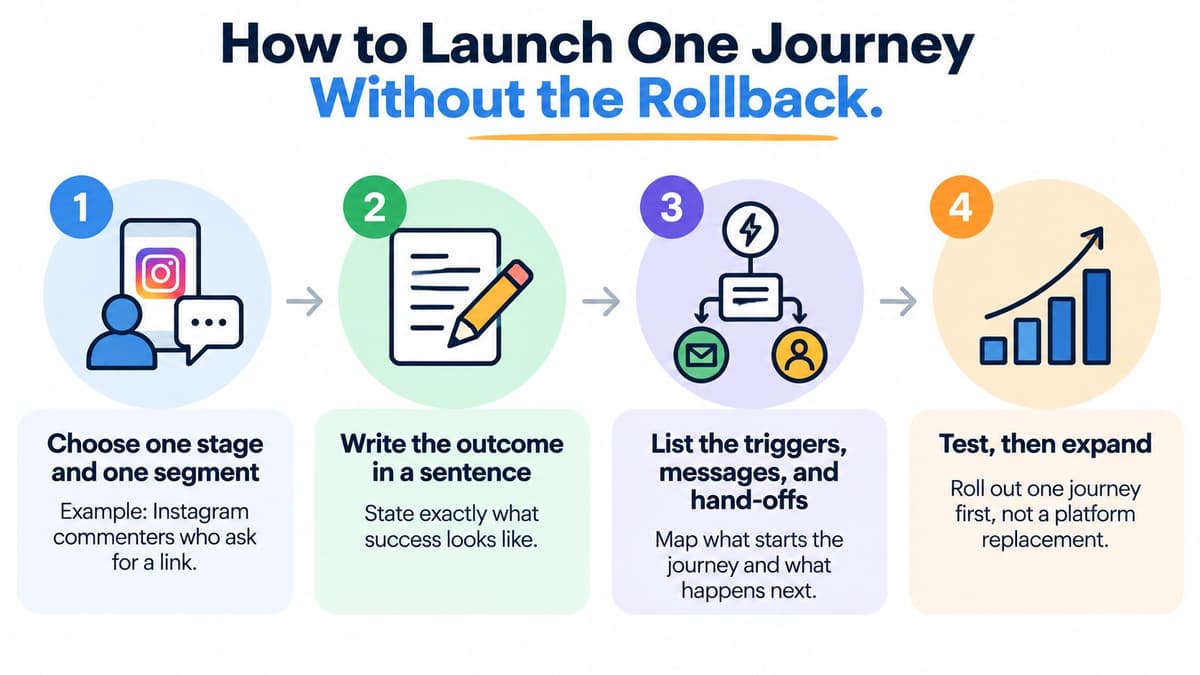
Launch one journey, not a platform replacement. A narrow pilot gives you a clean trigger, a manageable queue, and evidence you can act on.
Nine Steps in Order
- Choose one stage and one segment. For example, Instagram commenters who ask for a link. A narrow audience makes success and failure visible.
- Write the outcome in one sentence. State what the customer should achieve, such as reaching the right product page or completing setup, because every later rule should serve that outcome.
- List current events and owners. Record what already happens, who replies today, staffed hours, and the usual backlog, so the pilot does not automate around an invisible manual process.
- Write escalate-if rules first. Cover low confidence, complaint language, an open case, and a high-value basket before you draft the happy path, because exits are harder to retrofit.
- Agree the travelling fields. Set the identifier, last intent, consent, channel, and source post or page link that must move with the customer.
- Connect only the touching systems. Link the CRM, social inbox, and any service queue used by this journey, and keep a human fallback when identity or consent is missing.
- Limit publishing automation to its proper job. Choose a scheduler for posting or inbox handling, separate from journey orchestration, because one suite rarely does both jobs equally well.
- Pilot on one platform. Run it for a short test period, disclose when a reply is automated, and set a staffed-hours response target for the human queue.
- Apply the stop rule. Pause or roll back if repeat contacts, complaints, or abandoned handoffs rise, because UK teams have withdrawn AI after launch when it misfired and a planned stop is safer than an improvised one.
Test More Than the Happy Path
Try the awkward cases before customers find them. Enter the journey twice, buy halfway through, open a complaint while a promotional sequence is active, and continue on another channel. The automation should stop, change path, or escalate rather than carry on as if nothing changed.
Check timing too. A link requested under a live post needs a fast response, while a replenishment reminder depends on the buying cycle. A default delay copied from a template is not a decision.
When the pilot holds, add a second stage and repeat the same discipline. Finish with a one-page runbook the on-call person can follow, covering owners, escalation triggers, pause controls, and where to log failures.
Social Workflows and Choosing a Scheduler
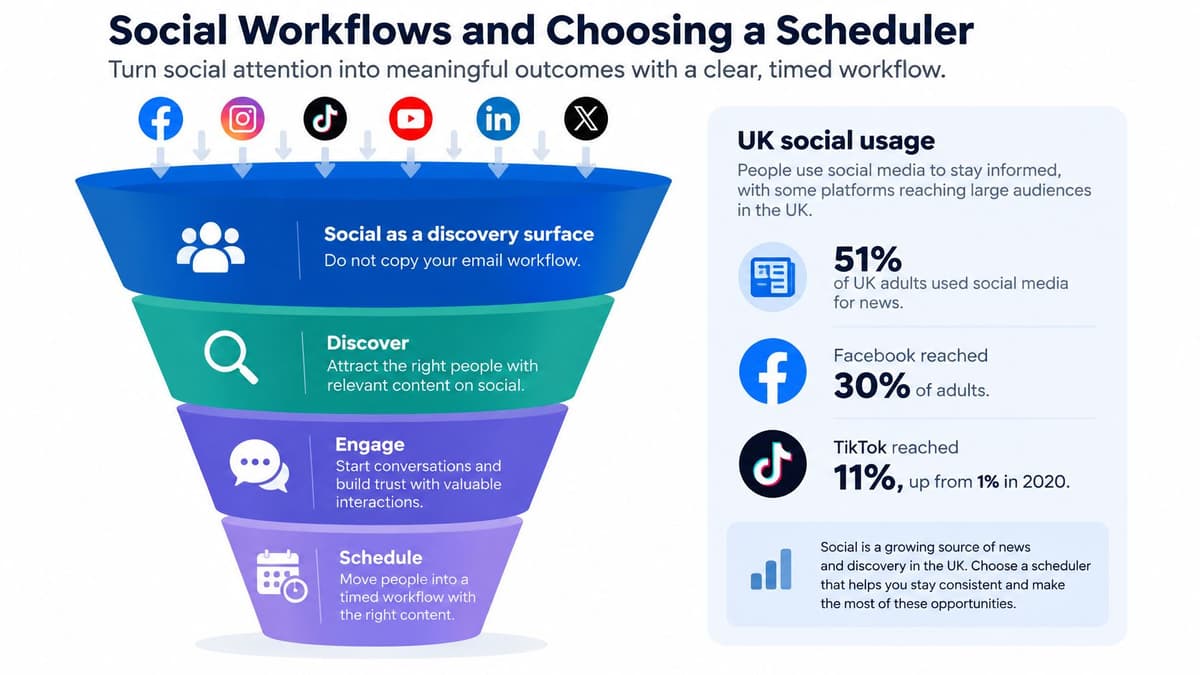
Social is its own discovery surface, not a copy of email with shorter copy. Ofcom figures reported in its 2025 look at the UK's news habits show that 51% of UK adults said they used social media to get news in 2025. Facebook reached 30% of all UK adults for news, while TikTok reached 11%, up from just 1% in 2020.
Those differences mean one automated post cannot stand in for every audience. Separate passive viewers from people who comment, share, save, or ask a question. Never score an impression as a lead.
Three Workflows That Respect the Handoff
Awareness on Instagram or TikTok. Schedule the post in Later or Buffer, then use a saved reply only when a comment asks for a price or link. Do not send unsolicited bulk DMs. Later suits visual grids, while Buffer suits a small team but can feel weaker when many stakeholders must approve.
Consideration on LinkedIn. Draft a short series in Typefully or Buffer. If a comment names a competitor or a budget, send it to a named person the same day with the post URL attached. Typefully suits short text, but it is a poor fit for broad multi-network creative.
A Facebook complaint. Never auto-resolve it. Acknowledge publicly if appropriate, move private details to a secure channel, and hand over the full thread. Hootsuite or Sprout Social can centralise inboxes for larger teams, Publer or SocialBee may suffice for a solo creator, and Planable helps when clients must approve before posting. Fees change, so check each vendor's site before you commit.
For broader context on tool categories, read this guide to social media automation tools, and if you run several brand or client profiles, the multi-account scheduling picks from PostPulse offer a useful external comparison point. Treat every shortlist as a starting point, then test permissions, inbox handling, exports, and approval steps against your own workflow.
| Need | Directory page | What to check |
|---|---|---|
| Agencies with many clients | Schedulers for agencies | Per-client workflows and shared inboxes |
| Solo creators | Schedulers for solo creators | Lighter tools for one person |
| Pre-publish approval | Schedulers with approval workflows | Second review before anything goes live |
| Best Instagram schedulers | Best scheduler for that network | |
| TikTok | Best TikTok schedulers | Best scheduler for that network |
| Best LinkedIn schedulers | Best scheduler for that network | |
| Best Facebook schedulers | Best scheduler for that network | |
| Analytics-led teams | Schedulers for analytics | Reporting depth and data export |
| Enterprise stacks | Enterprise schedulers | Governance, permissions and integrations |
| Head-to-head comparisons | Scheduler comparisons | Side-by-side feature and limit checks |
| All reviewed tools | All social media schedulers | Full directory of schedulers |
Be plain about the boundary. Scheduler.social is an independent comparison directory, not scheduling software, and it does not publish posts for you. Tools such as Metricool, Vista Social, and Postiz also appear in the wider directory, so compare them neutrally against the names above rather than assuming the biggest suite fits your journey.
Customer journey automation works best when your social publishing, inbox, and handoff rules are chosen together, and Scheduler.social helps you compare real schedulers by platform, workflow, and team size without pretending to be one of them. Visit the directory to compare your options side by side and find the scheduler that fits the one journey you are piloting first.