How to Quote a Tweet on X in 2026: A UK Guide
Learn how to quote a tweet on mobile and web, when a repost is better, and how to schedule quote posts safely in the UK.
You've found a council update, a useful industry claim or a post that needs correcting. You want your followers to see it, but not without your explanation. Tap the wrong option and you'll share it without a word of context.
Learning how to quote a tweet takes little time. The judgement comes afterwards: deciding what your commentary implies, whether the author joins the conversation and whether you're entitled to amplify the material. For UK creators, businesses and communications teams, a quote post is public commentary, not just another sharing button.
Table of Contents
- How to Quote a Tweet on Mobile and Web
- Which to Use
- Schedule Quote Posts and Compare Tools
- Quoting Threads, Media and Replies
- Attribution and Copyright Checks for UK Posts
- Fixing Common Quote-Post Problems
How to Quote a Tweet on Mobile and Web
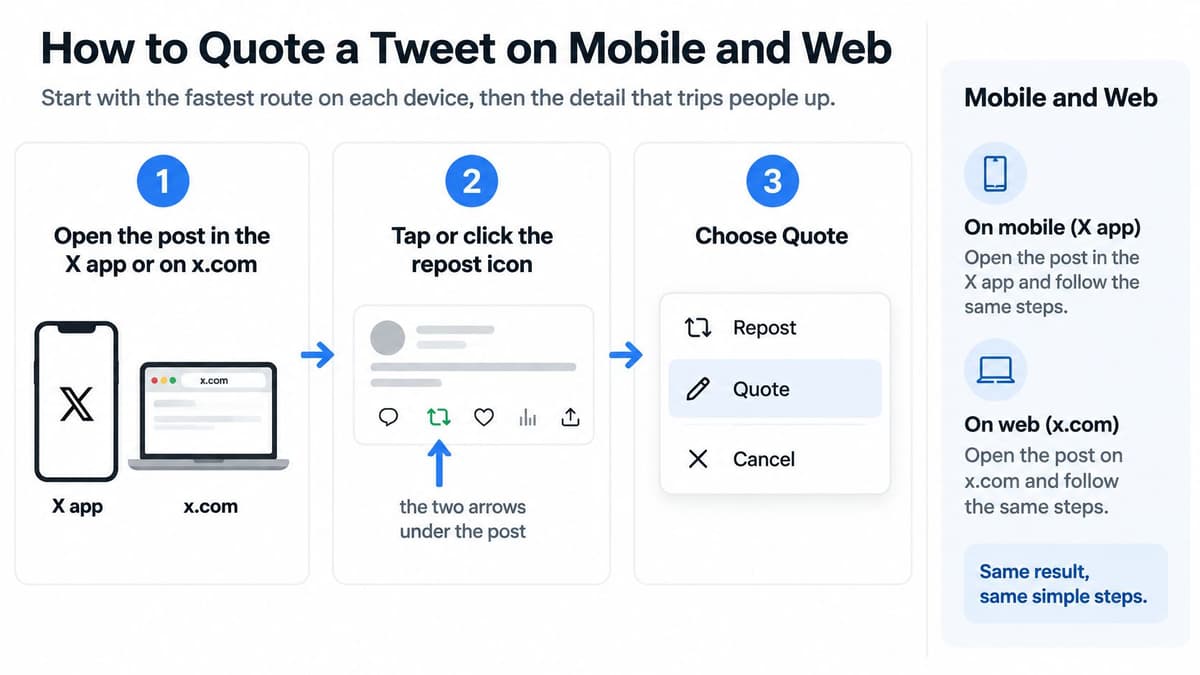
The quickest route is the same in the X mobile app and on the website: open the original, select the repost arrows and choose Quote. You don't need to copy the text or take a screenshot.
The publishing steps
- Open the post. Find it in the X app or on x.com, then open it so you can inspect the author and surrounding conversation.
- Tap or click the repost icon, the two arrows underneath the post. Don't use the separate sharing control for copying links.
- Choose Quote from the menu. X opens a composer with the original post attached beneath your text box.
- Write your commentary. According to X's guide to post types, ordinary posts have a 280-character limit, while accounts with access to longer posts can use up to 25,000 characters and include photos, GIFs and video.
- Check the attached original and the account you're publishing from, then publish. On a work account, reread your text as a reader who knows nothing about the conversation.
The controls are easy to confuse when you're moving quickly. Repost shares the original without commentary; Quote opens the space for your own words. Read the menu label rather than tapping from muscle memory.
Use this visual reminder when switching between devices.
Make the opening line useful
Start with why you're sharing it. A council update might need an explanation of which residents it affects; an industry claim might need a qualification about who it applies to. Avoid an unexplained reaction that forces readers to guess whether you agree.
Your commentary should tell readers what to make of the attached post, not merely announce that you've seen it.
If you're adding supporting footage from another platform, separate capture from permission to reuse. AI Video Detector's guide to record Instagram videos on desktop explains the capture workflow, but recording a clip doesn't establish reuse rights.
Before publishing, inspect the composer rather than trusting the post you remember opening. A good result has your point in the first few words, with the intended original visible underneath. Readers should understand the relationship between them without opening another page, although longer originals may require expansion.
Which to Use
Repost, quote post and reply compared
| Action | Adds your words | Original stays attached | Best for |
|---|---|---|---|
| Repost | No | Yes, shown as a reposted item | Sharing a post to your followers without comment |
| Quote post | Yes | Yes, shown inside your post | Adding context, a correction or your own view |
| Reply with link | Yes | No, only the link | Pointing someone to a post without framing it as your own view |
Choose a repost when the original already says what your audience needs. An official service announcement may be clearer without an extra introduction, especially if your comment would repeat it. You're passing it along without adding a separate claim.
Choose a quote post when the framing matters. You might explain how an announcement affects customers, challenge a misleading comparison or distinguish a proposed change from an existing policy. Make that distinction explicit rather than assuming readers will infer it.
Attribution isn't the same as conversation
The attached post identifies its author, but that doesn't automatically bring them into every subsequent exchange. X's reposting instructions explain that replies to a quote post don't automatically include the original author; you need to mention their account yourself.
If you want their answer, add @username to the relevant reply and ask a specific question. A mention makes the invitation explicit, but it doesn't guarantee they'll notice or respond. Don't treat silence as agreement.
A reply containing a link suits a narrower task: directing someone in an existing conversation to supporting material. Keep the surrounding explanation clear, because readers may otherwise have little reason to open it.
Decision test: If your comment only repeats the original, repost it. If your comment changes how readers should understand it, quote it.
For contentious material, consider the audience you're introducing. A quote can turn a small conversation into a public dispute, even when your wording is restrained.
Schedule Quote Posts and Compare Tools
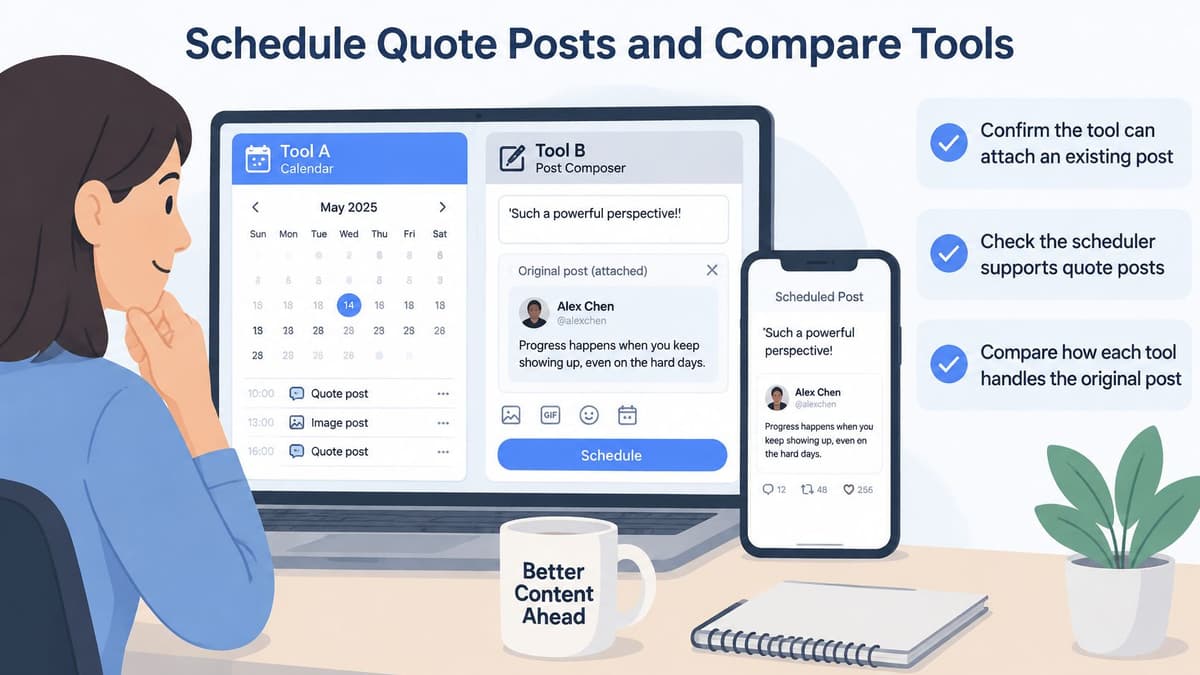
Scheduling a quote post requires a separate capability check. A tool that supports ordinary X posts doesn't necessarily support attaching an existing post, and a pasted URL isn't proof that it will publish as a native quote.
Compare the publishing workflow, not just the interface.
Confirm what will actually publish
- Existing-post attachment. Check whether the tool accepts the original post's URL as a quote-post reference, rather than inserting it into your text.
- Inspect the preview. It should distinguish your commentary from the attached original; confirm the published behaviour with a non-sensitive test.
- Media support. If your draft needs a photo, GIF or video, verify that the tool supports that combination specifically for quote posts.
- Check the account's scheduling time zone. For example, a UK charity planning a council update for 8.30am British time should see that intended local time, not an unexplained default zone.
- Account connection. Confirm which X account is authorised and whether the tool can publish directly or requires a manual completion step.
Don't assume X's own composer and an external scheduler offer identical options. If the tool can't preserve the attached original, use a reminder to publish natively rather than substituting an ordinary link post.
For the wider queueing workflow, this guide to scheduling posts on Twitter/X explains the practical setup. Keep the quote-post attachment test separate from your general scheduling checks.
This video provides an additional walkthrough to consider alongside your own publishing test.
Match the tool to the approval process
For a solo creator, start by comparing Buffer, Publer, Typefully and SocialBee against the actual job: drafting commentary, attaching the original and publishing reliably. A basic plan may be enough, but only if it includes the required X workflow. Don't pay for a larger suite merely to solve a task it still can't perform.
For team use, put Hootsuite, Sprout Social, Metricool, Later and Postiz on the comparison list too. Assess review permissions, handovers and connection maintenance rather than assuming every tool handles approvals or quote posts alike. Features differ and prices change, so check each vendor's site before committing.
Use the independent directory's X scheduler listings, complete tool directory and head-to-head comparisons to narrow the options. The solo-creator selection and approval-workflow selection help organise that comparison by need; the directory itself doesn't schedule or publish posts.
Quoting Threads, Media and Replies
A quote can be technically correct but misleading because readers see only the attached item. Check what survives when you lift a post out of its original conversation.
- Threads need an entry point. Quote the opening post when the argument relies on the whole thread. If a later post contains the point you're discussing, identify its position and explain the relevant context.
- A photo or video can dominate your commentary. Decide whether the media supports your point, and inspect it rather than relying on the thumbnail. PeopleFinder's guide to how to view Twitter photos offers viewing guidance, but the original account and conversation remain important context.
- Replies need their question. A short answer can look categorical when detached from the post it answers. Name the subject of that exchange in your commentary.
- For a post containing a link, check the destination as well as the preview. A familiar headline isn't enough if the page has been updated or the link leads somewhere unexpected.
- Your own archive needs checking too. Before quoting an old post, establish whether the announcement, offer or claim still holds.
A launch post that looks new again
Say a brand quotes its product launch from last year with an enthusiastic invitation to order. Followers could reasonably read that as a fresh launch, even if the date remains visible inside the attachment. If availability or specifications have changed, the result is more than a cosmetic mistake.
A clearer approach identifies it as a look back and explains what's different now. If the product is no longer available, don't let celebratory wording imply otherwise.
The useful habit is to reread the attached item inside the composer. Threads, replies and media can change what your audience understands, even when you remember the words accurately.
Attribution and Copyright Checks for UK Posts
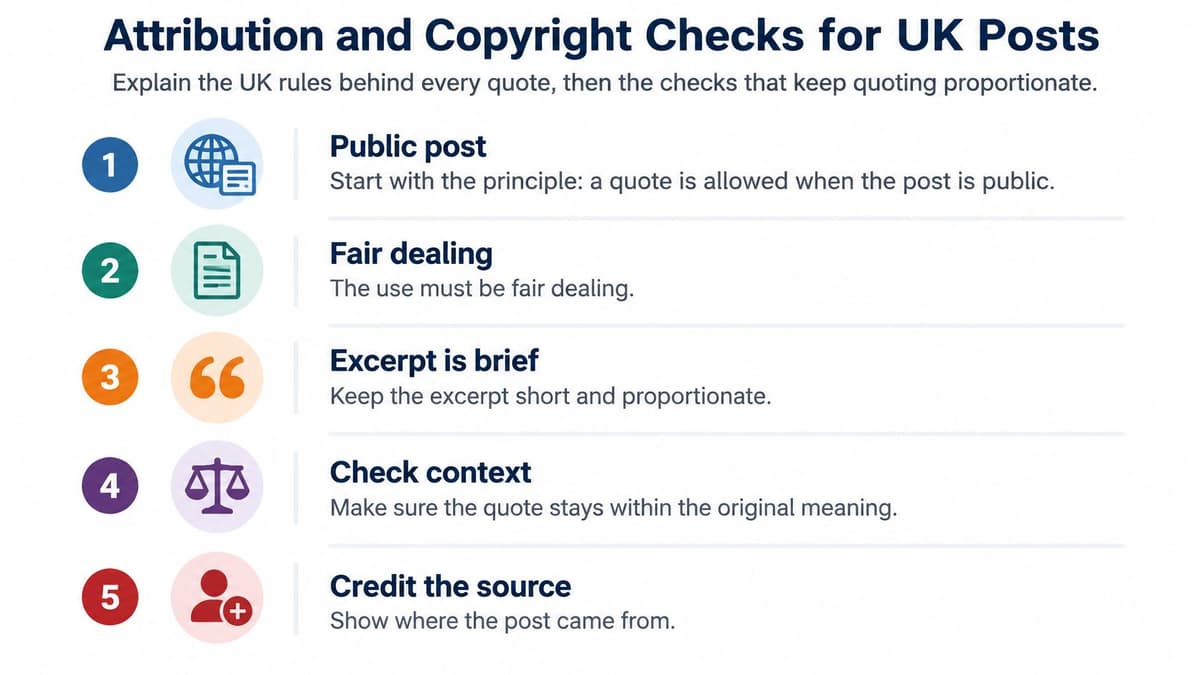
A public post isn't automatically free to reproduce. The UK government's copyright exceptions guidance permits quotation where the work has been made public, the use is fair dealing, the amount is no more than the purpose requires and sufficient acknowledgement is provided; there's no fixed word-count safe harbour.
A short excerpt with genuine commentary is generally lower risk than reproducing a whole thread, image, chart or video. Fairness remains case-specific, including whether your use substitutes for the original or harms its market. Attaching someone's post doesn't turn every use into fair dealing.
Use this checklist before amplifying material.
Run the editorial checks
- Verify identity and context. Confirm the account is authentic, record the original URL and date, and inspect replies, edits and possible satire.
- Preserve meaning. Keep qualifiers intact and distinguish paraphrase from verbatim quotation.
- Check the media. AI Image Detector's verification guidance for journalists and moderators is useful when assessing visual material. Don't treat a detector result as conclusive proof.
- Keep credit visible. A logo or watermark isn't permission to reuse an image; this explanation of what a watermark is helps distinguish identification from authorisation.
Institutional rules may be stricter than the permissions available under copyright exceptions. Rushcliffe Borough Council's social-media rules prohibit posting copied content without copyright ownership and publicising personal information, illustrating why organisational policy needs its own check.
Before publishing: Quote only what you can defend, credit the author clearly and retain a route to the original.
Don't quote a private account without permission. Also consider harassment and privacy: a lawful quotation can still expose someone to an audience they didn't expect.
Fixing Common Quote-Post Problems
If the composer shows no attached original, stop before publishing. A wrong link, restricted account or deleted source can leave you with text that no longer points readers to what you intended.
Quote-post symptoms, causes and fixes
| Symptom | Likely cause | Fix |
|---|---|---|
| Original post missing from composer | Link is wrong, account is private or post was deleted | Check the link and account visibility, then open Quote again |
| Quote published without commentary | Repost was tapped instead of Quote | Delete the repost and quote the post again |
| Scheduled quote posted at the wrong hour | Time zone in the tool differs from your account | Check the time zone setting and reschedule |
| Author did not see your reply | Replies to a quote do not mention the author | Add their @username to your reply |
| Quoted post later deleted or changed | Source was edited or removed after you quoted it | Add a correction note, or remove the quote and record the date |
| Readers think you endorse the post | Commentary is too thin | Add a clear line of your own view above the link |
Preserve provenance when the source changes
A screenshot alone doesn't prove where a post came from. Keep the original URL with your editorial record, alongside the publication date and, for changeable material, the retrieval date. If you retain a screenshot internally, use it as supporting evidence rather than a replacement for provenance.
The stakes aren't limited to interface mistakes. Ofcom's 2025 UK news-consumption findings reported that more than one-third of UK adults who go online were unaware that online content may be false or biased.
When the source changes materially, decide whether your published interpretation is still defensible. A minor wording edit may not affect your point; a correction to the underlying claim might require withdrawing it. Make any correction understandable to someone encountering your quote for the first time.
For drafts that won't fit, consult the guide to Twitter/X character limits rather than deleting the qualification that makes your statement accurate. Cut repetition before cutting context.
Scheduler.social is an independent directory that reviews and compares social media schedulers, not a publishing tool. Visit Scheduler.social to compare options for your X workflow, check their trade-offs and find the right scheduler for your quote posts and approval process.