Most advice about community engagement planning starts with a posting schedule. That's the wrong starting point. A full calendar can still produce a quiet, disconnected community if every message asks for attention and none makes participation easier.
The teams that build durable communities treat engagement as a system of deliberate touchpoints. They create useful reasons to return, offer several ways to contribute, respond visibly, and make room for people who won't act after one invitation. Consistency matters more than a viral spike because trust develops through repeated evidence that participation leads somewhere.
The UK data supports this broader view. In 2024/25, 41% of adults in England took part in at least one form of civic participation, civic consultation, or civic activism during the previous year, while 34% engaged in civic participation and 19% in civic consultation specifically, according to the Department for Culture, Media and Sport Community Life Survey. A substantial audience can respond, but it won't necessarily respond to a single post, meeting, or survey.
Table of Contents
- The True Meaning of Community Engagement
- Defining Your Objectives and Audience
- Selecting Channels and Content Formats
- Building a Sustainable Editorial Calendar
- Assigning Roles and Establishing Feedback Loops
- Setting KPIs and Measuring Success
The True Meaning of Community Engagement
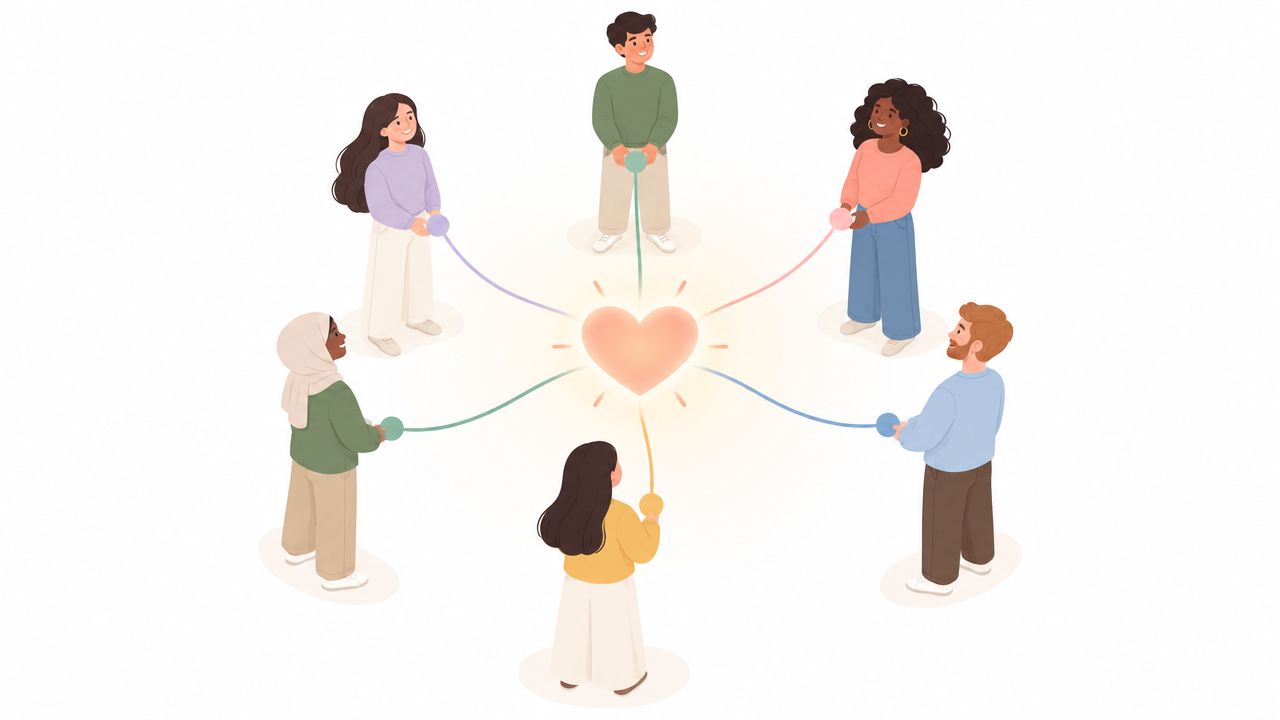
Community engagement planning isn't a plan for filling empty social media slots. It's the operating system behind how people discover your work, understand its relevance, decide to contribute, and see what happened afterwards.
Likes and follower counts can indicate exposure, but they rarely explain whether people feel connected or willing to participate again. A community becomes useful when members ask questions, share experience, help one another, attend activities, provide informed feedback, or return after an initial interaction. Those behaviours require more than frequent publishing. They require reliable invitations, clear expectations, and visible follow-through.
Replace reaction with a repeatable system
A reactive approach publishes when a campaign launches, a complaint appears, or a trend creates an opportunity. That approach makes the audience responsible for noticing you at precisely the right moment. It also leaves quiet periods without a clear purpose.
A planned system maps the journey instead:
- Awareness: Explain what's happening and why it matters.
- Understanding: Provide context in plain language, including constraints and trade-offs.
- Low-friction response: Let people answer a short question, vote, comment, email, attend, or speak privately.
- Conversation: Give participants a chance to build on one another's views.
- Closure: Show what you heard, what changed, and what couldn't change.
- Return: Offer a reason to stay involved after the immediate issue ends.
That structure turns isolated interactions into a relationship. It also helps teams distinguish between content that earns attention and content that creates participation.
The UK's history shows why this distinction matters. People and Planning, the Skeffington Report, published in 1969, is widely described as a turning point that made publicity and consultation required parts of the planning system. Parliament's later review noted that the Government doesn't routinely collect national data on public involvement in planning, which leaves organisations with a practical responsibility to define and measure engagement clearly rather than assume that a formal consultation represents the whole community. The review is available through the House of Commons public engagement in planning report.
Practical rule: If someone contributes once, your plan should already contain the next useful interaction.
Good community engagement planning also accepts that the loudest contributors aren't the entire audience. Frequent commenters can help you spot themes, but they may not represent people with limited time, lower confidence, accessibility needs, or little interest in public debate. A durable strategy designs for both the visible contributors and the silent majority.
For a practical companion on trust, participation prompts, and community routines, review LearnStream community engagement best practices. Use its ideas as prompts, then adapt them to your own audience, capacity, and accountability requirements.
Defining Your Objectives and Audience
Start with a decision, not a demographic profile. Ask what you need the community to understand, do, influence, or continue doing. “Increase engagement” is too vague to guide content. “Collect informed views on three proposed priorities and publish a response” gives the team a purpose and a finish line.
Set objectives that change behaviour
Write objectives around observable actions. Depending on your organisation, that might mean:
- Participation: More people submit a view, attend a session, join a working group, or answer a short prompt.
- Quality: Contributions contain enough context to identify needs, barriers, or workable alternatives.
- Continuity: Participants return for an update, a follow-up question, or the next stage.
- Trust: Members understand how decisions are made and can see where their input affected the result.
- Service improvement: Repeated feedback identifies a specific change to a product, programme, or local offer.
Give each objective an owner and a review point. If nobody owns the response process, the community experiences the campaign as extraction. You ask for input, collect it, and then disappear.
Segment by motivation and access
Demographics can help you identify who is present, but motivations explain how to reach people. Build segments around practical differences such as:
| Audience characteristic | Planning question | Useful adjustment |
|---|---|---|
| Limited time | What's the shortest credible way to contribute? | Use one-question prompts, quick polls, and concise summaries |
| High subject knowledge | What evidence or detail will they expect? | Publish background notes, definitions, and source material |
| Low confidence | What makes participation feel safe? | Offer anonymous routes, clear moderation, and examples |
| Accessibility needs | What could block comprehension or response? | Provide accessible formats, captions, readable layouts, and alternatives |
| Low digital access | Where can a person participate offline? | Add printed materials, telephone routes, in-person options, or partner outreach |
The Government's digital inclusion work highlights why this matters. Its evidence-gathering exercise received 800 responses, with 756 submitted online and 44 by email, a pattern that shows how national engagement can skew towards digitally connected participants. The Digital Inclusion Action Plan update also describes plans for an annual Public Engagement Survey covering online and offline groups.
Design test: For every digital action, identify an equivalent route that doesn't depend on confidence, equipment, connectivity, or spare time.
Prioritise one primary audience for each campaign and identify secondary groups that need individualised treatment. A nonprofit team building this foundation can use your nonprofit marketing plan as a planning reference, particularly when engagement goals need to align with fundraising, service delivery, or volunteer outcomes.
Selecting Channels and Content Formats
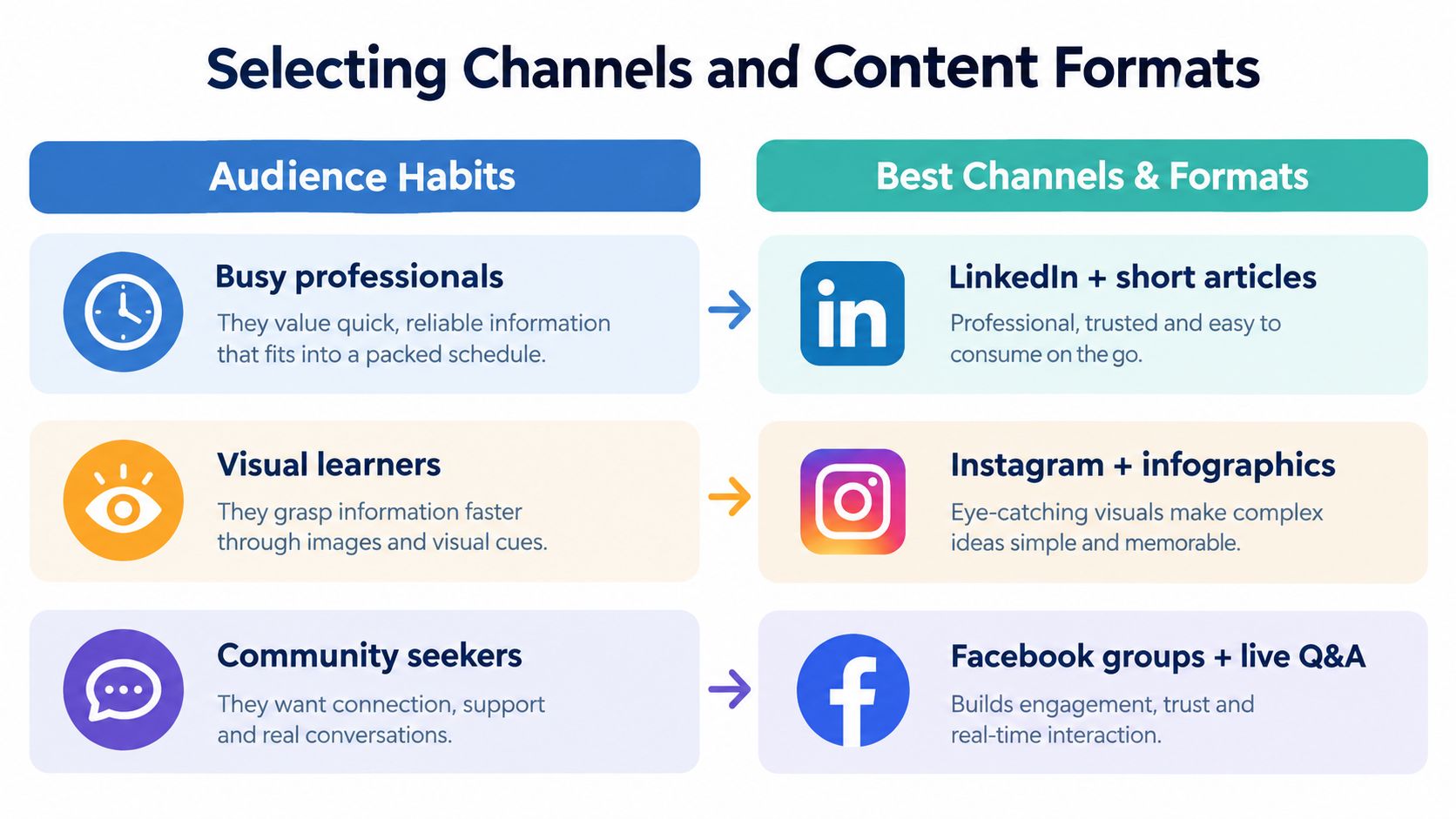
Choose channels according to the job they need to perform, not their popularity. A platform is useful only when your audience can find it, understand it, and respond without unnecessary effort.
A busy professional might accept a concise LinkedIn post that points to a longer briefing. A visual learner may grasp an infographic faster than a dense announcement. Someone looking for belonging may need a moderated group conversation rather than a polished broadcast. These are different participation environments, even when they support the same campaign.
Give every channel a defined role
Build a channel matrix before producing assets:
| Channel role | Suitable formats | Main trade-off |
|---|---|---|
| Reach | Short videos, social posts, partner shares | Broad exposure can bring shallow responses |
| Explain | Articles, briefings, email updates, recorded presentations | More detail improves understanding but demands attention |
| Discuss | Groups, live Q&As, forums, moderated comment threads | Conversation creates insight but needs active moderation |
| Collect | Forms, polls, surveys, phone calls, workshops | Structured input is easier to analyse but can limit nuance |
| Reassure | Progress updates, response summaries, direct replies | Transparency builds trust but exposes unresolved issues |
Don't place every message everywhere. Adapt the central idea to the behaviour each channel supports. A short post should make one point and offer one next step. A guide should answer objections and define terms. A live session should include a way for people who can't attend to contribute or review the outcome.
Design for access, not just convenience
Digital channels can reduce friction for people who are connected and confident online. They can also make a campaign invisible to people with limited access, disabilities, language barriers, or little time. The answer isn't to abandon digital communication. It's to treat digital as one part of a multi-channel sequence.
Use plain language, captions, transcripts, image descriptions, readable documents, and mobile-friendly forms. Work with trusted local organisations when a community is more likely to respond through an existing relationship than through your branded account. If you can't provide every format, state which alternatives are available and how to request support.
The best channel plan is usually narrower than the first draft. Start with the places where your priority audience already pays attention, then add channels only when they solve a specific access or participation problem.
Building a Sustainable Editorial Calendar
A calendar shouldn't prove that your team is busy. It should make participation predictable for the audience and manageable for the people doing the work.
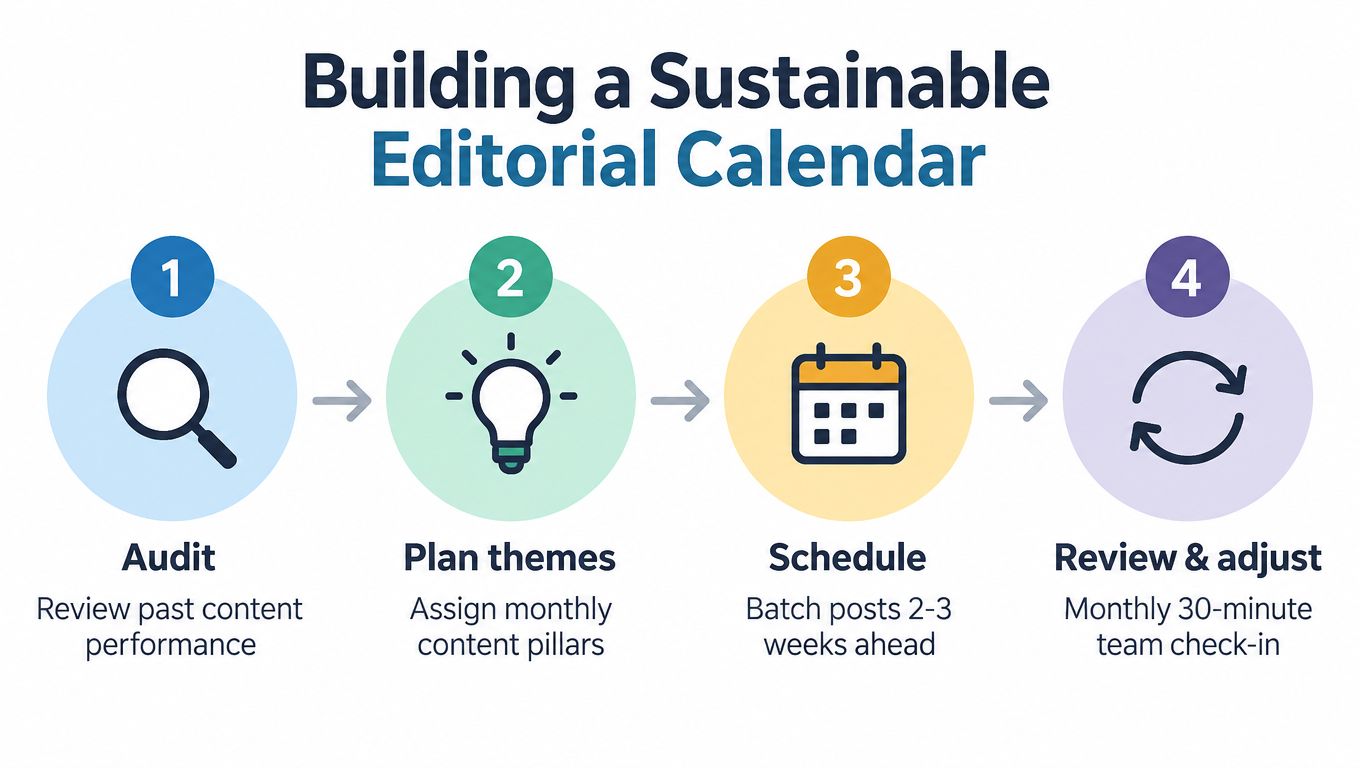
The strongest calendars balance four content functions: orientation, value, interaction, and accountability. Orientation tells people what's happening. Value teaches or helps. Interaction asks for a manageable contribution. Accountability reports what happened with previous contributions. If every entry is promotional, members learn that your community exists mainly to distribute announcements.
Plan around capacity
Begin with the time your team can sustain during a difficult month, not the output you could create during a campaign launch. Set a baseline rhythm for ordinary weeks, then define what changes during events, consultations, or urgent issues.
A practical calendar contains:
- Recurring touchpoints: A regular update, prompt, digest, or discussion that gives people a reason to return.
- Campaign moments: Events, surveys, launches, workshops, or decision deadlines.
- Response windows: Protected time for comments, messages, moderation, and follow-up.
- Production blocks: Sessions for drafting, adapting, checking accessibility, and scheduling.
- Review points: A short meeting to remove weak formats and strengthen useful ones.
Batching helps, but don't batch the conversation away. Prepare evergreen explanations and routine prompts in advance, while leaving space for timely replies and community-led topics. A pre-written post can't replace an answer to a question that matters today.
Use a content brief for every item. It should record the audience, purpose, key message, call to action, format, owner, reviewer, accessibility requirements, and destination for responses. That small discipline prevents a common failure mode, where a post goes live without anyone knowing who handles the replies.
A visual calendar can support the workflow by showing themes, channels, owners, status, and deadlines in one place. Scheduler.social, for example, combines a visual planning calendar with scheduling, channel adaptation, bulk publishing, and approval steps. It can fit teams that need to coordinate social content alongside a wider engagement campaign. For the strategic decisions behind a calendar, see this guide to content planning for social media.
Consistency isn't publishing at the same frequency forever. It's keeping the promise that your community will know when, where, and how to hear from you.
Build quiet-period resilience
Quiet periods expose whether a calendar has a real purpose. Keep a bank of useful answers, member stories with permission, explainers, event reminders, and feedback summaries. Don't fill silence with noise. Publish only when the message helps someone understand, decide, contribute, or stay connected.
Live sessions work best when they have a defined question, a named facilitator, a moderation plan, and a published follow-up. Challenges can create energy, but they shouldn't become the only route to belonging. Many members prefer reading, reacting privately, completing a small task, or receiving an update before they contribute publicly.
For a short visual reminder of how planning can support multiple formats, the following video can sit within a wider workflow rather than replace it.
Assigning Roles and Establishing Feedback Loops
Community management fails when responsibility is shared by everyone and owned by nobody. A team can have excellent writers, designers, and subject specialists, yet still miss questions because no person has the explicit duty to monitor, triage, and respond.
Define roles around decisions and hand-offs. One person may perform several roles in a small organisation, but the responsibilities still need to be visible.
- Strategist: Sets objectives, audience priorities, and engagement boundaries.
- Subject owner: Checks accuracy, context, and implications.
- Producer: Creates the post, document, video, or event materials.
- Moderator: Manages replies, safety, escalation, and tone.
- Approver: Confirms that the content meets brand, legal, and accessibility requirements.
- Analyst: Reviews patterns and turns evidence into recommendations.
A role matrix should answer four questions for each campaign: who drafts, who approves, who publishes, and who responds. It should also specify what happens when a question is sensitive, urgent, abusive, or outside the team's authority.
Make approval proportionate
Not every reply needs a committee. Routine content can use a lightweight check, while sensitive announcements, policy statements, or crisis responses need subject and leadership review. Excessive approval creates slow communication. No approval creates inconsistency and avoidable risk.
Set service expectations before launch. Decide which messages need a same-day response, which can wait for a considered answer, and which should move to a private channel. Record the final response so the whole team can reuse accurate information rather than answer the same question differently.
Teams coordinating volunteers or distributed contributors may also benefit from dedicated volunteer management software, particularly when availability, tasks, permissions, and follow-up need to sit alongside communications.
Close the feedback loop visibly
Listening only has value when the organisation acts or explains why it can't act. Create a simple loop:
- Capture: Collect comments, survey responses, event notes, direct messages, and recurring questions.
- Classify: Group input by theme, urgency, audience, and decision area.
- Assess: Separate preferences from evidence, identify conflicts, and record constraints.
- Act: Make a change, commission further work, or reject an idea with a clear reason.
- Report: Publish the outcome in language participants can understand.
The social media approval workflow for SaaS teams offers a useful model for separating drafting, review, and publication. Apply the same logic to engagement feedback. The person who collects input shouldn't have to carry the entire burden of deciding what it means and communicating the result.
Setting KPIs and Measuring Success
A healthy community dashboard combines behavioural evidence, response quality, and organisational follow-through. It doesn't treat every visible reaction as equal.
Track a small set of measures across the full engagement journey:
- Reach and access: Which audiences received the message, through which routes, and who appears to be missing?
- Participation: How many people contributed, in what formats, and how much friction did they encounter?
- Continuity: Did participants return, attend a later activity, or respond to a follow-up?
- Conversation quality: Were contributions relevant, respectful, specific, and useful for decision-making?
- Responsiveness: How quickly did the team acknowledge and answer questions?
- Influence: What changed because people contributed, and what explanation was provided where nothing changed?
Don't hide qualitative evidence inside a comments column. Tag recurring concerns, note language that signals confusion, and preserve representative feedback with permission. A fall in public comments might mean reduced trust, a clearer answer that resolved uncertainty, or a channel problem. Numbers need interpretation.
The UK benchmark is useful as context, not as a target for every organisation. In the 2025/26 Community and Engagement Survey, 46% of adults aged 16 and over reported taking part in civic participation, consultation, or activism at least once in the previous 12 months, up 5 percentage points from 2024/25, according to the Department for Culture, Media and Sport summary report. Your own baseline should reflect your audience, purpose, access routes, and available capacity.
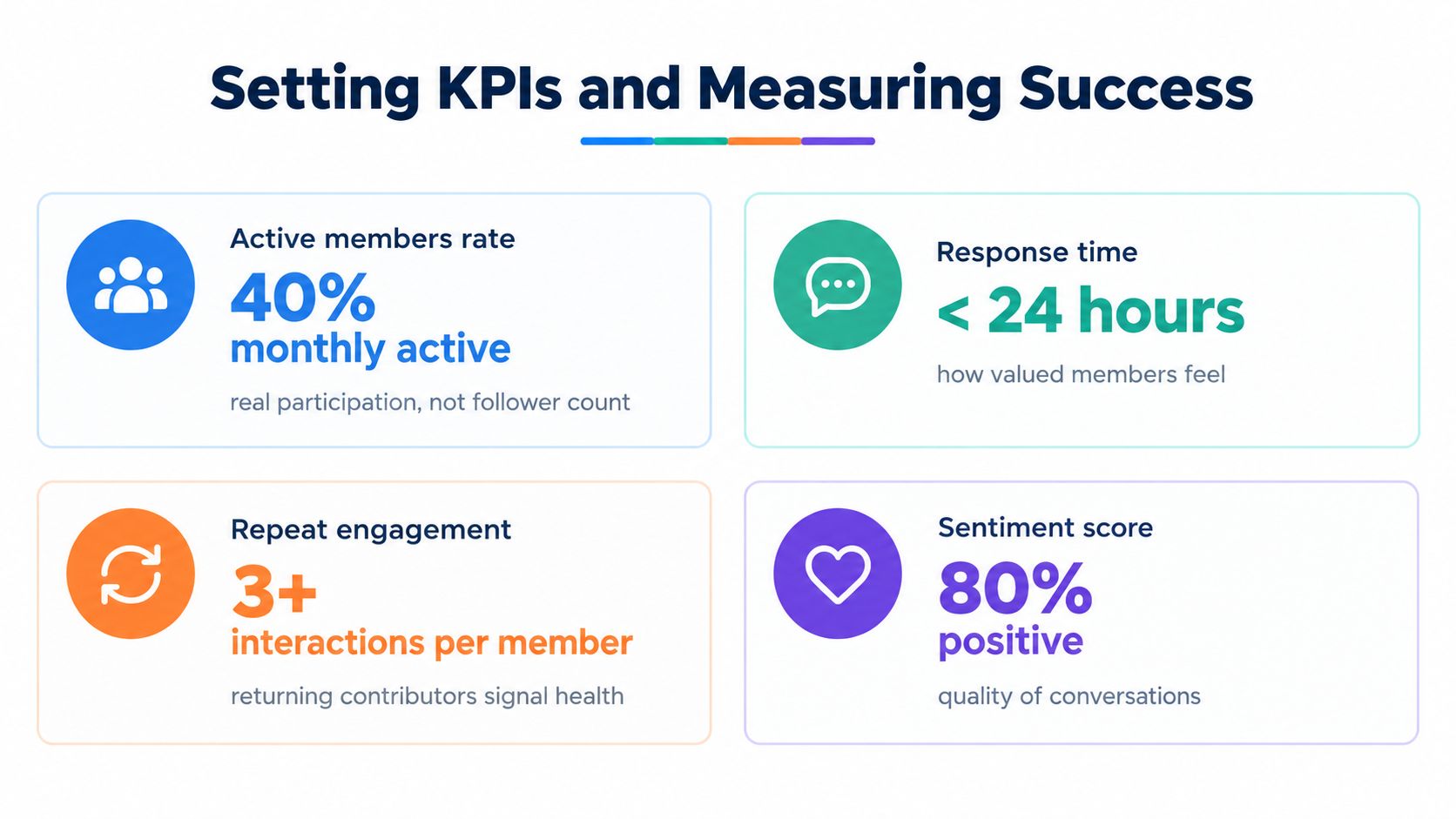
Review the dashboard on a set rhythm. Compare planned touchpoints with actual responses, inspect which groups remain absent, and record the action taken from feedback. For the mechanics of one commonly used social measure, see how to calculate engagement rate, but don't let a single rate stand in for trust, access, or influence.
Community engagement planning works when objectives, channels, calendars, roles, feedback loops, and measurement reinforce one another. Build the system for the people who need several low-pressure opportunities to participate, not only for the people who comment first.
Scheduler.social brings the planning, adaptation, approval, and publishing workflow into one workspace, so teams can maintain consistent touchpoints across major social channels without repeating manual tasks. Visit Scheduler.social to organise your engagement calendar, coordinate reviews, and keep every public update connected to a deliberate community strategy.