Quality Assurance Processes for Social Media Teams in 2026
Quality assurance processes for social media: the six stages, review checks, UK compliance steps and KPIs to track, with a practical workflow example.
A launch post is sitting in your queue right now, fully approved, attractively designed, and wrong in a way nobody will spot until a customer replies. The price belongs to last quarter. The link points to a retired page. The team that wrote it is offline.
That's the gap quality assurance processes close. They're not extra scrutiny layered over creative work. They're a designed sequence of checks, owners and sign offs that finds errors while they're still cheap to fix, and measures success by escaped errors, not by how many approvals you collect.
Table of Contents
- What Quality Assurance Processes Mean for Social Teams
- The Six QA Stages Every Scheduled Post Passes Through
- Running Review and Approval Without Creating a Bottleneck
- Governing AI-Assisted Drafts Without Losing Accountability
- Localisation and Accessibility Checks for Adapted Content
- UK Compliance Checks for Social Campaigns
- KPIs That Show Whether Your QA Process Works
- Choose a Scheduler That Fits Your QA Workflow
What Quality Assurance Processes Mean for Social Teams
Say a bakery schedules a Friday 9am launch post on Wednesday afternoon. The copy names a price from a draft menu, the link goes to an old ordering page, and the image crop cuts off the product name. Nobody's watching at 9am because scheduling was meant to make watching unnecessary, so the first notification of a problem is a reply asking why checkout charges more.

Quality assurance processes are the repeatable checks you run before and after publishing so that outcome doesn't depend on luck. Quality assurance is the system that prevents errors through standards, roles and checkpoints. Quality control inspects a finished post against those standards, and proofreading is one final read for typos. Blurring the three leaves teams proofreading carefully while the wrong link sails through untouched.
Treat the process like a pilot's pre flight checklist. Pilots run the same list whether they've flown ten times or ten thousand, because a fixed list catches what tired memory misses. A social checklist works the same way on prices, dates, links, account names and time zones.
Scheduling raises the stakes because queued posts publish without a human in the room. Agencies juggling several client accounts and small teams with no dedicated editor feel that sharpest, since one person's assumption can become every client's published error.
Working test: If nobody can name who checked the link, the link wasn't checked by the system. It was checked by optimism.
What follows is a practical build. You'll get six stages, tiered approvals, UK compliance and accessibility gates, AI governance, and KPIs that reveal whether fewer mistakes are reaching the audience.
The Six QA Stages Every Scheduled Post Passes Through
Use the map below as your working sequence. Every post travels left to right, and a named sign off moves it into the next stage.
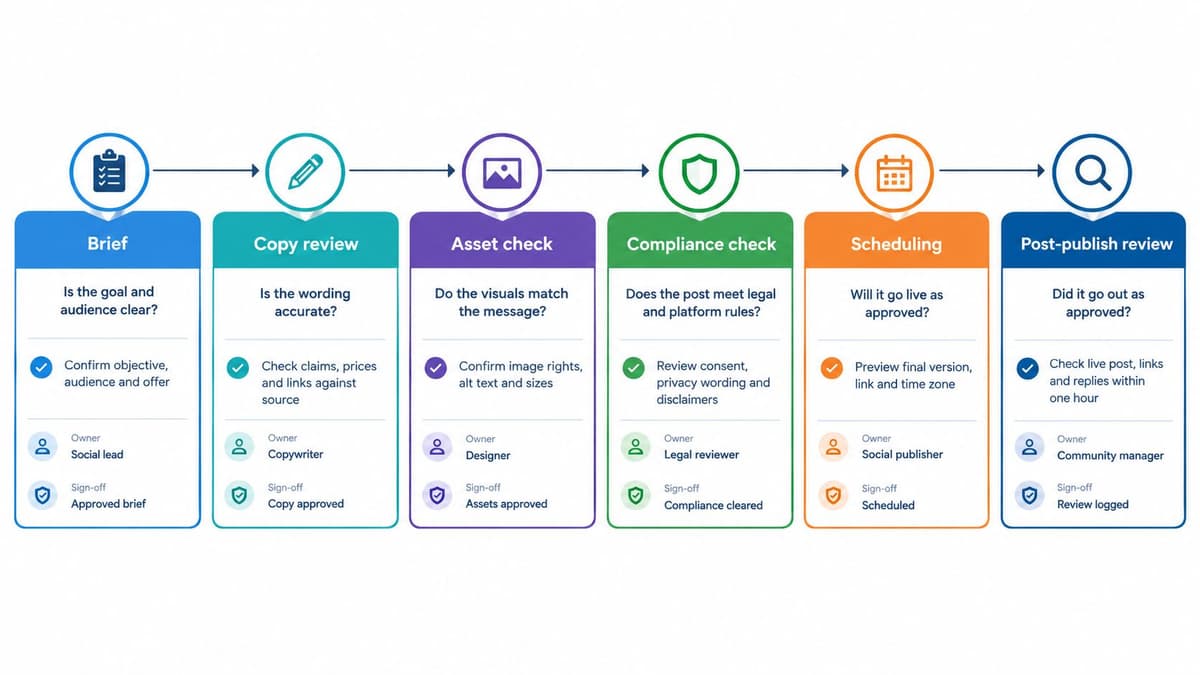
| Stage | Question it answers | Typical check | Owner | Sign off |
|---|---|---|---|---|
| Brief check | Is this post needed and on strategy? | Campaign goal, audience and platform are named | Content lead | Brief approved |
| Draft QA | Is the copy accurate and on brand? | Facts, figures, links, tone and platform character limits | Copywriter | Editor approval |
| Asset QA | Do the visuals and video work? | File specifications, crops, captions, alt text, video length | Designer or producer | Visual check passed |
| Compliance and adaptation | Is it lawful and right for each market? | Claims, consent, sensitive data, localised version | Named compliance or regional lead | Named approver signs off |
| Scheduled state check | Will it publish correctly? | Platform preview, time zone, link destination, tracking parameters | Social manager | Final go in the scheduling tool |
| Post publish review | Did anything go wrong after release? | Replies, reports, metric anomalies, corrections made | Community manager | Incident logged or closed |
Rule One Never Skip a Stage Under Time Pressure
Urgency doesn't remove a stage, it shortens it. Keep pre approved templates for stock shortages, event delays, service outages and sponsor announcements, with claims, disclaimers and reply wording already cleared. A publisher then checks only the variable details, such as the date, location and link, while the full sequence still happens in miniature.
Say a venue changes a start time an hour before doors open. The template carries the approved apology wording and ticketing link. The owner verifies the new time, checks the preview, and publishes without inventing fresh language under pressure.
Rule Two Test the Post in Its Scheduled State
Most hidden errors surface at stage five because that's where you finally see what the audience sees. Check each platform preview separately, confirm the queue's time zone, open the destination link from the preview, and inspect tracking parameters for the right campaign values. A post can pass draft review in a document and fail here through a cropped headline, a truncated link or a 9am slot set for the wrong region.
This mirrors the standard quality cycle. You set explicit standards, measure the post against them, correct anything that deviates, and check that the fix held in the final rendered version. Skipping that last check is how an editor corrects a price in the draft while the queued version keeps the old one.
Rule Three Give Every Stage a Named Owner
A stage owned by the team is usually performed by nobody. Put a person's name beside each sign off, plus a deputy for leave and sickness. If the compliance lead is away, the post waits for the deputy rather than borrowing approval from whoever is online.
Record the sign off where the post lives, not in a chat thread that scrolls away. Six weeks later, when a client asks who cleared a claim, you need a traceable answer in seconds.
Running Review and Approval Without Creating a Bottleneck
Approvals slow down when every post receives the same scrutiny. I'd route work by risk instead, which keeps routine content moving and reserves senior attention for posts that can cause harm. Teams refining this split may find The AI CMO's approval workflow guide useful alongside a written tier policy.
- Tier 1 routine: Posts built from an approved template need one approver. Examples include opening hours, evergreen tips with no new claims, and reposts with unchanged links.
- Tier 2 substantiated: Anything quoting prices, dates, results, partners or a live news event needs two approvers, one for accuracy and one for final release.
- Tier 3 escalated: Complaints, safety issues, legal threats and crisis responses go straight to a named escalation owner. Nobody improvises an approval chain during an incident.
The Reviewer Checklist
- Verify each figure against its source document.
- Test every link and confirm its tracking parameters.
- Check spelling of brand, product and people names.
- Confirm mentions, tags and hashtags point to the right accounts.
- Check character limits and line breaks for each platform.
- Confirm who handles replies during the first hour.
Transparency belongs on this same gate. The ICO direct marketing checklist treats social media marketing as a specific scenario, requiring organisations to ensure it's fair and tell people about it, and to ask for explicit consent before using special category data such as health information for direct marketing. Reviewers should therefore confirm the audience was informed, identify any sensitive segmentation, and block release where required consent and documentation are missing.
Keep the queue moving with fixed review windows, batched approval slots and a comments rule. Reviewers flag changes that alter meaning, accuracy or risk, not personal phrasing preferences. A worked pattern for software teams appears in this approval workflow for SaaS social teams, and the same tiering logic transfers well to agencies.
Would this post still be correct if it went out tomorrow with no one watching?
If a reviewer can't answer yes within a minute, the post isn't ready. Send it back with the specific failed item named, not a vague request to take another look.
Governing AI-Assisted Drafts Without Losing Accountability
AI makes drafting faster. It doesn't transfer responsibility for a published claim, and interest alone proves nothing about quality. KPMG's 2025 UK software testing research reports generative AI is an investment priority for around 68% of surveyed UK respondents, while also noting AI support for test case generation and defect prediction. Adoption is not evidence that escaped defects fall.
Set three rules before AI touches client copy. First, a named human approver verifies every factual claim, price, date and quotation before the draft enters normal tiers. Second, log which posts used AI assistance, the tool used and the approver, so an error can be traced to its origin. Third, any AI drafted post making claims, covering regulated topics or targeting sensitive audiences moves to Tier 2 or Tier 3, whatever its drafting route.
Keep the brief, a summary of the prompt and the approved final version together in the shared draft. That record matters when a caption tool or the ShortGenius AI ad creative tool produces fluent wording that subtly changes an offer. Fluency is the risk, because polished prose invites lighter reading.
Test the benefit over a quarter. Compare approval cycle time, first pass approval rate and escaped error rate for AI assisted posts against manually drafted posts. Our broader look at AI social media content generators covers tool choice, but your own error data should decide the thresholds. If escaped errors rise, tighten the tiers before you expand use.
Localisation and Accessibility Checks for Adapted Content
Translation converts words. Localisation checks whether the whole message still works in the market receiving it, and that distinction decides who should review the final version.
The example below shows why a reviewer needs to inspect the rendered post, not only the translated text file.

Where Adapted Posts Break
- Dates and money: Day and month order flips between markets, and prices may need a different currency, tax treatment or offer end date.
- Calendar fit: A holiday reference, school term or sporting event may not apply, or may land on a sensitive local date.
- Language conventions: Idioms often don't travel, and UK spelling such as organise and colour looks careless if a US version was intended.
- Visual cues: Clothing, hand gestures, road signs and even colour meanings can undermine an otherwise accurate translation.
Give each market a native speaking reviewer and a short glossary of approved product names, slogans and prohibited phrases. The adapted version passes through the same approval tier as the original, because localisation can introduce a new claim even when the source was safe. A price converted at an old exchange rate is a factual error, not a translation nuance.
The Accessibility Gate
Accessibility isn't final polish. UK government communication guidance on accessibility standards sets WCAG 2.2 Level AA for digital content and says informative images, graphics and tables on websites or social media must include alt text. That's a named standard you can check against before release.
- Alt text: Describe the information an informative visual carries. Don't repeat the caption word for word, and don't write “image of”.
- Decorative visuals: Handle them so assistive technology can skip them rather than announcing meaningless file names.
- Video: Add accurate captions, check speaker names, and never rely only on burned in text that's too small to read.
- Graphics and hashtags: Confirm sufficient colour contrast for text, and use camel case hashtags such as #QualityAssurance so screen readers can split the words.
Run one quick test before sign off. Hide every image mentally and read only the copy, captions and alt text. If the offer, date or call to action disappears with the visuals, the post fails the gate and returns to asset QA.
UK Compliance Checks for Social Campaigns
A common assumption is that a social post is informal marketing and therefore sits outside data protection rules. In the UK, it doesn't. If you're targeting particular people, building custom audiences or sending promotional messages, your QA gate needs a compliance owner with authority to stop publication.
The visual summary below outlines the checks to complete before a campaign is cleared.
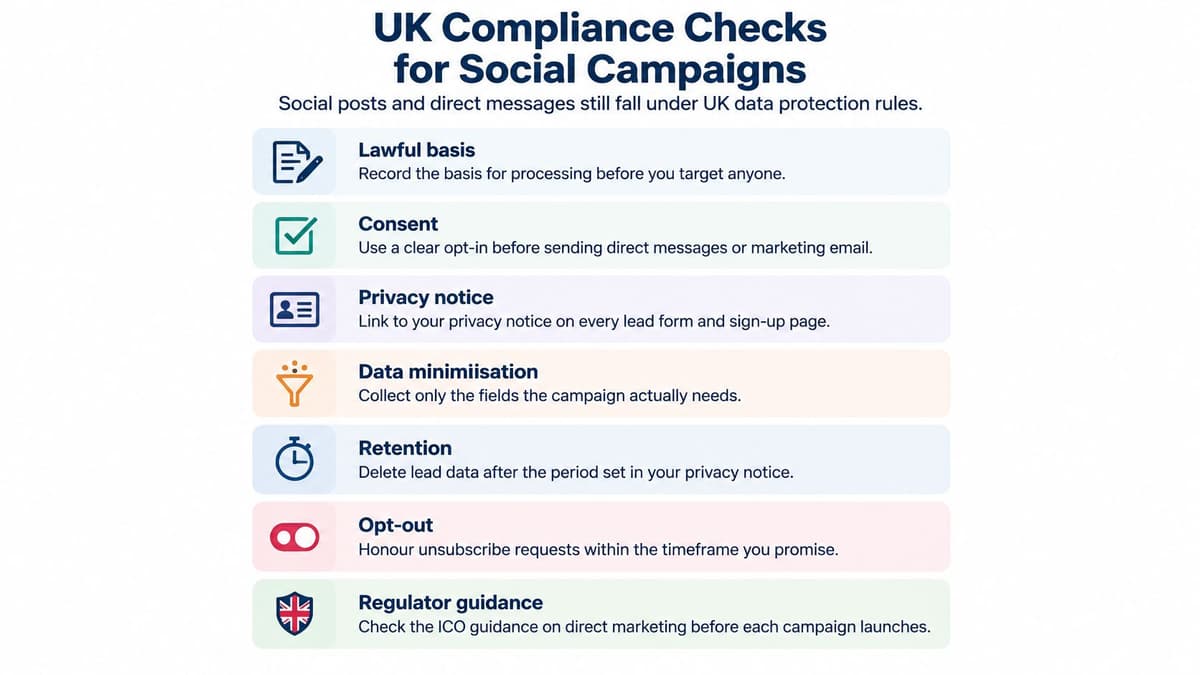
The ICO guidance on planning direct marketing explains that UK direct marketing is governed by the UK GDPR, the Data Protection Act 2018 and, where applicable, PECR 2003, and that direct marketing includes material directed at particular individuals through social media. It also states individuals have an absolute right to object to direct marketing. Your checklist therefore needs evidence, not reassurance.
Run the Gate in Approval Order
- Lawful basis: Record the documented basis for each targeted campaign before audience building begins.
- Fair processing information: Confirm people have been told about the social media marketing and can find the relevant privacy information.
- Sensitive data: Identify whether targeting or segmentation uses special category data. Block it unless the consent position has been properly established and recorded.
- Objection route: Test the unsubscribe or objection mechanism yourself. A link that exists but fails on mobile doesn't pass.
- Claim substantiation: Hold evidence for results, savings, prices and health related benefits, and check wording against the advertising rules enforced by the ASA.
The short video below is a useful prompt for discussing where a routine content check ends and specialist legal review begins.
A QA checklist supports legal review, it doesn't replace it. Keep a record of each compliance sign off, including the campaign version cleared and any conditions attached. Rules and regulator guidance change, so confirm current requirements with the ICO or a qualified adviser rather than recycling last year's checklist.
KPIs That Show Whether Your QA Process Works
Counting approved posts tells you a queue moved. It doesn't tell you whether quality improved, because a team can approve everything quickly and still publish the same number of mistakes. Measure what escaped, how often you had to correct it, and what speed cost you.
| KPI | What it measures | How to calculate | Starting point |
|---|---|---|---|
| Escaped error rate | Posts with errors found after publishing | Errors found after publishing divided by posts published | Set baseline over four weeks |
| Correction rate | Posts edited or deleted within 24 hours | Corrected posts divided by posts published | Set baseline over four weeks |
| Approval cycle time | Hours from draft to final approval | Median hours per approved post | Set baseline over four weeks, tracking urgent posts separately |
| First pass approval rate | Posts approved without changes | Posts approved first time divided by posts submitted | Compare with baseline before changing reviewer rules |
| Accessibility pass rate | Posts meeting alt text and caption checks | Compliant posts divided by posts reviewed | Aim for every informative visual to carry alt text |
| Compliance exceptions | Posts needing legal rework | Count per month, reported with trend | Track raw count from the first month, with no rate target |
How to Read the Pattern
Escaped error rate is your headline number. If approval cycle time falls while correction rate rises, you've built a faster gate with larger holes. If first pass approval rises and escaped errors fall together, briefs and drafting standards are probably improving upstream.
Don't borrow a benchmark from another team with different platforms, volumes and risk. Collect a four week baseline, then set targets from your own starting point and review the trend monthly. This approach fits the wider discipline of KPI measurement for social teams, where a small set of consistently defined measures beats a large dashboard nobody trusts.
Reporting caution: With low post volumes, two mistakes can make a percentage look catastrophic. Always show raw counts beside rates.
Judge small accounts over a quarter, not a single month. Note the cause beside each escape, such as wrong source data, stale link, missed alt text or incorrect time zone. The category trend tells you which stage to strengthen next.
Choose a Scheduler That Fits Your QA Workflow
Say a four person team manages two clients, one UK based and one serving Ireland. The brief lives in a shared document, drafts are created inside the scheduling tool so comments stay attached to the correct version, and standard posts need one named approver while claims need a second. The Irish version starts from the approved UK post, passes its own localisation check, and targeted campaigns wait for the compliance lead.
| QA stage | Feature to look for | Question to ask the vendor |
|---|---|---|
| Brief and draft | Shared drafts with comments | Can comments be tied to a specific draft version? |
| Draft approval | Approval workflow with named roles | Can approvers be required in a fixed order? |
| Asset QA | Media preview per platform | Does the preview show crops, captions and alt text? |
| Compliance and adaptation | Approval history and audit log | Can we export who approved what and when? |
| Scheduled state check | Per platform preview and time zone display | Which time zone does the posting queue use? |
| Post publish review | Comment inbox and analytics | Can we flag and log an error against a published post? |
Tools differ sharply here. Planable is often shortlisted where client facing review is central, while Hootsuite and Sprout Social appeal to larger teams needing broader governance and reporting. Buffer suits simpler approval needs, and Vista Social and Publer are worth comparing where multiple brands or bulk workflows matter. I wouldn't accept a vendor's approval label at face value. Run one Tier 2 post, one adapted post and one correction through a trial and see where the record breaks.
Plans and prices change, so check each provider's site before budgeting. Start with schedulers grouped for approval workflow needs, then use head to head scheduler comparisons to test your finalists against the stages in the table. Scheduler.social is the independent directory where those options can be compared side by side. Choose the tool that enforces your owners, previews and audit trail with the least workaround, not the one with the longest feature list.
Compare social media schedulers side by side on Scheduler.social, filtering by approval workflows, platforms and team needs before you commit. Check each finalist against your six QA stages, audit log requirements and time zone handling, then pick the tool that keeps routine posts moving without letting high risk errors escape.