How to Schedule Tweets on X: A Complete Guide for 2026
Learn how to schedule tweets on X using the native tool and discover why a platform like Scheduler.social is better for growth. Get pro tips and best practices.
You sit down to post on X, open the app, tweak the wording three times, get pulled into replies, then remember the rest of the week has no content lined up. That's how most inconsistent social accounts happen. Not because the team lacks ideas, but because posting depends on someone being available at the right minute.
A better workflow starts with scheduling. It removes the daily scramble and turns publishing into a repeatable system. That matters more in a mobile-first environment. In the UK, 88% of adults used the internet on a mobile phone in 2024, and 73% used social media for communication, according to Sprout Social's write-up citing Ofcom data. When audiences are checking feeds all day from their phones, consistency stops being a nice extra and becomes an operational job.
If you're learning how to schedule tweets, start with the native option so you understand the mechanics. Then decide quickly whether it's enough for your workflow.
Table of Contents
- Why You Should Stop Posting Live and Start Scheduling
- How to Schedule Tweets Natively on X The Basic Method
- A Better Way How to Schedule Tweets with Scheduler.social
- Native X vs Scheduler.social A Side-by-Side Look
- Scheduling Best Practices for Maximum Engagement
- Scheduling Tweets FAQ and Troubleshooting
Why You Should Stop Posting Live and Start Scheduling
Posting live feels productive because it's immediate. In practice, it usually creates a fragile workflow. One missed slot, one meeting that runs over, one afternoon spent dealing with customer messages, and your posting rhythm disappears.
That's the pattern I see most often with small teams and founders. They don't need more motivation. They need a system that keeps publishing moving when the day gets messy.

What live posting gets wrong
Live posting makes every post compete with the rest of your workday. It also pushes you towards reactive decisions:
- You post when you remember, not when the audience is most likely to see it.
- You reuse safe ideas, because there's no time to plan stronger content.
- You lose continuity, especially when several people touch the same account.
For anyone managing social as part of a wider workload, scheduling is the first professional upgrade. It gives you a queue, a review moment, and a way to stay visible when you're offline.
Practical rule: Use live posting for genuine real-time commentary. Use scheduling for everything that can be planned in advance.
There's also a broader operational reason to stop relying on ad hoc posting. UK audiences are already mobile-first, and social teams need to match that behaviour with organised publishing rather than occasional bursts. If you manage social for a service business, local brand, or property team, it helps to see how other teams empower agents with marketing automation so daily posting doesn't depend on manual effort alone.
What scheduling actually gives you
Scheduling isn't just about saving time. It changes the quality of your output because you can batch work and think strategically.
A good schedule lets you:
- Write in batches when you're focused, instead of posting half-finished ideas.
- Keep message quality steady across launches, quiet weeks, and busy periods.
- Separate planning from engagement, so you can spend live time replying, not scrambling to publish.
Scheduled publishing is the backbone. Real-time engagement is the layer you add on top.
That's the mindset shift. Don't treat scheduling as a convenience feature. Treat it as the operating system for your X presence.
How to Schedule Tweets Natively on X The Basic Method
If you want the simplest answer to how to schedule tweets, use X's built-in scheduler on desktop. It works, it's straightforward, and for occasional posting it's perfectly usable.
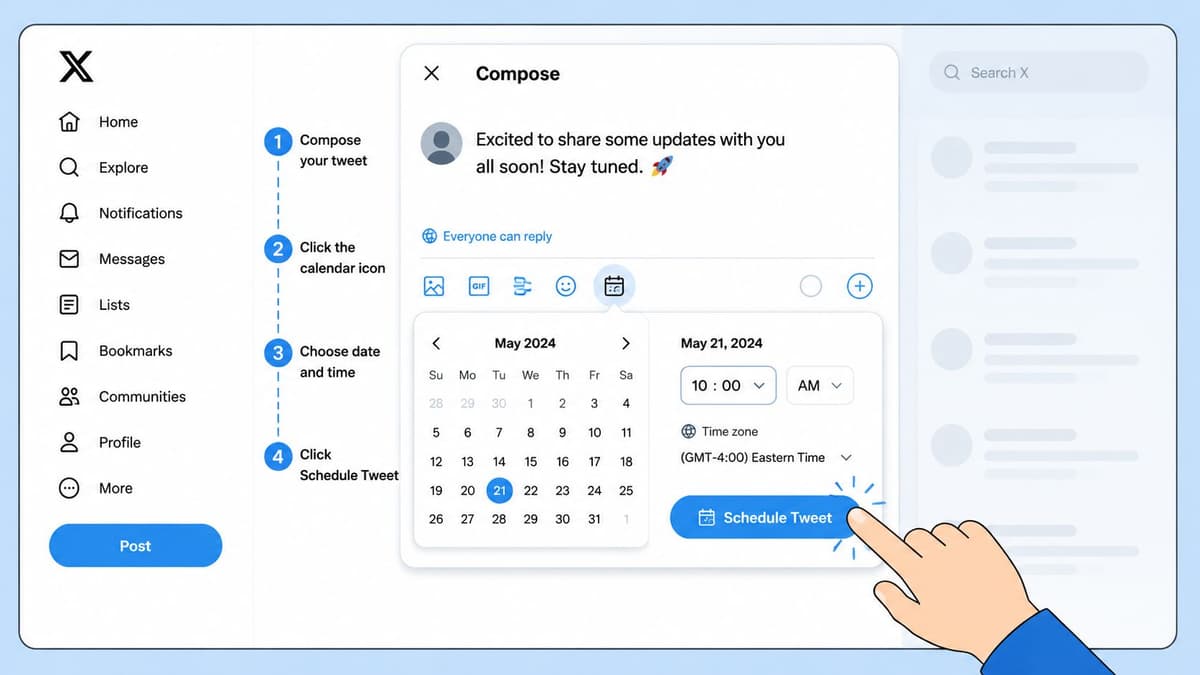
Use the desktop composer
Open X in a desktop browser and start a new post. Write the tweet, add any media, then use the scheduling control in the composer to choose a future date and time. Confirm it, and the post goes into your scheduled queue.
The native flow is fine when you're publishing a handful of posts and you don't need a larger planning view.
A basic process looks like this:
- Open the post composer on X.com.
- Write the tweet and add images, video, GIFs, or poll content if needed.
- Click the scheduling option in the composer.
- Choose the date and time you want.
- Confirm the scheduled post rather than publishing immediately.
What the native method does well
The native scheduler has one clear advantage. It's already there. There's no extra setup, no separate account, and no learning curve beyond finding the right button.
That makes it useful for:
- Solo users who only schedule occasionally.
- Simple announcements that need a fixed publishing time.
- Testing the habit before you commit to a fuller workflow.
If you're also connecting tools around your publishing stack, a dedicated integration like the PostPulse Twitter connector can be useful when you want X activity to fit into a broader automation flow instead of staying isolated.
A short walkthrough helps if you want to see the native interface in action:
Where the cracks show
The biggest limitation is that the native method is still basic. It handles a scheduled post. It doesn't give you much of a publishing system.
The UK-specific pain point is mobile. While 70% of UK social media users access Twitter/X via mobile devices, the native scheduled posting feature remains unavailable on the UK mobile app, forcing users to switch to desktop. This gap leaves 45% of UK small businesses struggling to maintain consistent posting schedules without desktop access.
For working teams, that creates friction fast:
- No proper calendar view, so it's harder to spot content gaps.
- No bulk scheduling, which makes weekly planning repetitive.
- No built-in collaboration flow, so approvals move into messages or email.
- No strong mobile-first workflow, which is awkward for people who work on the move.
Native X scheduling is a good starter tool. It isn't a serious planning environment.
That's why experienced teams usually outgrow it. The issue isn't whether it works. It's that it stops working well once content becomes a process rather than a one-off action.
A Better Way How to Schedule Tweets with Scheduler.social
Once posting becomes part of a real content operation, the bottleneck usually isn't the act of scheduling. It's everything around it. Planning, adapting, approving, and keeping multiple channels aligned are where teams lose time.
That's where a dedicated platform changes the workflow.
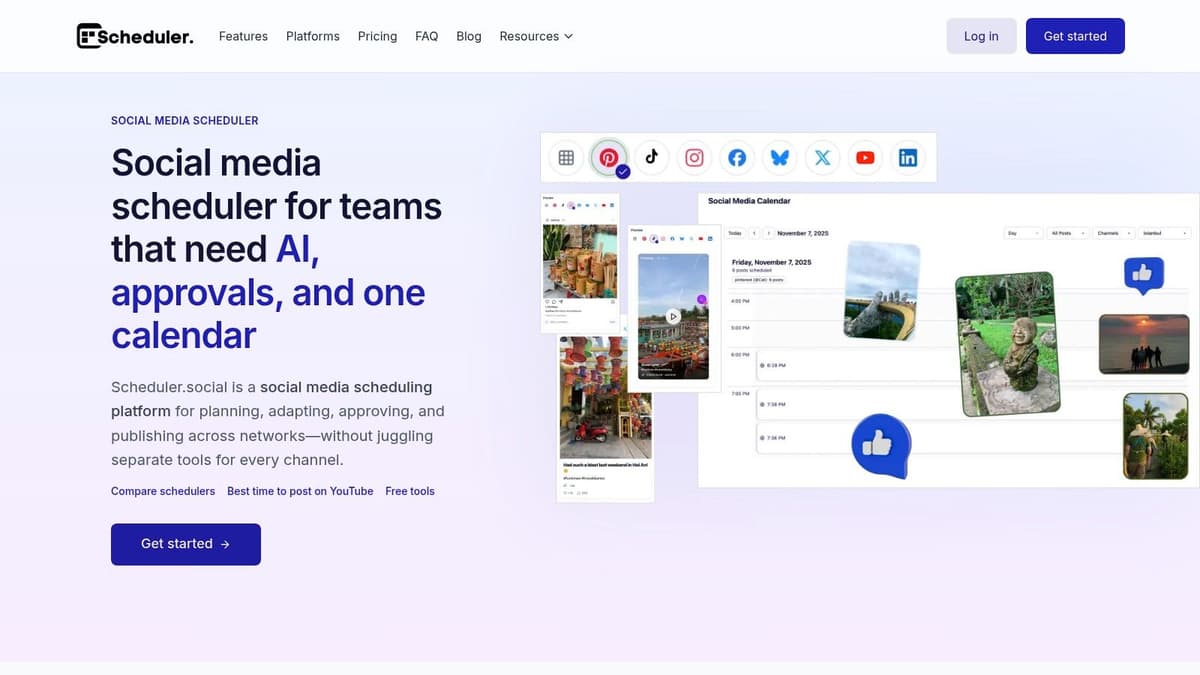
Plan visually instead of guessing
The first upgrade is visibility. A visual calendar shows what's going out, when it's going out, and where the gaps are. That sounds simple, but it fixes a lot of common posting mistakes.
With a calendar-based workflow, you can:
- Spot dead zones where nothing is scheduled for days.
- Balance campaign posts and regular content without overloading one week.
- Coordinate launches across channels rather than planning X in isolation.
That's a better way to handle how to schedule tweets because the post stops being a single task. It becomes part of a sequence.
A queue tells you what's next. A calendar tells you whether the whole plan makes sense.
Build posts once then adapt them properly
Teams typically don't publish only on X. They're taking one idea and turning it into a tweet, a LinkedIn post, an Instagram caption, maybe a YouTube community update. Done manually, that becomes slow and messy.
That friction is already visible in the UK market. Most guides focus on scheduling tweets in isolation, but 62% of UK DTC brands report that cross-channel adaptation takes 3+ hours per campaign. AI-driven tools can automate this adaptation, addressing a key inefficiency that UK agencies say costs them 28% of their campaign efficiency.
A dedicated platform helps because it doesn't force you to rewrite from scratch each time. You can draft the core idea once, then adapt tone, structure, and format for each network.
That matters in real work:
- X needs brevity and pace
- LinkedIn usually needs more context
- Instagram often needs caption flow and visual framing
- Brand compliance still needs checking across all of them
If you want a closer look at a platform built for that workflow, the Twitter scheduling workflow on Scheduler.social shows how planning and publishing can sit in one place instead of being split across tabs and documents.
Schedule at scale without spreadsheet pain
Manual scheduling works until volume increases. Then you start repeating the same motions all week. Open composer, paste copy, attach asset, set time, repeat.
A stronger workflow usually includes:
- Bulk upload for prepared content batches.
- Reusable queues for recurring content types.
- Asset organisation so images and videos aren't scattered across folders.
- Thread and multi-format support so the format matches the idea.
Professional tools beat manual methods by a mile. Not because they magically make content better, but because they remove low-value repetition. Your attention stays on message quality instead of admin.
Keep approvals inside the workflow
The hidden problem with native scheduling is collaboration. One person writes, another edits, someone else approves, and the actual publishing step sits in a separate place. That creates version confusion fast.
A team-friendly workflow should keep status visible. Draft. In review. Approved. Scheduled. Published.
When approvals sit inside the scheduling process, you avoid common failures:
- The wrong copy goes live
- A post gets approved in Slack but never scheduled
- Two people edit different versions
- Campaign timing drifts because nobody owns the final step
For agencies and in-house teams, that structure matters as much as the scheduler itself. It's the difference between having posts scheduled and having a social system that can scale.
Native X vs Scheduler.social A Side-by-Side Look
If you're deciding between the built-in option and a dedicated platform, the fastest way to judge it is by workflow fit. Native X is fine for one-off scheduling. A professional platform is built for volume, visibility, and teamwork.
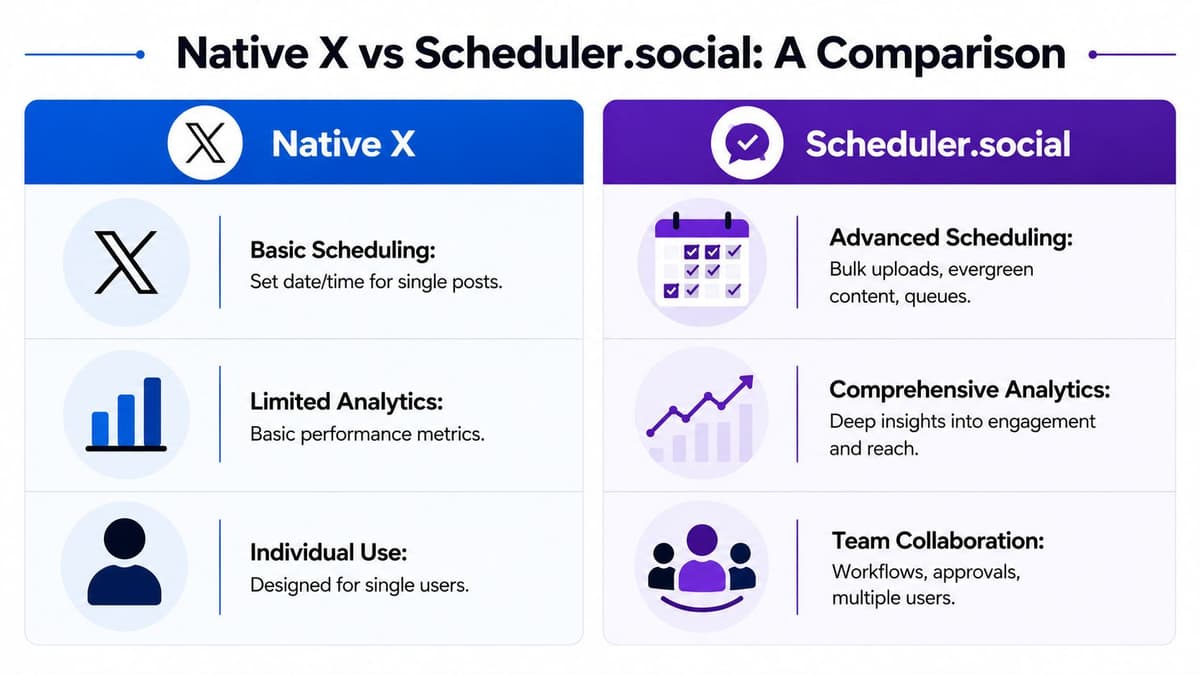
| Capability | Native X | Scheduler.social |
|---|---|---|
| Single post scheduling | Yes | Yes |
| Desktop scheduling | Yes | Yes |
| Mobile-friendly workflow | Limited | Yes |
| Visual content calendar | No | Yes |
| Bulk scheduling | No | Yes |
| Cross-channel publishing | No | Yes |
| AI-assisted adaptation | No | Yes |
| Team collaboration | Limited | Yes |
| Approval workflow | No | Yes |
| Scalable campaign planning | Limited | Yes |
The practical difference is less about features on a checklist and more about how many manual steps your team still has to carry.
Native X works best when:
- You run one account
- You schedule occasionally
- You don't need approvals or cross-channel planning
A dedicated platform works better when:
- You batch content weekly or monthly
- You manage several channels
- You need visibility across campaigns
- You want the publishing process to survive busy weeks
The moment you need calendar context, approvals, or multi-channel adaptation, native scheduling stops being enough.
If you're a creator posting a few updates a week, native X might be all you need. If you're a brand, agency, or growing team, the trade-off is straightforward. Basic scheduling saves a step. A dedicated platform saves the workflow.
Scheduling Best Practices for Maximum Engagement
Scheduling only helps if the plan behind it is sound. A weak queue just automates weak posting. The best results come from combining timing discipline with enough flexibility to keep the account feeling current.
Use timing data without becoming rigid
UK teams increasingly rely on analytics-led scheduling because audience behaviour shifts across channels. The Reuters Institute found that 51% of UK adults used YouTube for news and 30% used X/Twitter for news in 2024, which reinforces that X matters, but it usually performs best as part of a broader publishing rhythm rather than as the only channel. That data is summarised in Onlypult's guide referencing the Reuters Institute figures.
The practical takeaway is simple. Don't pick times based on generic advice alone. Use your own analytics to identify the windows when your audience responds, then test around them.
For timing, I'd keep it this way:
- Start with your account history and identify posts that earned replies, reposts, or clicks.
- Schedule around repeatable patterns, not one lucky outlier.
- Review weekly, because audience habits change with campaigns, seasons, and work routines.
If you want a timing framework to compare against your own account data, this guide to the best time to post on Twitter is a practical starting point.
Build a content mix that doesn't feel repetitive
Accounts usually underperform because every scheduled post is trying to do the same job. One week becomes pure promotion. Another becomes random commentary with no direction.
A healthier queue has variety:
- Educational posts that teach or clarify something useful.
- Conversation starters such as questions, opinions, and lightweight prompts.
- Proof posts that show product use, outcomes, or behind-the-scenes work.
- Promotional posts that ask for a click, signup, or sale.
That mix keeps the account readable. It also gives you more to learn from when reviewing performance later.
Don't fill the calendar with identical asks. Build a queue that earns attention before it tries to convert it.
Some teams also pair consistent posting with audience-building tactics outside the scheduler. If you're exploring ethical growth options, resources about free Twitter followers can be useful as a supplementary read, but they shouldn't replace a solid content rhythm.
Leave room for live moments
The biggest mistake with scheduling is overfilling the calendar. If every slot is packed, you leave no room for timely commentary, replies, or a fast reaction to news in your niche.
A good schedule leaves space. Not because the plan is incomplete, but because X still rewards accounts that feel present.
Keep some flexibility for:
- Industry news
- Customer conversations
- Unexpected strong ideas
- Follow-up posts when a thread gets traction
The most effective accounts don't choose between scheduled and live posting. They use scheduled content as the base layer, then add live participation where it counts.
Scheduling Tweets FAQ and Troubleshooting
A few issues come up repeatedly when people first learn how to schedule tweets. Most of them are easy to solve once you know where the friction usually happens.
Can I edit a scheduled tweet
Usually, yes. Open your scheduled posts, select the post, and update the copy or timing. If the platform doesn't allow direct editing for a given post state, duplicate it, make the change, and remove the old version.
For longer posts, it helps to check copy length before rescheduling. A simple tool like this Twitter character counter saves you from finding out too late that an edit broke the format.
Do scheduled tweets look different to followers
No. Followers see the post as a normal published tweet. The important difference is operational, not visual. Scheduling changes how you manage content, not how the audience experiences the post.
How should I handle UK time zones and seasonal clock changes
Careful attention is required in scheduling, as small errors can lead to avoidable misses. The X composer shows the account's current time zone, and scheduling requires selecting a specific date and time. As noted in MicroPoster's explanation of X scheduling, that displayed timezone matters, especially when UK teams are working across GMT and BST.
Before you confirm any scheduled post, check the displayed time zone manually. That one glance prevents a lot of wrong-hour publishing.
If several people manage the same account, make that a standard checklist item.
What if a scheduled post fails to publish
Check the obvious things first. Look for connection issues, media problems, expired authorisations in third-party tools, or a post that was never fully approved.
Use this troubleshooting order:
- Confirm the post status in the scheduler.
- Check attached assets for upload or format issues.
- Verify account access if you use a connected platform.
- Reschedule manually if the post was time-sensitive.
Should I schedule everything
No. Schedule the repeatable, planned content. Leave reactive posts, direct engagement, and timely commentary for live handling. That balance keeps the account organised without making it feel robotic.
Scheduler.social is a strong fit if you've outgrown one-by-one posting and need a proper social workflow. It gives you a visual calendar, AI-assisted content adaptation, approvals, and multi-channel publishing in one place, so your team can plan once and publish consistently without the usual manual mess. Explore Scheduler.social if you want a more reliable way to run X and the rest of your social channels.