How to Post on Pinterest: A Complete 2026 Guide
Learn how to post on Pinterest effectively in 2026. Our step-by-step guide covers Pin creation, optimisation, scheduling, and performance tracking.
You've got a blog post, product page, recipe, tutorial, or shop listing ready to promote. You open Pinterest, upload an image, add a quick description, hit publish, and then nothing much happens. That's where most Pinterest frustration starts. The content itself may be good, but the posting process is often too loose.
Knowing how to post on Pinterest isn't just about getting a Pin live. It's about preparing an asset that can be searched, saved, revisited, and measured over time. The teams that get traction usually treat each Pin as a small search-driven campaign, not a one-off upload.
Table of Contents
- Why Posting on Pinterest Requires a Strategy
- Preparing Your Pin for Maximum Impact
- The Manual Posting Workflow on Pinterest
- How to Schedule Pins and Automate Your Workflow
- Beyond Publishing What to Do After You Post
- Your Path to Consistent Pinterest Growth
Why Posting on Pinterest Requires a Strategy
A lot of people come to Pinterest thinking it works like Instagram or Facebook. It doesn't. Pinterest behaves more like a visual discovery engine, which means search intent, board relevance, and long-term usefulness matter more than quick bursts of attention.
That difference changes how you should post. A Pin isn't finished when the upload completes. It needs the right creative, the right keywords, the right board, and a clear destination if you want it to keep working after the first day.
Pinterest is also large and competitive enough that casual posting usually gets buried. Sprout Social reports 619 million monthly active users globally in its 2025 and 2026 coverage, and the Statista data cited there says brands published an average of 10 posts per week on Pinterest in 2025, which was nearly 43% higher than in 2024. That's a strong signal that consistent publishing is now a normal baseline, not an advanced tactic for a few heavy users (Sprout Social's Pinterest statistics roundup).
If you run ecommerce, that matters even more because Pinterest often supports discovery before purchase intent is fully formed. If you want a wider plan for how Pinterest fits into revenue work, this guide on how to grow your sales with social media marketing is a useful companion.
A weak Pinterest workflow usually looks like this:
- The design is fine, but generic. The image looks nice, yet it doesn't give a user a reason to save or click.
- The copy is vague. Titles and descriptions don't match how people search.
- The board choice is sloppy. The Pin gets saved wherever there's room, not where it most clearly belongs.
- There's no review loop. No one checks what earned saves, comments, or follows, so the next batch repeats the same mistakes.
Practical rule: Treat every Pin like a searchable content asset, not a social post that disappears tomorrow.
If your posting still feels improvised, fix the system before you chase output. A documented content strategy workflow makes Pinterest easier because it forces you to decide what you're publishing, who it serves, and how you'll judge whether it worked.
Preparing Your Pin for Maximum Impact
Most Pinterest performance problems start before you ever log in. The creative is the lever. If the Pin isn't visually clear and textually searchable, publishing mechanics won't rescue it.
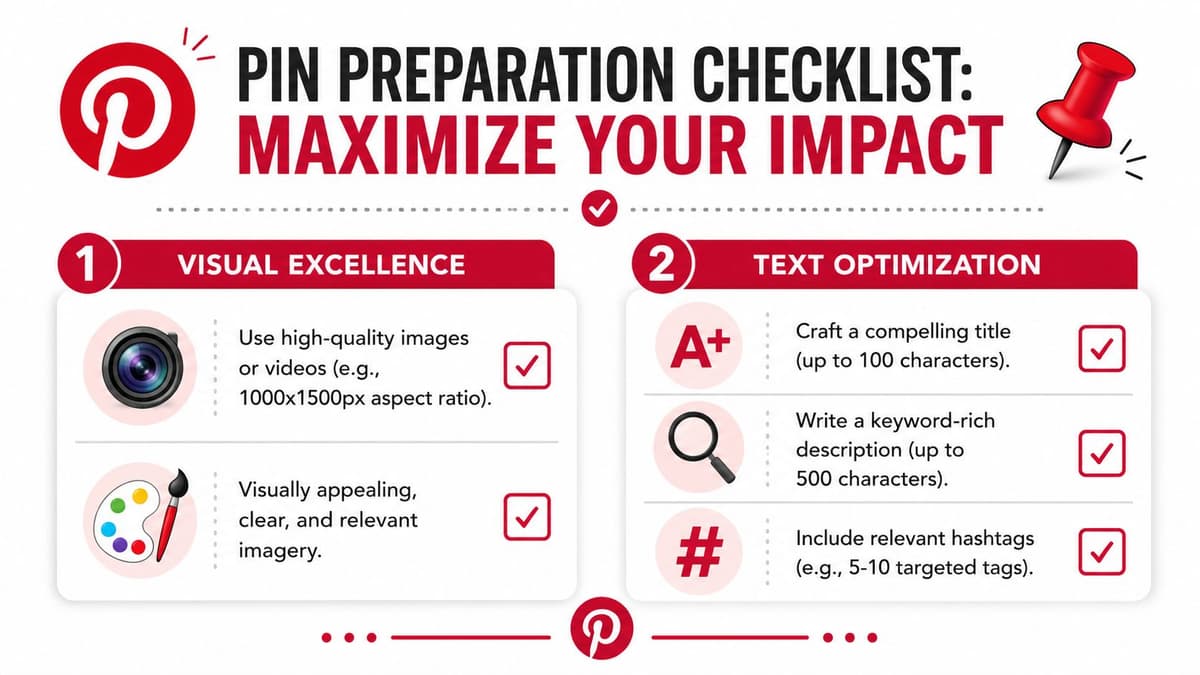
DigitalMarketer reports that Pinterest's recommended format is a 2:3 aspect ratio (1000 × 1500 px), and guidance cited there also aligns with the broader best practice of using keyword-rich titles and descriptions because Pinterest discovery is search-led rather than purely feed-led (DigitalMarketer's Pinterest marketing guide).
Build the visual first
The image or video has one job. It needs to stop the scroll and explain the value quickly.
Use vertical creative built intentionally for Pinterest, not a cropped asset from another platform. A blog header, square Instagram graphic, or horizontal product shot often looks like a compromise because it is one.
A strong Pin visual usually includes:
- A clear focal point. One product, one promise, one finished result, or one strong subject.
- Readable text overlay. This works best when it states the benefit or topic plainly.
- Clean hierarchy. Users should understand the Pin in a glance, especially on mobile.
- Visual relevance. If the title says “small kitchen storage ideas”, the image should show exactly that, not a broad lifestyle scene.
If you publish for a shop, publisher, coach, or content brand, create multiple visual variants for the same destination page. Change the headline, crop, image selection, or colour treatment. Pinterest rewards relevance. It doesn't need every Pin to look identical.
For brands building a wider search-and-social system, these Ecommerce content marketing strategies are useful because they help you turn one offer or article into multiple entry points instead of relying on a single creative angle.
Write for search not just for persuasion
Pinterest copy needs to do two things at once. It should help the platform understand the topic, and it should help the user decide the Pin is worth saving or clicking.
Start with Pinterest's own search bar. Type the core topic and note the phrasing that appears around it. Those phrases are often better than the wording internal teams invent in meetings.
Then write metadata with intent:
Title Keep it specific. Name the topic, outcome, or category directly.
Description Add supporting context in natural language. Include related terms without stuffing them awkwardly.
Destination link Match the promise of the Pin to the page it lands on. Misalignment kills trust quickly.
Alt text Describe the image accurately. This helps with accessibility and forces clarity.
Don't write Pinterest descriptions like ad slogans. Write them like search-aware summaries with a clear benefit.
Here's the trade-off many teams miss. Clever copy often sounds better in a brand review. Plain, keyword-aligned copy usually performs better on Pinterest because it matches how people search. If you have to choose, choose clarity.
The Manual Posting Workflow on Pinterest
Every marketer should know the native process, even if they later move to a scheduling workflow. It helps you understand what Pinterest requires and where mistakes happen.
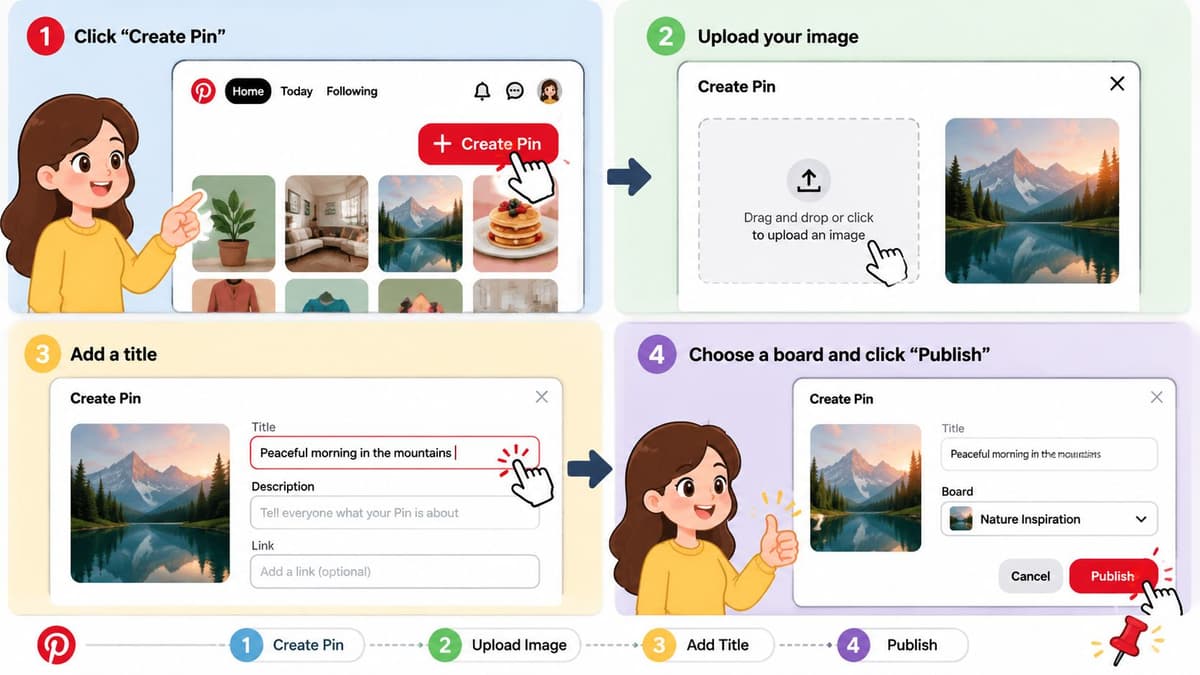
The native posting sequence
Adobe's walkthrough keeps the mechanics simple. Open the Pinterest app or site, tap Create +, choose Pin, upload the image or video, then add your title, description, destination website, alt text, and choose a board before publishing. The important detail is that the Pin is published immediately after board selection, which means the biggest friction point is often missing or weak metadata, not the upload itself (Adobe Express guide to posting on Pinterest).
In practice, I'd treat manual posting like a checklist rather than a casual action:
- Upload the final asset only. Don't use Pinterest as a draft space.
- Paste in prepared copy. Writing titles and descriptions on the fly leads to weak search phrasing.
- Check the destination page. Broken links and mismatched landing pages waste good Pins.
- Add alt text before you forget. It's easy to skip once you're in a rush.
- Choose the most relevant board first. This is not housekeeping. It affects how the Pin is initially framed.
Where manual posting usually breaks down
Manual posting is fine at low volume. It starts to wobble when you're publishing multiple creatives, working across campaigns, or handing tasks between people.
The common failure points aren't glamorous:
| Issue | What happens |
|---|---|
| Metadata written live | Titles become vague and descriptions lose search intent |
| Wrong board chosen | The Pin starts life in a weak context |
| Inconsistent naming | Boards and assets become messy fast |
| No approval step | Typos, wrong links, and off-brand creative go live |
The upload itself is easy. The discipline around the upload is what separates tidy Pinterest accounts from chaotic ones.
If you only post occasionally, manual may be enough. If you're trying to publish consistently each week, it usually becomes a bottleneck.
How to Schedule Pins and Automate Your Workflow
Posting one Pin at a time inside Pinterest works until volume, deadlines, and team coordination show up. Then the hidden cost becomes obvious. You spend more time assembling and checking posts than improving the creative.
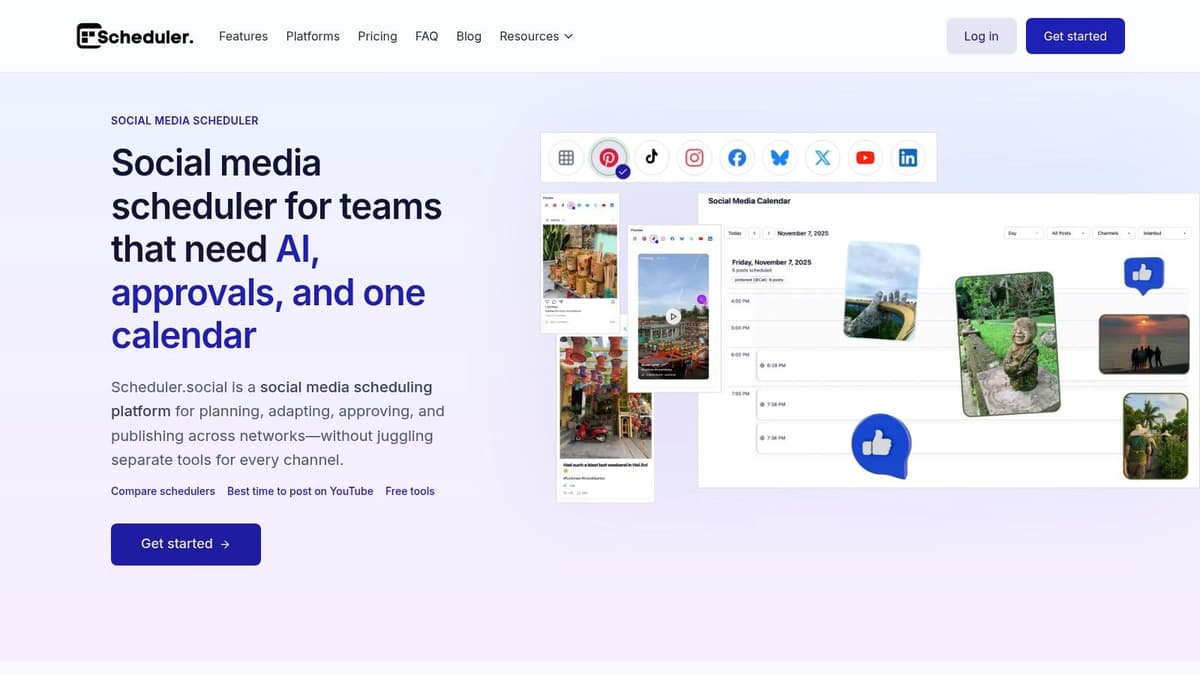
Near the top of a proper workflow, a calendar view helps because you can see cadence, campaign gaps, and board distribution before anything goes live.
Pinterest is especially shaped by mobile discovery. Pinterest's analytics environment is built around tracking Pins, ads, audience insights, and top-performing content, and the broader 2026 statistics referenced there note that 82% of users browse through the Pinterest mobile app and that users save more than 1.5 billion pins per week globally (Pinterest Analytics). That matters because your workflow should support repeat discovery, not just the moment of publication.
Why scheduling beats posting in the moment
The biggest advantage of scheduling isn't convenience. It's control.
When you schedule Pinterest content in batches, you can review creative quality, line up titles and descriptions, and make sure each Pin has a sensible board destination before launch day. That reduces the kind of rushed decisions that hurt distribution.
A stronger scheduling workflow usually includes:
- Content batching. Design several Pins for one URL or campaign in one sitting.
- Calendar planning. Space related Pins so they support each other without feeling repetitive.
- Bulk upload. Move multiple approved assets into the queue together.
- Approval checkpoints. Useful when a writer, designer, and account manager all touch the same Pin.
- Mobile-first review. Check whether text overlay and composition still work on a phone screen.
If your current process is “post whenever there's time”, consistency will always feel fragile. For a better planning rhythm, this practical plan for social media consistency is worth reading because it translates broad calendar advice into something teams can maintain.
What to automate and what to keep manual
Not everything should be automated equally.
Automate the repetitive parts. Keep judgement-heavy steps human.
| Automate | Keep manual |
|---|---|
| Scheduling dates and times | Final creative selection |
| Bulk asset upload | Board relevance decisions |
| Draft descriptions from templates or AI | Keyword judgement and tone |
| Approval routing | Landing page checks |
| Status tracking | Post-performance interpretation |
That balance matters more than is often realised. Automation is good at removing friction. It's not good at deciding whether a Pin belongs on “Minimalist Living Room Ideas” or “Small Flat Storage Tips”.
A dedicated Pinterest workflow also helps agencies and in-house teams avoid approval chaos. One person can draft, another can review copy, a lead can approve the final queue, and everyone can see status without chasing messages across email and chat. If you're exploring a platform built for that kind of process, the Pinterest publishing workflow here shows what a centralised setup looks like.
Later in the workflow, video can help teams understand the mechanics faster than text alone:
The trade-off is simple. Manual posting gives you immediacy. Scheduling gives you consistency, visibility, and far fewer preventable mistakes. For anyone publishing Pinterest as an actual channel, not an occasional add-on, that trade-off usually favours scheduling.
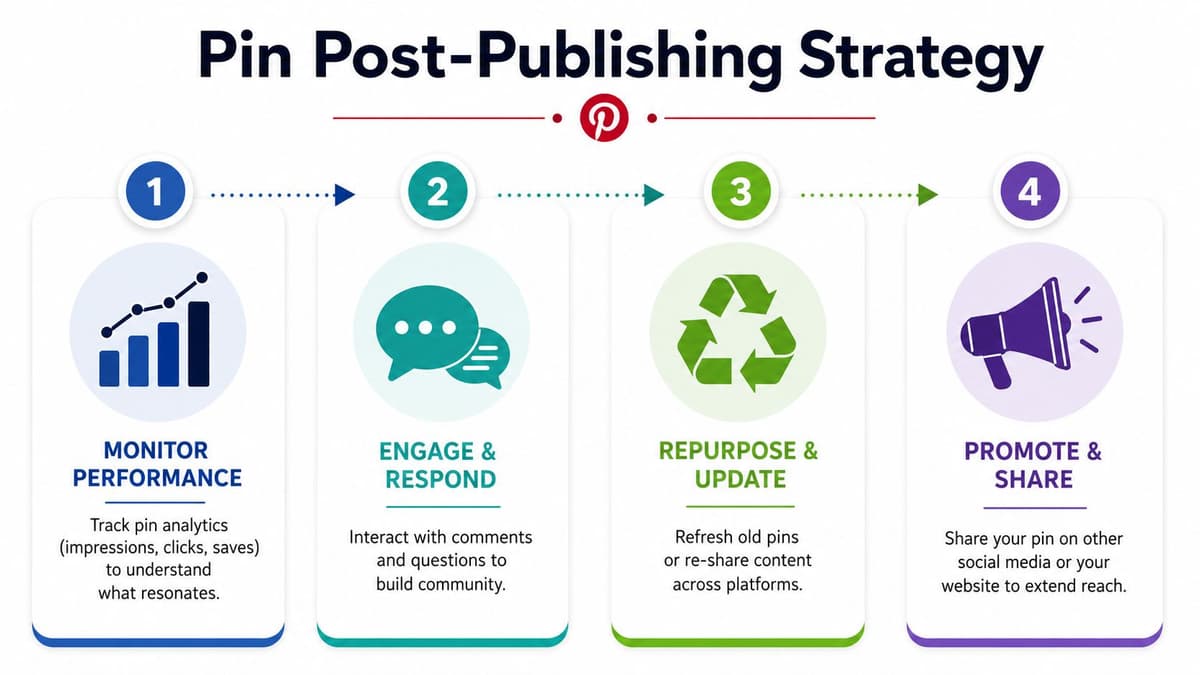
Beyond Publishing What to Do After You Post
Most Pinterest guides stop too early. They explain how to click publish, then leave you alone with the hard part, which is improving distribution after the Pin is live.
Pinterest's own creator guidance says quality and relevance matter more than frequency, recommends posting weekly as a rule of thumb, and points to saves, comments, and follows as the most useful signals to track. It also advises saving a Pin to the most relevant board first because that initial save gets distribution priority, while irrelevant board saves can hurt distribution (Pinterest's beginner content guide).
Your first board choice matters
That first save is strategic. Don't dump a new Pin into a broad catch-all board because it's convenient.
If a Pin is about vegan meal prep, save it first to the board that most directly matches vegan meal prep. Not “Healthy Ideas”. Not “Food Inspiration”. Not a mixed board where the topic becomes fuzzy. Relevance beats convenience here.
After publishing, I'd use a simple follow-up process:
- Check that the Pin rendered correctly. Confirm the image, title, description, and link all appear as intended.
- Watch early engagement signals. Saves, comments, and follows are more useful than obsessing over one immediate outcome.
- Plan additional creative variants. If the page matters, make more than one Pin for it.
- Expand carefully to other relevant boards. Do this thoughtfully over time, not in a burst of random re-saving.
A Pin doesn't need more boards. It needs the right boards.
One high-value page can support several Pins with different headlines, image treatments, and audience angles. That's often more effective than over-saving the same exact creative everywhere.
Use analytics to decide what to make next
Post-publication work should feed the next round of creation. If you ignore analytics, Pinterest turns into guesswork.
Use Pinterest Analytics to identify which Pins earn saves, comments, follows, and meaningful traffic actions. Then ask practical questions. Did a specific headline pattern work better? Did a certain visual style get saved more often? Did one board context outperform another?
A clean review habit looks like this:
Identify top-performing Pins Look for patterns, not one-off surprises.
Compare the creative Study the overlay text, imagery, promise, and landing page fit.
Review board relevance Some Pins underperform because the context is wrong, not because the content is weak.
Create the next iteration Build the next Pin family from proven angles.
If you want a cleaner way to think about interaction quality, this guide on how to calculate engagement rate helps frame what engagement signals tell you and where they can mislead.
Good Pinterest management is iterative. You publish, observe, adjust, and republish stronger variations.
Your Path to Consistent Pinterest Growth
Pinterest rewards the people who stay organised. Not the people who post the most random content. Not the people who keep rewriting the same description at the last minute. The accounts that grow usually run a repeatable system.
That system is straightforward. Start with a strong vertical asset. Write a title and description built for search. Publish to the most relevant board. Keep a weekly rhythm. Then review what earned saves, comments, follows, and visits so the next batch is better than the last.
If you're learning how to post on Pinterest for a business, creator brand, or client account, the biggest shift is mental. Stop thinking in terms of “I need to upload something today.” Start thinking in terms of “I need to launch content assets that stay useful.”
A practical Pinterest workflow tends to look like this:
- Create with intent. Design Pins for a specific topic, audience, or landing page.
- Optimise before upload. Metadata and board choice should be ready before posting.
- Publish consistently. Weekly discipline beats bursts of rushed activity.
- Review and adapt. Use performance signals to guide the next round of Pins.
That's manageable even for small teams, solo creators, and busy marketers. What causes problems isn't usually lack of effort. It's lack of process.
The good news is that process is fixable. Once you've built a reliable Pinterest routine, posting stops feeling scattered and starts feeling cumulative. Each new Pin has a job. Each board has a purpose. Each review cycle sharpens the next one.
If you want one place to plan, review, and schedule Pinterest content without bouncing between spreadsheets, drafts, and live posting windows, try Scheduler.social. It gives you a visual calendar, approval workflows, AI-assisted drafting, and cross-channel publishing so you can run a steadier Pinterest process with less manual work.