Advanced Search Twitter: Master X/Twitter for 2026
Master the power of advanced search twitter for X/Twitter. Our guide covers operators, query building, and turning insights into marketing strategy for 2026.
You open X to “do a quick search” for customer feedback. Ten minutes later, you're buried in reposts, old jokes, irrelevant mentions, and accounts that have nothing to do with your market. The problem usually isn't the platform. It's the way searches are typically conducted.
That's where Advanced Search changes the job. Used properly, advanced search on Twitter stops being a way to find tweets and becomes a way to build intelligence. You're not just hunting for mentions. You're finding competitor weak spots, repeat audience questions, emerging angles for posts, and the exact phrasing real people use when they describe a problem.
I treat X search like a working research layer for marketing. A good query isn't disposable. It becomes a reusable asset your team can revisit, refine, save, and fold into your content process.
Table of Contents
- Beyond the Search Bar How to Access Twitter Advanced Search
- Mastering the Advanced Search Form Step by Step
- Unleash Power with Search Operators
- Building Strategic Queries for Marketing Goals
- From Search Results to Actionable Workflows
- Pro Tips and Common Pitfalls to Avoid
Beyond the Search Bar How to Access Twitter Advanced Search
Many begin in the standard search bar, type a keyword, and hope relevance does the rest. That works for casual browsing. It's weak for research.
X's web interface gives you a proper Advanced Search view once you're logged in. X formalised it as a logged-in web feature that you can access from search results through Advanced search or More options, with filters for words, dates, people, and other fields, according to X's Advanced Search help page. That matters because it gives you a repeatable way to narrow a messy topic fast.
Use the web interface first
If you're teaching a teammate or building a query for the first time, start in the form. It forces clearer thinking.
A simple workflow looks like this:
- Run a broad keyword search first so X opens a results page.
- Open Advanced search from the menu options on that page.
- Fill only the fields you need instead of trying to use every box.
- Check the result quality, then tighten the query with exclusions, dates, and account filters.
The reason this works is simple. The form helps you think in categories. What words do I need? Which account type matters? What date range is relevant? Do I want replies, links, or original posts?
Why power users move to operators
The form is great for building the first draft. After that, serious users of advanced search Twitter move to operators in the main search bar because it's faster and easier to reuse.
I'll often build a query in the form once, inspect the resulting syntax, then save that logic in a note. From there, I can tweak one piece at a time for campaign work, competitor checks, or issue monitoring.
Practical rule: Use the form to learn. Use operators to work.
If you want extra operator examples beyond the platform basics, this roundup of expert X search strategies is useful because it shows how practitioners combine terms rather than relying on single-keyword searches.
For teams that want discovery and publishing in the same operating system, it also helps to keep your X planning tied to a dedicated Twitter scheduling workflow. That way, a useful search doesn't die in a tab. It becomes something your team can publish.
Mastering the Advanced Search Form Step by Step
A good query starts with a business question, not a keyword.
If I need to understand why a launch underperformed, I do not start by searching the product name and scrolling. I break the question into parts. What wording are customers likely to use? Which accounts matter? What time window matches the campaign? Which results are useful enough to act on later? The Advanced Search form is good at forcing that discipline, and that is why it helps you build intelligence instead of collecting random posts.
Start with the Words fields
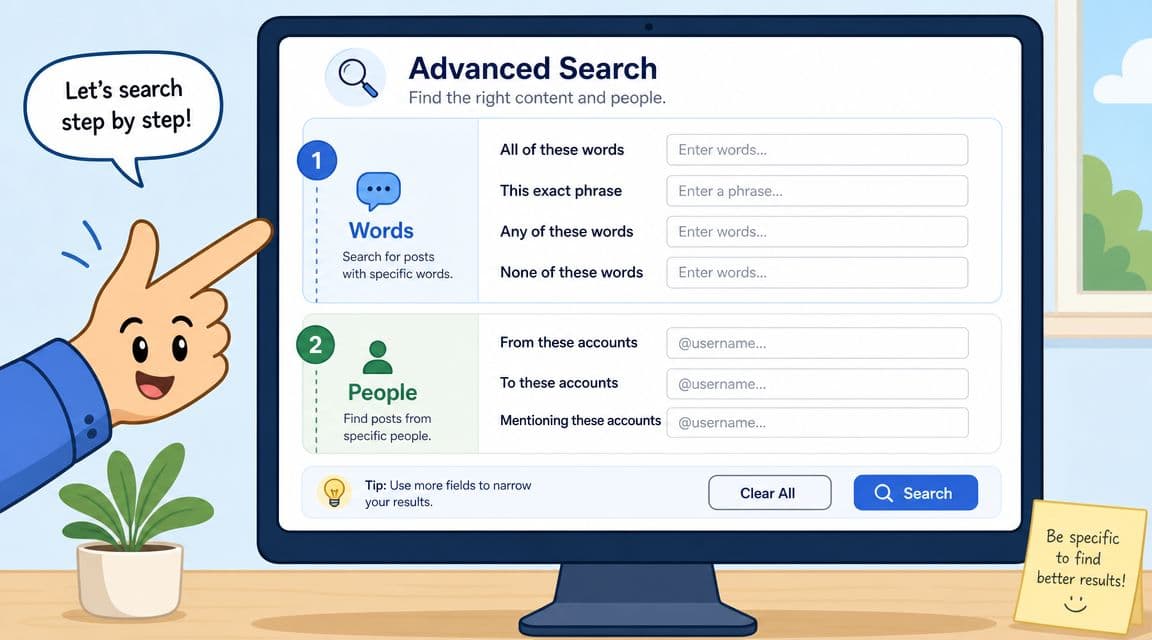
The Words section shapes result quality more than anything else in the form. Broad searches fail because the query is too loose, not because X lacks data.
Here is how I use each field:
- All of these words for terms that need to appear together in the same conversation
- This exact phrase for product names, campaign lines, or repeated customer wording
- Any of these words for synonyms, misspellings, and the language real users choose
- None of these words to cut junk before it wastes your time
For example, if I am reviewing reactions to a feature release, I want language that signals opinion, not every casual mention. I might use the feature name as the exact phrase, add terms like review, feedback, bug, and thoughts under variants, then exclude giveaway, hiring, and meme. That setup usually gives me a cleaner read on sentiment themes, objections, and content angles.
The exclusion box does a lot of work. Strong searches are often built by removing bad matches early.
Use People fields to separate audience insight from account activity
The People filters answer a different question. They tell you whose behavior you are studying.
That distinction matters in marketing work. If I am auditing a competitor's messaging, I search posts from their account. If I want to see what customers ask them in public, I search posts to their account. If I am checking how often people refer to our brand without using the exact handle, I combine Mentioning these accounts with brand and product variants in the Words fields.
These combinations are reliable:
| Goal | Form logic |
|---|---|
| Review a brand's own positioning | From these accounts |
| Find customer questions aimed at a competitor | To these accounts |
| Catch loose brand mentions and tagging habits | Mentioning these accounts plus keyword variants |
That split helps avoid a common mistake. Teams mix up what the brand published with what the market said back. Those are different datasets, and they lead to different decisions.
After you've built one or two searches in the interface, it helps to watch a live walkthrough and compare the steps against your own process.
Tighten result quality with filters and engagement signals
This is usually where a messy search becomes useful.
The form's filters help you cut low-value results fast. If I am looking for product complaints, I may want replies included because frustration often shows up there first. If I am searching for content ideas, I care more about original posts with signs of traction. If I am collecting creative examples, media-only results can save time.
The form also maps to underlying search logic such as min_replies:, min_likes:, min_faves:, near:, and within:. You do not need to memorize that syntax yet. It helps to know the form is not a dead end. It is a query builder, and the logic can later become a reusable search you run every week.
A practical way to choose filters:
- Need opinions: include replies and look for conversational phrasing
- Need proven content angles: focus on original posts with engagement thresholds
- Need visual references: use media filters
- Need cleaner data: remove repost-heavy results and weak matches
If a search feels noisy, I change the filter before I add more keywords.
Add dates before you trust what you see
Time range is what turns a search into usable intelligence.
Without dates, you end up mixing current reactions with old bugs, previous launches, and outdated sentiment. That is how teams misread demand or overreact to issues that were solved months ago. I add date limits earlier than many people do because marketing questions are usually tied to a specific event, period, or test.
A few patterns work well:
- Campaign review: limit the search to the launch window
- Recurring pain point analysis: compare one recent period against another
- Trend validation: keep the range tight so older viral posts do not distort the picture
This is also the point where search becomes part of a workflow. Once a query consistently surfaces useful posts, save it, name it by use case, and review it on a schedule. That is how you go from finding tweets to building a repeatable source of market insight.
Unleash Power with Search Operators
The form gets you started. Operators make you fast.
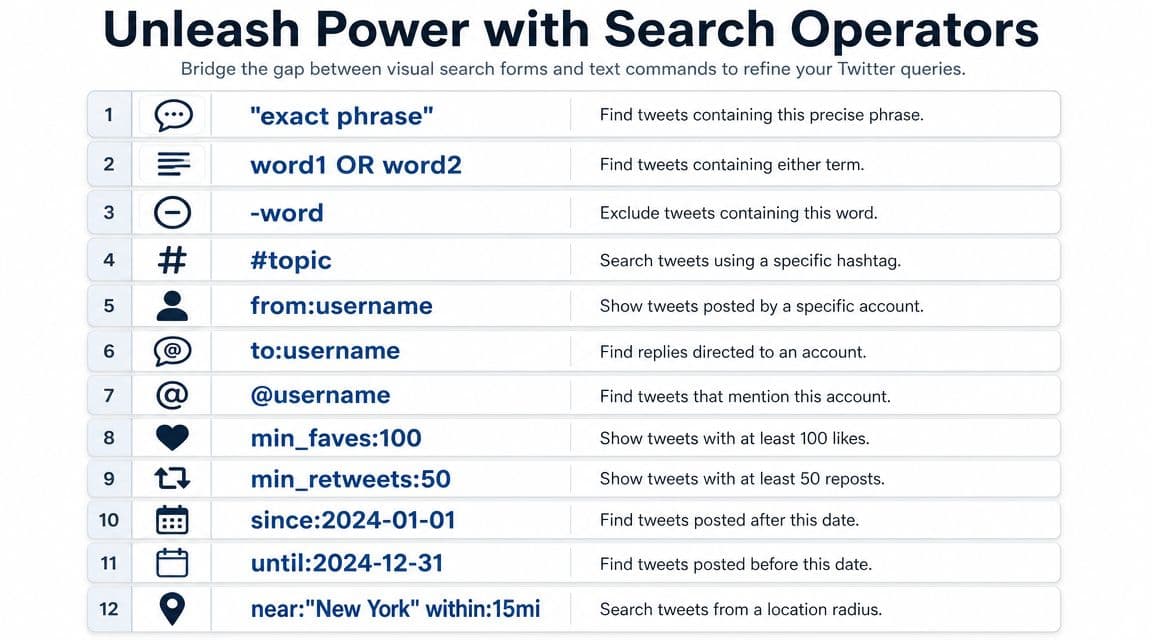
Once you understand that every field in Advanced Search maps to search syntax, you can build sharper queries directly in the main search bar. That's where most day-to-day work happens.
Why operators beat the form in daily work
Operators are better when you need speed, iteration, and reusable logic. You can copy a query, change one term, rerun it, then save the version that surfaces the cleanest result.
This matters a lot in the UK. DataReportal estimated 27.2 million social media user identities in the UK in early 2024, equal to 40.2% of the population, and reported that X ads reached 21.0 million UK users in January 2024, according to this overview on Twitter advanced search and UK audience scale. In a market that large, operators such as from:, since:, until:, and lang: are practical tools for narrowing UK-specific conversations instead of drowning in broad result sets.
Operators I use most
Here are the ones that do the bulk of real marketing work:
| Operator | What it does | Practical example |
|---|---|---|
from: |
Posts from an account | from:competitor brand |
to: |
Replies to an account | to:competitor support |
"exact phrase" |
Exact wording match | "free trial" |
OR |
Includes variants | pricing OR plans OR cost |
-word |
Excludes noise | apple -fruit |
since: |
Starts a date range | launch since:2026-01-01 |
until: |
Ends a date range | launch until:2026-01-31 |
lang: |
Limits language | lang:en |
-filter:retweets |
Removes reposts | brand -filter:retweets |
filter:links |
Finds posts with links | competitor filter:links |
min_replies: |
Finds active discussion | feature request min_replies:5 |
min_faves: |
Finds liked posts | topic min_faves:20 |
A few queries I use often:
Competitor support friction
(help OR issue OR broken) to:competitor -filter:retweets lang:enPopular original takes in a niche
"email marketing" min_replies:5 -filter:retweets lang:enBrand mentions without your own account polluting results
("brand name" OR @brandhandle) -from:brandhandle -filter:retweets
Learn a small set of operators deeply. You don't need every command. You need the ones that help you ask better business questions.
Building Strategic Queries for Marketing Goals
A query becomes valuable when it's tied to a decision. The point isn't to admire a clever search string. The point is to learn something you can act on.
For UK-focused search design, broad reach is part of why the method matters. The UK remains heavily connected online, and region-specific monitoring benefits from filtering tightly. For practical audience tracking, one useful approach is combining boolean keywords with date, language, and account filters, then validating what you see against wider digital behaviour. The ONS reported that 97% of UK adults were recent internet users in 2024, which supports using X as a high-coverage discovery channel for public conversation, while also reinforcing the need to narrow noisy searches with exact phrases, exclusions, and engagement filters, as discussed in this guide to using Twitter Advanced Search operationally.
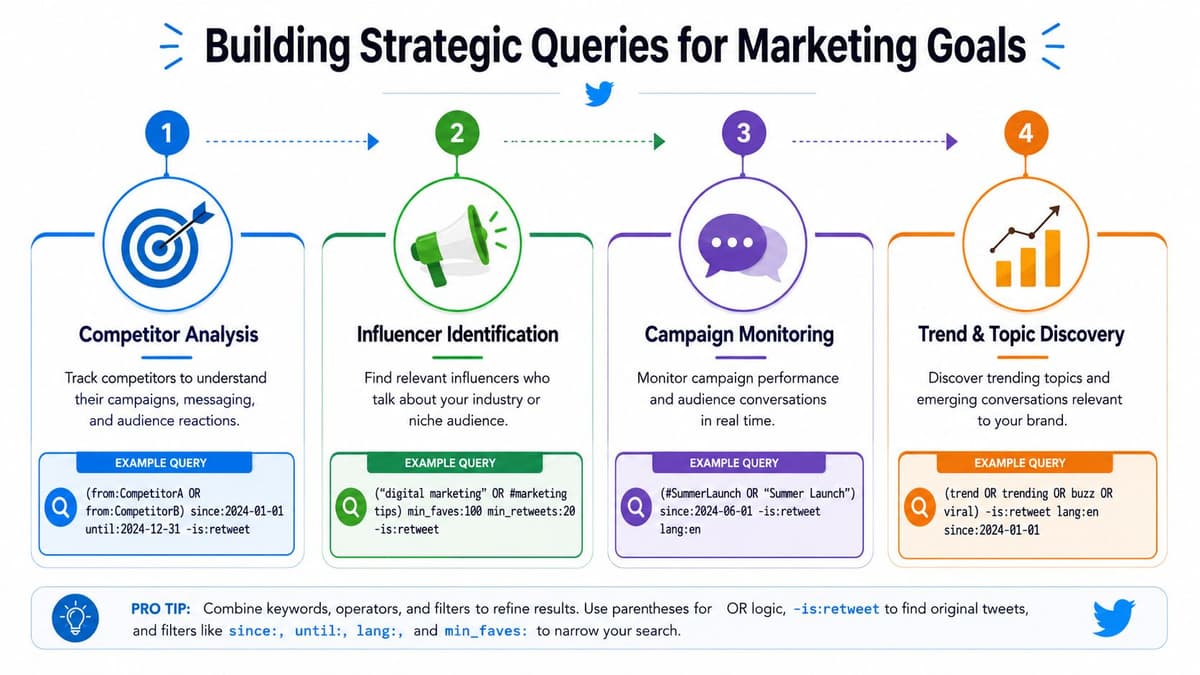
Competitor monitoring
Most competitor search is lazy. People search a rival's name, skim a few posts, and think they've done monitoring.
I want three separate views.
First, direct complaints aimed at them
to:competitor (help OR issue OR refund OR broken) lang:en -filter:retweets
This finds customer-facing friction. You're looking for repeated wording, not isolated drama.
Second, third-party sentiment about them
("competitor name" OR @competitor) (love OR hate OR confusing OR slow) -from:competitor lang:en
Messaging gaps become evident. Customers often explain a rival's weak point more clearly than your own team would.
Third, content strategy patterns
from:competitor filter:links -filter:replies
This gives you a clean view of what they push as top-level distribution.
Content ideation
Search is excellent for finding content angles your audience already cares about. I'm not looking for “viral tweets to copy”. I'm looking for repeated questions, frustration loops, and language worth mirroring.
Useful query patterns:
"your topic" (how OR why OR what OR "best way") lang:en -filter:retweets("your category" OR "problem you solve") min_replies:3 lang:en#yourtopic -filter:retweets lang:en
If the results feel generic, add industry terms. If they feel too narrow, remove the hashtag and rely on phrase-based intent instead.
One practical next step is turning those discovered questions into a posting calendar built around timing. If your team wants to pair search-led ideas with publication timing, this guide on the best time to post on Twitter is a useful companion.
Customer feedback and UGC
Brands commonly miss easy wins. They wait for formal feedback when public language is already sitting in search results.
Try:
("your brand" OR @yourhandle) (love OR using OR tried) -filter:retweets@yourhandle filter:images -filter:retweets"product name" (review OR feedback OR thoughts) lang:en
The first gives sentiment-rich text. The second helps surface customer visuals. The third catches people who mention the product without tagging the account correctly.
When you find strong phrasing, save it. Customer wording is often better than internal copy because it describes the problem in the market's own language.
Lead discovery and sales context
This one needs care. Don't treat search as a spam list generator.
Search for active buying context, not random mentions:
("looking for" OR "need a") "your category" lang:en("can anyone recommend" OR "any suggestions for") "your category" lang:en("switching from" OR "fed up with") competitor lang:en
These queries don't hand you leads on a plate. They show where intent, dissatisfaction, or evaluation is already happening. That's useful for sales enablement, founder-led outreach, and content that answers the exact buying objections people are posting publicly.
From Search Results to Actionable Workflows
Search on its own doesn't change anything. A useful workflow does.
The handoff is where teams often lose value. Someone finds a useful thread, drops it in Slack, and by Friday nobody remembers why it mattered. The fix is a repeatable process that turns searches into monitored streams, then into content or response tasks.
Save what works
If you build a query that consistently surfaces good material, save it in X. That gives you a lightweight monitoring layer you can revisit without rebuilding the logic every time.
For UK audience intelligence, tighter query design matters because public conversation can be broad and messy. Ofcom reported that 75% of UK adults use social media for news, which is one reason local issue tracking on X remains operationally relevant, especially when language, dialect, and region mix together, as discussed in this article on UK-specific Twitter advanced search use cases.
A saved-search setup I like looks like this:
- Brand watch for direct and indirect mentions
- Competitor watch for support complaints and campaign reactions
- Topic watch for recurring questions in the category
- Regional watch using
lang:enplus city names and spelling variants
A saved search is not a report. It's a listening feed. The report starts when someone tags patterns, examples, and next actions.
Turn findings into publishing tasks
Once patterns appear, move them out of search and into planning. If you repeatedly see the same objection, that's a post. If customers keep asking the same setup question, that's a thread, guide, or FAQ asset. If a competitor's launch lands badly, that may shape your positioning, not just your commentary.
A simple operating rhythm works well:
- Search for recurring questions, complaints, and strong phrasing.
- Tag what you're seeing by theme, urgency, and content potential.
- Plan a response format such as a single post, thread, carousel adaptation, or linked asset.
- Schedule it so the insight becomes published output, not forgotten research.
Tools can help at this point. X's own saved searches are useful for monitoring. For the publishing side, a platform like best social media scheduler options for teams can help organise ideas into an actual content calendar. Scheduler.social is one example if you need a shared calendar, approvals, and multi-network scheduling in the same workflow.
The core point is operational, not technical. Search should feed planning. Planning should feed publishing. Otherwise, advanced search Twitter stays interesting but unproductive.
Pro Tips and Common Pitfalls to Avoid
Most bad searches fail for boring reasons. The query is too broad, the exclusions are missing, or the user trusts the first page of results without tightening anything.
What usually goes wrong
These mistakes come up constantly:
- Broad noun searches: Searching a generic keyword like a product category often pulls in jokes, spam, news, and unrelated commentary.
- No exclusions: If you don't remove obvious noise terms, reposts, or off-topic variants, the result quality collapses.
- No phrase matching: If wording matters, use quotation marks. Otherwise X treats the words more loosely.
- No regional logic: UK targeting often needs city names, spelling variants, and language controls together.
That regional point matters more than many guides admit. For UK-specific audience intelligence, mixed language and location require more careful query design, such as combining lang:en with UK spelling variants and city names. That's especially relevant when local issue tracking matters, and Ofcom reported that 75% of UK adults use social media for news in the source discussed earlier.
What experienced teams do differently
Experienced search users behave more like analysts than browsers.
- They start narrow: It's easier to widen a search than rescue a chaotic one.
- They compare versions: One query with
-filter:retweetsand one without can tell you whether interest is original discussion or just amplification. - They track wording: People don't all describe the same problem the same way. Save variant phrasing.
- They separate use cases: Don't mix brand mentions, competitor complaints, and content ideation into one monster query.
One more practical rule. If a query looks clever but doesn't help a real decision, scrap it. The best searches are usually the simplest ones that produce a repeatable signal.
If you want your X research to turn into actual output, Scheduler.social gives you a way to move from saved searches and content ideas into a shared publishing workflow with scheduling, approvals, and cross-channel planning. It's useful when your team has already outgrown scattered docs, browser tabs, and manual posting.