Schedule Posts on Facebook to Boost Engagement
Learn how to schedule posts on Facebook using Meta Business Suite or third-party tools. Our 2026 guide helps you save time and boost engagement.
Whether you use Meta's own Business Suite or a dedicated third-party tool, scheduling your Facebook posts is a game-changer. It’s how you plan content in advance, keep a steady presence, and automatically hit those peak engagement times, even when you’re not online.
Table of Contents
- Move Beyond Last-Minute Content Scrambles
- Using Meta Business Suite to Schedule Posts
- Taking Your Content Strategy Further with Third-Party Scheduling Tools
- When to Post on Facebook for a UK Audience
- How to Fix Common Facebook Scheduling Glitches
- Your Facebook Scheduling Questions, Answered
Move Beyond Last-Minute Content Scrambles
Let's be real: inconsistency is the biggest killer of Facebook growth. That daily scramble to find something—anything—to post is a fast track to burnout and a chaotic brand presence. This guide isn't just a simple 'how-to'; it’s about understanding why scheduling is a core strategy, not just a time-saving trick. It's about building a system you can rely on.
Transform Your Approach from Reactive to Strategic
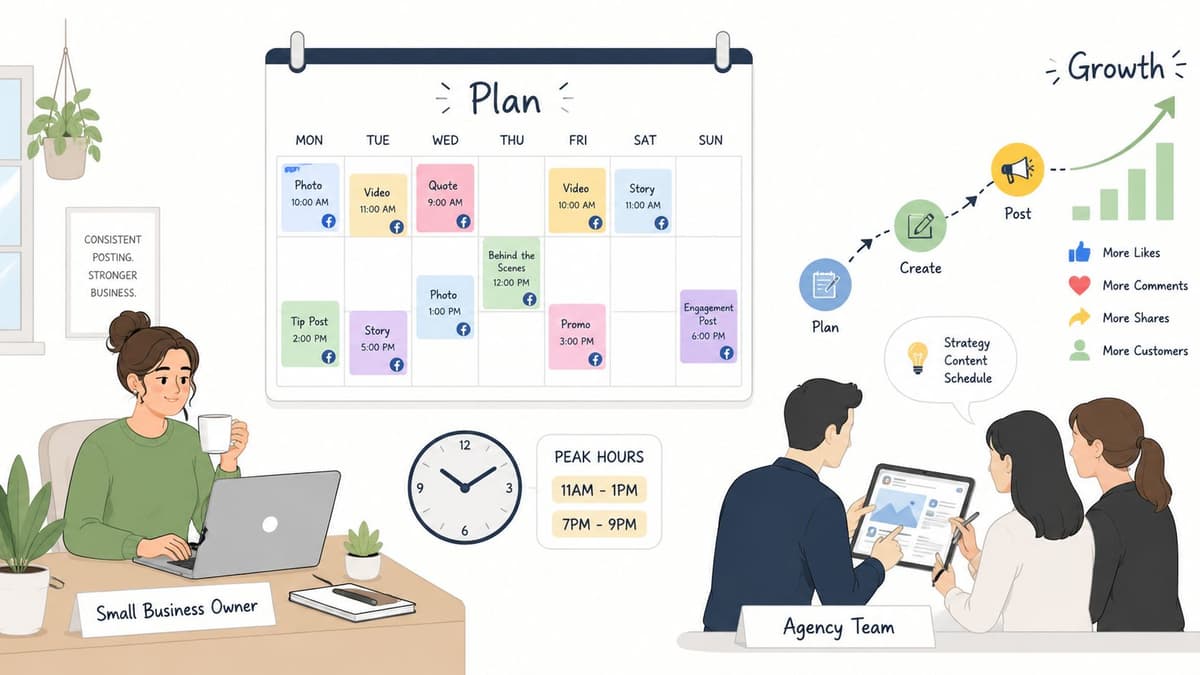
Think about it from a practical standpoint. For a small business owner, scheduling means your Facebook page looks professional and active while you're actually running the business. If you're an agency, it’s the only sane way to juggle multiple client accounts without dropping the ball.
When you start planning your content ahead of time, you gain some serious advantages:
- It frees up your mental energy for bigger, more creative tasks.
- It guarantees your brand is active during the best engagement windows, no matter your personal schedule.
- It helps you build a cohesive narrative over time, instead of just a string of random, disconnected posts.
The goal is to shift your entire mindset from being reactive and chaotic to becoming proactive and strategic. This is what truly lays the groundwork for sustainable growth and a stronger bond with your audience.
To keep your content calendar full, it's smart to get good at repurposing what you already have. For instance, learning how to maximize podcast reach can give you a nearly endless supply of quality material. If you want to go deeper on this, our complete guide on https://scheduler.social/blog/content-planning-for-social-media is the perfect next step.
Using Meta Business Suite to Schedule Posts
If you're looking to get started with scheduling Facebook posts, your best bet is to begin with Meta's own tool: the Meta Business Suite. It's completely free, built right into the platform, and lets you manage both Facebook and Instagram from one place. Think of it as the natural first step to creating a more organised content workflow.
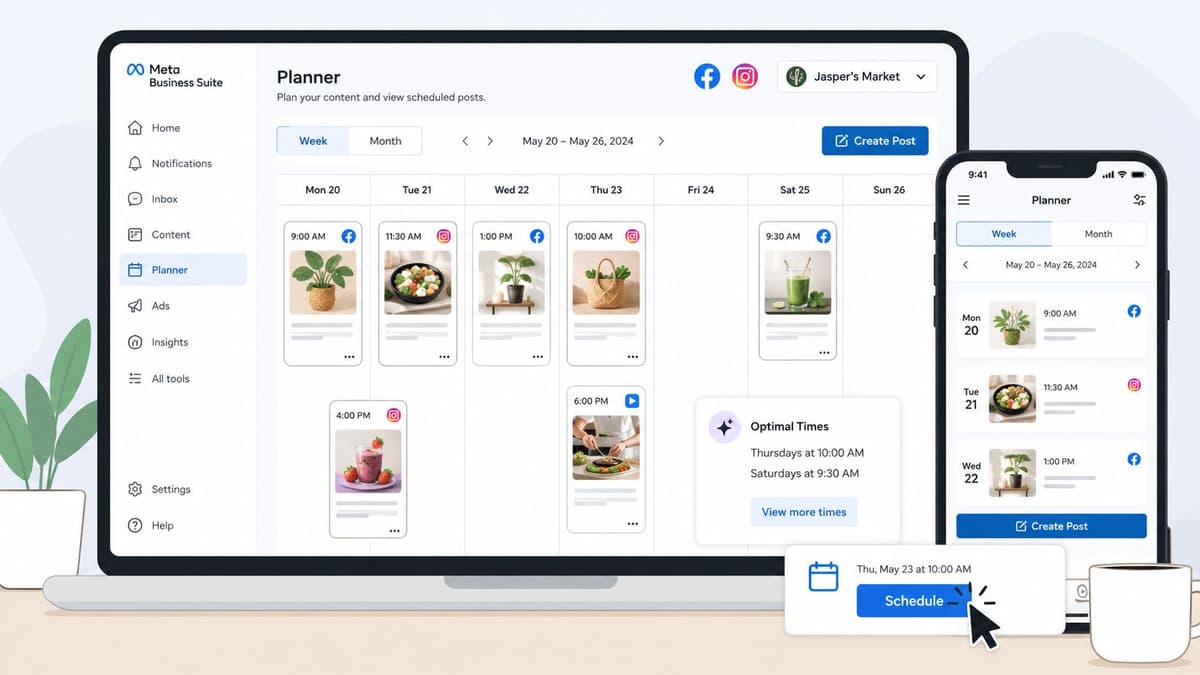
To find it, just head to your Facebook Page and look for the link to the Business Suite. Once you're in, you'll see a dashboard with various tools, but the one you’ll want to get familiar with is the Planner. This is your command centre—a calendar that gives you a bird's-eye view of everything you've scheduled and published. It’s fantastic for quickly seeing where the gaps are in your content calendar.
Crafting Your First Scheduled Post
From the Planner, hit the "Create post" button to open up the composer. It looks and feels just like writing a regular post, so you can jump right in with your text, emojis, and any photos or videos you want to add.
The magic happens right below the "Publish" button. Instead of publishing immediately, you'll choose the "Schedule" option. This brings up a simple calendar and time picker, letting you pinpoint the exact date and time for your post to go live.
A brilliant little feature here is the Optimal Times suggestion. Meta looks at when your audience has been most active in the past and recommends a few time slots. It’s a great way to take the guesswork out of posting.
Adding the Finer Details
The composer has everything you need to polish your post and boost its potential for engagement.
- Tagging Other Pages: Just type the "@" symbol and start typing a name to mention another business or collaborator. It’s a simple trick that can seriously widen your post's reach.
- Adding a Location: If you’re posting about a physical shop or an event, adding a location tag helps you connect with local audiences who might be searching for things nearby.
- Including Links: All you have to do is paste a URL into the text box. Facebook takes care of the rest, automatically creating a clickable link preview for you.
Now, it's worth mentioning that the Business Suite can feel a bit clunky or slow at times, especially if you're managing a heavy content load. But for a free, fully integrated tool, it’s the perfect place to start. It gives you all the core functionality you need to schedule posts on Facebook and start building a consistent presence.
Taking Your Content Strategy Further with Third-Party Scheduling Tools
While Meta's own Business Suite is a decent place to start, anyone serious about social media management will quickly outgrow it. Juggling multiple platforms, working with a team, or mapping out a big campaign can make the native tools feel clunky and inefficient. This is the point where a dedicated third-party platform stops being a luxury and becomes a necessity for an organised content operation.
Think about it: instead of hopping between Facebook, Instagram, LinkedIn, and X, you could see your entire content plan on one clean, visual calendar. This bird's-eye view is incredibly powerful. You can instantly spot gaps in your schedule, drag and drop a post to a different day, and make sure your brand's voice is consistent everywhere, all from a single dashboard.
Moving from Busywork to a Cohesive System
The true value of these platforms is how they centralise your entire social media workflow. Tools like Scheduler.social let you manage everything from one command centre. You can schedule posts on Facebook weeks in advance, see what’s coming up on a shared calendar, and push the same update to multiple networks without tedious copy-pasting. You’re essentially swapping chaotic, manual tasks for a calm, predictable system.
Many of these tools also come packed with features that Meta’s platform simply doesn't offer:
- AI Content Generation: Stuck for ideas? Many schedulers can help you brainstorm concepts, draft copy, and even rephrase a single message to match the specific tone of each social network.
- Approval Workflows: This is a lifesaver for teams and agencies. A junior team member can draft a post, a manager can review it, and the client can give final approval—all without a single email chain.
- Unified Analytics: Get reports that pull data from all your social channels. This allows you to see what’s truly resonating with your audience across the board, not just on Facebook in isolation.
Ultimately, adopting a third-party tool isn't just about saving a bit of time. It's about building a scalable process that supports real growth. It’s what allows you to plan an entire month of content for three different clients or repurpose one great video across five platforms in a matter of minutes.
If you’re thinking it might be time to make the switch, our guide on choosing the best social media scheduler can help you weigh up the options.
When to Post on Facebook for a UK Audience
It's a frustrating feeling: you've crafted the perfect post, but it gets little to no engagement. Often, the culprit isn't the content itself—it's the timing. If you schedule posts on Facebook without thinking about when your audience is actually scrolling, you're essentially talking to an empty room.
Generic advice about posting times rarely works because user habits change drastically from one region to another. For a UK audience, the sweet spots are all tied to the rhythms of a typical day. Think about it: the lunchtime scroll, the commute home on the train, or the evening wind-down on the sofa. Your goal is to pop up on their feed right at these key moments.
Pinpointing Peak Engagement Windows
So, when are people in the UK most likely to be on Facebook? All the data points to weekdays trumping weekends, with clear peaks in the afternoon and evening. This makes total sense when you consider that most people are tied up with work in the morning and are much more likely to browse social media later in the day.
Based on engagement data from 2026, the golden window for reaching a UK audience is Tuesday through Thursday, between 3 p.m. and 9 p.m. GMT. Thursday, in particular, often stands out as the single best day for engagement, especially in the later slot of 4 p.m. to 11 p.m. GMT.
This is the kind of data-driven approach that moves your social media strategy from guesswork to a predictable, effective system.
A Week at a Glance: Optimal Posting Times
To help you put this into practice, here's a breakdown of the best times to aim for throughout the week. Remember, this is a brilliant starting point, but always double-check your own Facebook Page Insights to see what works specifically for your followers.
Optimal Facebook Posting Times for a UK Audience (GMT)
This table summarises the best days and times to schedule your Facebook posts to reach UK users, based on recent engagement data.
| Day of the Week | Peak Engagement Windows (GMT) | Notes |
|---|---|---|
| Monday | 5 p.m. - 9 p.m. | Engagement is usually a bit lower as people settle into the work week. |
| Tuesday | 3 p.m. - 10 p.m. | A very strong day for engagement as the week hits its stride. |
| Wednesday | 4 p.m. - 9 p.m. | Consistently high activity, especially during the post-work hours. |
| Thursday | 4 p.m. - 11 p.m. | Often the best day of the entire week for reach and interaction. |
| Friday | 1 p.m. - 5 p.m. | Activity tends to dip as people log off for the weekend. |
| Weekend | 6 p.m. - 9 p.m. | Generally lower engagement, but can be a good slot for community posts. |
Treating these windows as your guide will give your content the best possible chance of being seen, liked, and shared. It’s a simple adjustment that can make a huge difference to your results.
This chart breaks down how much time social media managers typically save by using scheduling tools for these kinds of tasks.
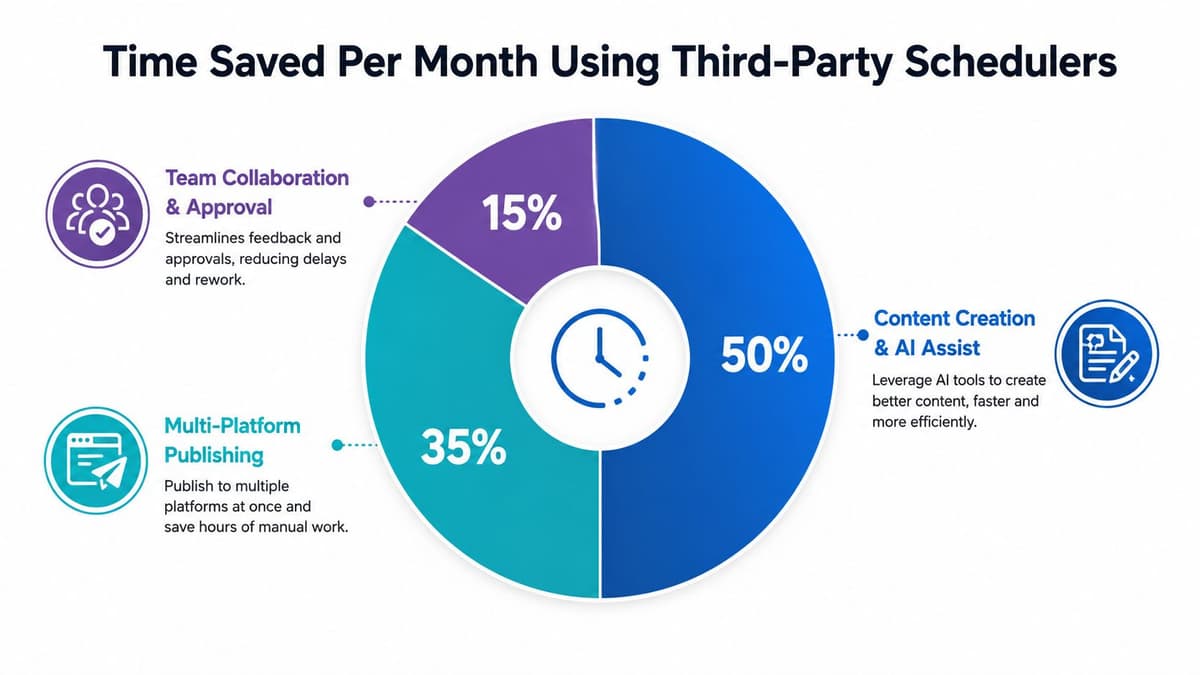
As you can see, the biggest wins come from streamlining the content creation process and publishing to multiple platforms at once. For an even more detailed look at timing, check out our guide on the best time to post on Facebook.
How to Fix Common Facebook Scheduling Glitches
It happens to the best of us. You’ve planned your content meticulously, but a scheduled post vanishes from the queue or flat-out fails to publish. It’s a frustrating moment, but don't panic—these glitches are almost always a quick fix.
First things first, check your connection. Nine times out of ten, a "failed to publish" error is simply because the link between Facebook and your third-party scheduler has expired for security reasons. Popping into your tool's settings, disconnecting your Facebook account, and immediately reconnecting it is the magic bullet. Honestly, this simple refresh solves the problem more than 80% of the time.
What about a post that seems to have disappeared entirely? Before you assume it’s lost to the ether, have a dig around in your platform's drafts or any "needs approval" sections. It’s surprisingly common for a post to get stuck there instead of being properly scheduled.
Troubleshooting Specific Post Errors
Sometimes, the issue isn't the connection but the content itself. If a published post looks odd—especially with images or videos—it’s usually down to a formatting or file size problem.
Image Dimensions: Facebook can be particular about aspect ratios. If your image looks strangely cropped or stretched, try re-uploading it in a more standard size, like a 1:1 square or a 4:5 vertical format.
Video Files: If a video gets stuck processing, the usual culprits are an unsupported file type or a file size that's over the 1 GB limit. Converting it to a standard .MP4 file before uploading will almost certainly do the trick.
When you schedule posts on Facebook, always give your queue a final check before logging off. A quick two-minute review can save you from discovering a publishing error hours later, ensuring your content plan stays perfectly on track.
Your Facebook Scheduling Questions, Answered
Once you get into the rhythm of scheduling your Facebook content, a few common questions always seem to pop up. Let's clear the air on some of the most frequent ones so you can build your content plan with confidence.
Can I Edit a Scheduled Post on Facebook?
Yes, you absolutely can! Nothing is set in stone until it's live. Think of your content calendar as a draft, not a final copy.
Inside Meta Business Suite, just head to your 'Planner' or 'Content' calendar. Find the post you want to change, click on it, and you can edit anything you need—tweak the copy, swap the photo, or even bump it to a different day or time.
And don't worry, this isn't just a Meta thing. Any good third-party scheduling tool will offer the same flexibility. Most let you simply drag and drop posts to new time slots or click in to make quick edits, ensuring everything is perfect before your audience sees it.
Does Scheduling Posts Reduce My Reach?
This is probably the biggest myth out there, and it’s one that just won't seem to die. The short answer is no.
Facebook has officially stated that using their native scheduler or a recognised third-party tool does not negatively impact your organic reach. The algorithm cares about high-quality, engaging content that gets people talking; it couldn't care less if you published it on the spot or scheduled it last Tuesday.
In fact, the opposite is often true. By scheduling your content, you can be strategic and consistently hit those peak engagement hours when your audience is most active. Doing that can actually give your reach and interaction rates a healthy boost.
How Far in Advance Can I Schedule?
Your scheduling window depends on the tool you're using.
With Meta Business Suite, you can plan your content up to 75 days in advance, which is more than enough for most businesses planning a month or two ahead.
If you need a longer runway, professional third-party platforms are the way to go. Many of them let you queue up posts for several months, and some even for a full year. For an agency juggling long-term campaigns or a brand that maps out its marketing calendar quarterly, that kind of long-range planning is a complete game-changer.
Ready to transform your content workflow from chaotic to calm? Scheduler.social gives you a visual calendar, AI-assisted writing tools, and seamless team approvals to help you publish consistently and grow your audience. Start your free 7-day trial and see the difference at https://scheduler.social.