Agency Social Media Management: Profitable Framework
Build a profitable agency social media management service with our framework. Covers client onboarding, AI content, pricing, & reporting.
If you're running a growing agency, this probably sounds familiar. One client wants last-minute edits to tomorrow's posts. Another still hasn't approved next week's calendar. Your team is copying the same campaign idea into LinkedIn, Instagram, X, and TikTok by hand, then rewriting each caption in a rush because the original version doesn't fit the platform. Meanwhile, reporting day is coming, and half the data still lives in native dashboards, spreadsheets, and someone's browser tabs.
That setup works for a while. Then it breaks.
Most agencies don't struggle because they lack ideas. They struggle because their service delivery is too manual. Social media management becomes a pile of tasks instead of an operating system. The result is familiar: bottlenecks, scope creep, inconsistent output, and margins that get thinner as client count goes up.
There's also a real opening here. Only 22% of social media marketing is performed by outside agencies, while most execution still sits in-house, according to the CMO Survey coverage cited by Directive Consulting. Agencies that can show control, speed, and clear business value have room to win accounts that are tired of internal chaos.
Table of Contents
- From Chaos to Control An Introduction
- Laying the Foundation for a Scalable Service
- Mastering Client Onboarding and Strategy Development
- Building Your Agency Content Engine
- Structuring Profitable Pricing and Service Tiers
- Demonstrating Value with Effective Reporting
From Chaos to Control An Introduction
Most agency social media management problems don't begin with strategy. They begin with operations.
A new client signs. Everyone's excited. For the first few weeks, the account team handles requests manually because it's faster than setting up a proper process. Content lives in Google Docs. Approvals happen in email. The designer stores assets in one folder, the strategist stores briefs in another, and the client sends revisions by WhatsApp voice note. Nothing is technically impossible, but everything takes longer than it should.
Then another client joins. Then another.
What looked flexible starts creating drag. A simple caption revision touches the account manager, copywriter, designer, and client. A delayed approval means the team reshuffles the whole week. Community management gets mixed into content production, so no one owns response times properly. The agency feels busy all day and still misses deadlines.
Practical rule: If your delivery depends on memory, goodwill, and Slack messages, you don't have a system yet.
The fix isn't more effort. It's structure. A solid agency setup defines who owns strategy, who creates content, who handles engagement, how approvals move, where assets live, what gets reported, and what each client package includes. Once that structure is in place, your team stops reinventing delivery every month.
That's what separates profitable agencies from overloaded ones. They don't treat social as a collection of posts. They treat it as a managed service with clear inputs, clear workflows, and repeatable outputs.
Laying the Foundation for a Scalable Service
Before you try to scale agency social media management, fix the internal shape of the service. Most delivery issues come from one of three faults: unclear roles, disconnected tools, or offers that are too vague to execute cleanly.
Define roles before you add clients
Agencies often hire generally and operate vaguely. That creates overlap fast. One person starts as an account manager and ends up rewriting captions, chasing approvals, and answering comments. Another person is called a strategist but spends most of the week formatting reports.
A lean team works better when responsibilities are narrow and explicit:
- Strategist: Owns audience definition, platform priorities, campaign themes, and performance review. This role decides what should happen and why.
- Creator: Turns strategy into assets. That includes copy, visuals, short-form video briefs, platform variants, and content packaging.
- Community Manager: Handles replies, escalation, inbox organisation, and sentiment tracking. This role protects response quality and speed.
You can combine roles when the team is small. You shouldn't combine responsibilities without naming them. People need to know what they're accountable for, what they approve, and what they can leave alone.
Build a stack that reduces handoffs
Your tech stack should compress work, not multiply it. If planning happens in one tool, copy in another, approvals in email, and publishing in native apps, your team spends too much time moving information rather than acting on it.
For most agencies, the stack needs to cover five functions:
- Planning: A shared calendar that shows campaigns, channels, owners, and approval status.
- Creation: A workspace for drafting captions, attaching assets, and adapting one idea into channel-specific variants.
- Approval: Clear statuses, comments tied to the post itself, and a clean client review flow.
- Publishing: Multi-channel scheduling and bulk publishing.
- Reporting: Exportable performance views tied back to client goals.
That doesn't mean buying every platform on the market. It means reducing context switching. A practical starting point is reviewing tools built for multi-client teams, then comparing them against your workflow requirements. If you're auditing options, this breakdown of marketing software for agencies is a useful place to sanity-check what belongs in the stack.
Agencies offering paid social alongside organic content also need to think about creative production early. If your clients expect campaign video, the operational model changes fast. This guide on choosing a video ads agency is useful because it shows what to evaluate when content production and performance delivery start overlapping.
The wrong stack doesn't just waste money. It hides responsibility, slows approvals, and makes clients feel every internal crack.
Package the service before you sell it
Many agencies sell "social media management" as a broad promise and sort out delivery later. That's usually where margin leaks begin.
A better model is a small set of fixed packages with concrete deliverables. The names can vary, but the logic should stay tight:
- Foundation: A limited number of platforms, a set posting cadence, basic community management, monthly reporting.
- Growth: More channels, campaign support, deeper creative production, stronger reporting, faster response handling.
- Scale: Broader channel mix, higher approval complexity, active testing, multiple stakeholders, and advanced reporting layers.
The package matters because it controls staffing, workload, and pricing discipline. It also makes sales conversations cleaner. Instead of promising "whatever you need", you're matching a client to a delivery model your team can run.
If a service can't be scoped in advance, it usually can't be delivered profitably.
Mastering Client Onboarding and Strategy Development
A weak onboarding process creates months of avoidable friction. Clients feel uncertain, your team makes assumptions, and the account starts drifting before the first post goes live.
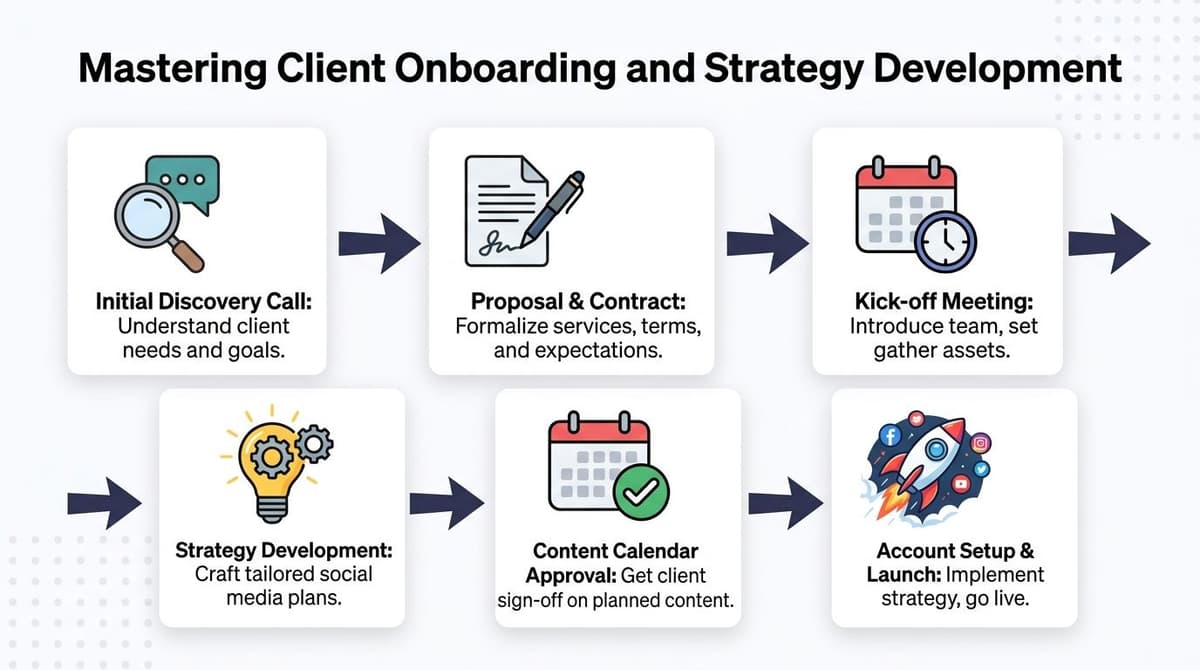
The fix is a repeatable onboarding sequence that moves from business context to access, then into a working strategy.
Start with business goals not content requests
Clients often arrive asking for more posts, faster growth, or a stronger presence. None of those are useful on their own. You need the commercial context behind them.
A proper discovery call should answer questions like:
- Revenue intent: Is social meant to support lead generation, ecommerce sales, brand demand, retention, or customer care?
- Offer priority: Which product, service, or category matters most right now?
- Sales reality: How long is the buying cycle, and what happens after someone clicks?
- Internal constraints: Who signs off, who provides assets, and who becomes the day-to-day contact?
Platform choices, tone, creative format, and reporting all depend on the business model. A B2B consultancy on LinkedIn needs a different system from a DTC brand built around short-form product video.
Collect assets and access in one sweep
Don't let asset collection drag across two weeks of back-and-forth. Send one structured request and make completeness a requirement before production starts.
Your onboarding checklist should usually include:
- Brand assets: Logos, fonts, colours, imagery rules, existing templates.
- Platform access: Social accounts, ad accounts if relevant, analytics access, link tracking tools.
- Reference material: Past campaigns, existing messaging, product notes, FAQs, competitor examples.
- Operational information: Approval contacts, escalation contacts, response rules for community management.
When this stage is loose, the team starts building with partial information. That's when you get off-brand posts, duplicated work, and approval delays caused by missing context rather than bad creative.
A simple planning framework helps here. If your team needs a faster way to standardise what goes into a client strategy pack, these social media plan templates can speed up the handoff between discovery and execution.
Write a strategy document clients can actually use
Many agencies overbuild strategy decks and underuse them. A good social media strategy document isn't a slide monument. It's a practical agreement about what the account is trying to do and how decisions will be made.
The document should cover a few essentials clearly:
| Component | What it must define |
|---|---|
| Audience | The primary personas, buying context, pain points, and platform behaviour |
| Messaging | The themes, offers, proof points, and tone boundaries |
| Channel focus | Which platforms matter now, which don't, and why |
| Content structure | Recurring themes, campaign types, and content mix |
| Measurement | The KPIs that matter to this client's business goals |
| Workflow | Approval path, review cadence, and who signs off |
Keep it tight enough that the client will read it. If the account team can't refer to it during content planning without opening a giant deck, it's too bloated.
A strategy is only useful when it resolves arguments before they happen.
The best onboarding leaves no mystery about success. The client knows what you're doing, your team knows how to execute, and both sides know where scope ends.
Building Your Agency Content Engine
Monday starts with three client messages. One wants last week's post rewritten for LinkedIn. Another has approved the design but changed the offer. A third needs six posts scheduled by noon because someone forgot a launch date. That is what breaks agency social media management at scale. Not the creative work itself, but the production system around it.
A content engine fixes that by turning social delivery into a repeatable operation. The core parts are straightforward: campaign planning, channel adaptation, approval control, and batch scheduling. When those four pieces run in one system, the team can handle more accounts without rebuilding the process every week.
A shared workflow matters because the bottleneck is rarely ideas. It is getting the right version of the right asset approved and published without losing context, missing feedback, or creating avoidable revision work.
Plan from campaigns not isolated posts
Agencies that plan one post at a time stay busy and still end up with weak calendars. The better model is to build around campaigns, then split those campaigns into repeatable content units your team can produce fast.
That usually means setting one commercial or audience priority for the month, breaking it into weekly content clusters, and assigning each angle to the channels where it has the best chance of working. A product launch might produce a founder opinion post for LinkedIn, proof-driven carousels for Instagram, short video hooks for TikTok, and FAQ-style clips for reels or shorts.
A simple planning rhythm works well:
- Monthly campaign theme: One clear business priority
- Weekly content clusters: Education, proof, objection handling, offer support, and lighter brand content
- Channel mapping: The format and angle each platform needs
- Reactive capacity: Reserved space for timely posts, trends, or announcements
Clients approve faster when they can see the campaign logic instead of reviewing disconnected captions. Internal production also gets easier because the team is building variations from a defined brief, not improvising from a blank calendar.
If your team needs a clearer planning structure, this guide to content planning for social media is a useful reference.
Adapt once, then tailor by channel
Cross-channel adaptation is where margin disappears.
A single campaign message often needs multiple versions, different creative notes, revised hooks, platform-specific formatting, and small legal or brand changes. Doing all of that manually for every client every week creates production drag fast.
The fix is not publishing identical posts everywhere. It is building the core message once, then adapting it with rules. That gives you consistency without producing generic content. In practice:
- LinkedIn usually needs a stronger point of view, clearer stakes, and more business context
- Instagram usually needs visual sequencing, shorter copy on the asset, and a simpler caption structure
- X usually needs a sharper opening angle, stronger pacing, or a thread format
- TikTok usually needs the same idea turned into a spoken hook, caption, and shot list
Modern workflow design improves margins. AI can handle first-pass adaptation, hook options, and caption variations. Human review still needs to set the strategic angle, catch weak phrasing, and protect brand standards. Agencies that skip the human step save minutes and lose quality. Agencies that refuse any automation burn time on work that software can already reduce.
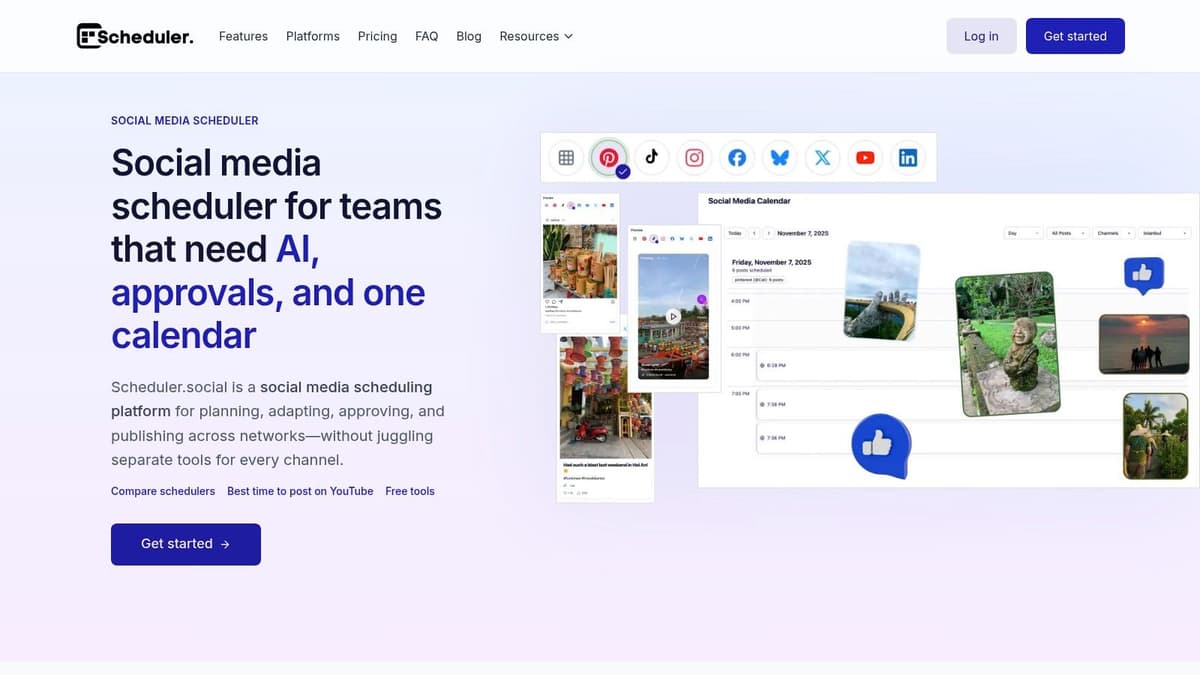
Scheduler.social is one example of a system built for that operational layer. It combines planning, AI-assisted drafting, approval steps, and multi-channel publishing in one dashboard, which is useful when one campaign needs several channel-specific versions rather than duplicate posts.
Creative input also gets stale if the same team writes from the same references every month. For fresh angles before production starts, Bulby's social media campaign insights can be a helpful prompt source.
Create approval stages that remove ambiguity
Approval problems usually come from loose process, not difficult clients.
If feedback arrives in email, Slack, comments, and voice notes, the team loses time comparing versions and guessing which edit is final. That turns simple content production into admin work.
Use fixed statuses and keep everyone inside them:
- Drafting for content production
- Internal review for strategic and brand checks
- Client review for external comments
- Revision required when feedback is active
- Approved when content is locked
- Scheduled when the publish date is set
The status names matter less than the discipline behind them. Internal reviews should happen before the client sees the post. Client comments should live inside the workflow, attached to the asset or caption they refer to. Approved content should only reopen if the client is making a genuine change request, not adding a preference after sign-off.
That distinction protects margin. Revision loops are one of the easiest ways for an agency to lose profit without seeing it in the retainer.
Operational warning: If feedback can arrive in four places, your team will spend time reconciling all four.
Schedule in batches and publish with confidence
Last-minute publishing creates avoidable mistakes. Links are wrong. Captions get edited after approval. Designers upload an outdated asset because the final file was sitting in a different thread.
Batch scheduling reduces that risk and gives account managers a clearer view of delivery. In most agency setups, scheduling one to two weeks ahead is enough to stabilise production while still leaving room for timely content, launches, and reactive posts.
This walkthrough shows the kind of workflow agencies should be aiming for when approvals and publishing are connected:
Batch scheduling does not mean rigid scheduling. It means your baseline output is already approved, visible, and queued before the week starts. That is how an agency handles more clients without adding chaos every time a brief changes.
Structuring Profitable Pricing and Service Tiers
A client signs a £1,500 monthly retainer for "social management." Three months later, your team is writing captions, reworking creative for three stakeholders, chasing approvals, pulling reports, joining weekly calls, and handling reactive requests that were never scoped. The account looks busy and the margin is gone.
That usually starts with pricing the visible tasks instead of the operating system behind the service.
Social management is not just posting. It includes strategy, platform-specific adaptation, internal coordination, client communication, revisions, reporting, and the admin load required to keep delivery on track across multiple accounts. Agencies that miss those inputs end up selling a service that gets harder to fulfil as they grow.
Why hourly pricing drags margins down
Hourly pricing feels safe at the start because it ties effort to revenue. It becomes a problem once the team gets better. Better processes, stronger templates, AI-assisted content adaptation, and tighter production workflows should improve margin. Under an hourly model, they often reduce billable time instead.
That creates the wrong incentive. Efficient agencies earn less unless they pad hours or keep work inefficient.
Tiered packaging solves that if the deliverables are clear and the boundaries are enforced. A Foundation tier might cover one or two channels, a fixed content volume, one approval round, basic community management, and monthly reporting. A Growth tier can add short-form video editing, paid support, deeper reporting, and faster turnaround. A Scale tier usually covers multi-channel delivery, campaign coordination, higher approval complexity, and custom workflows.
The point is simple. Price for complexity, not just output.
How to map pricing models to service tiers
Different pricing models fit different account types. Problems start when agencies force every client into the same commercial structure.
| Pricing Model | How It Works | Pros | Cons |
|---|---|---|---|
| Fixed monthly retainer | Client pays a recurring monthly fee for a defined package of deliverables | Predictable revenue, easier resourcing, cleaner client expectations | Can turn unprofitable if scope is vague or revisions are unlimited |
| Project-based pricing | Fee is tied to a campaign, launch, or one-off content package | Useful for short engagements, clear start and finish | Less stable revenue, can create uneven delivery cycles |
| Value-based pricing | Fee reflects the commercial value of the work, sometimes with performance-linked elements | Better fit for strategic work, stronger upside on mature accounts | Harder to scope, needs trust, data discipline, and clear attribution rules |
For many agencies, the most stable setup is a retainer at the core with controlled add-ons around it.
A practical service ladder often looks like this:
- Foundation: A narrower scope for clients who need consistent output on a limited number of channels.
- Growth: A larger retainer for brands that need more content formats, more adaptation, paid support, or more hands-on account management.
- Scale: Custom pricing for brands with multiple stakeholders, more approvals, campaign bursts, and higher strategic input.
The margin decision is often hidden in one place. Approval load.
A client with one decision-maker, a clear brief, and disciplined feedback can be highly profitable at a mid-range retainer. A client paying more can still damage margin if every post passes through four people, feedback arrives late, and "small tweaks" reset production every week. Service tiers should account for that upfront through revision limits, response windows, approval deadlines, and fees for out-of-scope requests.
This is also where agencies protect profitability with packaging discipline. Do not sell unlimited content, unlimited revisions, or vague promises like "full social support." Sell defined outputs, defined turnaround times, and defined decision rights. If the client wants flexibility, price it.
Social media costs more than clients expect because coordinated execution across strategy, content, approvals, adaptation, and reporting takes skilled labour and clear systems.
Profitable pricing is not about pushing rates higher for the sake of it. It is about building tiers that match delivery reality, leave room for account management overhead, and let the agency scale without each new client adding chaos. If the work is hard to deliver profitably, the fix is usually in the scope, the approval model, or the tier structure. Not in asking the team to work faster.
Demonstrating Value with Effective Reporting
A client opens your monthly report, scrolls past impressions, reach, and follower growth, then asks one question: "What did this do for the business?" If your team cannot answer that clearly, the report failed, even if the campaign performed well on-platform.
Reporting has one job. Show whether the work is producing business progress, explain why performance moved, and make the next decision easier.
Stop sending metric dumps
Platform exports are not client reporting. They are raw inputs.
A useful agency report has three parts. Start with the few performance indicators tied to the client's actual goal. That could be qualified traffic from social, booked calls, lead form submissions, ecommerce sessions, assisted conversions, or content engagement from the right audience segment. Then explain what created the result. Call out the format, message angle, offer, audience, posting pattern, or platform change that moved performance. Finally, make a decision. State what the team will repeat, cut, test, or rework next month.
Weaker agencies lose trust by sending charts and leaving the client to interpret them.
Strong agencies do the opposite. They turn activity into a point of view.
Track direct and indirect social impact
Social rarely follows a neat last-click path. A buyer sees a post, visits later through search, joins an email list, and converts after a sales call. If your report only counts direct clicks from social posts, you will underreport value and train clients to underestimate the channel.
The fix is a reporting model that captures both response and influence. Use direct-response tracking where possible, such as social-specific landing pages, tracked forms, tagged links, and offer codes. Then review indirect signals that often show up around social campaigns, including shifts in branded search, assisted conversions, sales timing, lead quality, and close rates from audiences that first engaged through social.
That combination gives clients a more honest picture of contribution.
It also sharpens internal decisions. If a short-form video series drives low direct conversions but consistently lifts branded search and return visits, the right move may be to keep it as a demand-generation asset rather than cut it for weak last-click numbers.
Build reports your team can produce consistently
Reporting falls apart when every account manager builds it from scratch. The work takes too long, definitions change between clients, and monthly reviews turn into a scramble for screenshots.
Use a fixed reporting structure across the agency. Keep the format standard, then swap the metrics and commentary based on the client's goals. A simple system works well:
- Scorecard: The small set of KPIs the client cares about
- Performance drivers: What content, audience, offer, or channel choices influenced the result
- Operational notes: Delays, approval bottlenecks, budget changes, or campaign constraints that affected delivery
- Next actions: What the team will test, change, pause, or scale in the next cycle
This matters more as you grow. Standard templates, clear UTM rules, and consistent naming conventions let junior team members gather data without breaking the reporting logic. AI can help summarize recurring patterns or adapt commentary drafts across accounts, but the final interpretation still needs human judgement. Clients are paying for analysis, not auto-generated recap text.
Good reporting protects retention because clients can see how the agency thinks, not just what the agency posted.
When reporting is structured, tied to commercial outcomes, and easy to repeat across accounts, it stops being an admin task. It becomes part of the operating system that keeps clients confident and keeps the agency in control.
If you're trying to run agency social media management without constant handoffs, approval confusion, and manual rework, Scheduler.social is built for that kind of operational setup. It gives teams one place to plan content on a visual calendar, adapt posts for different channels, route approvals, and publish consistently across accounts. That matters when you're managing multiple clients and need a system your team can follow.